
Hi There. I want some beauty for my worksheet). Tell me please how can I set a style to the cell range like Excel table format in the applied picture
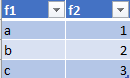
Currently I can’t find something like that in the interface. Suppose I can paint my rows with the script, but I should ran it on every new (deleted) row. It seems weird. Thanks
1 Like
Old but still relevant:
2 Likes
Awe, conditional formatting works good, thanks. Now the question for me is how can set the range for formatting in runtime mod with python. If you can, please support me with example
If somebody needs, here you are
def set_conditional_format_to_range_from_another_range(sheet, source_range, target_range):
    src_range = sheet.getCellRangeByName(source_range)
    trg_range = sheet.getCellRangeByName(target_range)

    # Get conditional formatting from source
    src_formats = src_range.getPropertyValue("ConditionalFormat")

    # Apply conditional formatting to target range
    trg_range.setPropertyValue("ConditionalFormat", src_formats)

    return True
what about:
trg_range.ConditionalFormat = src_range.ConditionalFormat
1 Like