
I’m a relatively new LO user. What is the SOP for detecting errant keystrokes that modify a single cell?
.
For example a check box analogous to Show Formulas, for Show Modification Date-Time, and the facility to highlight cells with a timestamp more recent than X time ago.
Standard Operating Procedures.
1 Like
In brief, export the sheet as CSV, then use diff to locate rows that differ compared to a know-good CSV.
.
Add an ID column that contains unique, permanent identifiers for each row.
Sort the two CSVs on that key before diffing.
.
For example:
.
Sheet-Fill Cells > Fill Random Number into a new column
-
Cell range:to match the data rows -
Distribution:toUniform Integer -
Minimum:to -99999 -
Maximum:to 99999
.
If you forget to adjust the range, @Timur answer may be of use:
.
Add / subtract 100000 to the rands, e.g. =IF( A2>0, A2+100000, A2-100000 )
- -xxxxx becomes -1xxxxx
- xxxxx becomes 1xxxxx
.
Manipulate some cells so that the ID sum is zero
- change the sign of one or more until: 100000 < sum > -100000
- find a cell that is > or < than the sum
- subtract / add the sum to the value of that cell
.
Find duplicates, e.g. sort on the column, then drag (or ctrl-shift double left click) a column of =IF( ID3=ID2, 1, 0 ). If the 0&1 column sum is not zero, tweak offending cells until the sum is zero, e.g. add and subtract 1.
.
To add a second batch of rows, repeat the above on the new batch, but add a multiple of 100000, then add the rows to the sheet.
.
The ID sum remaining zero is a quick check that the ID column hasn’t been errantly altered. As backups, CSVs are ~20% the size of ODSs when compressed since the ODSs are xml based, ymmv.
.
The column label can be set to ="ID SUM" & CHAR(10) & TEXT(SUM(<range>,"0"), credit to @JohnSUN here:
.
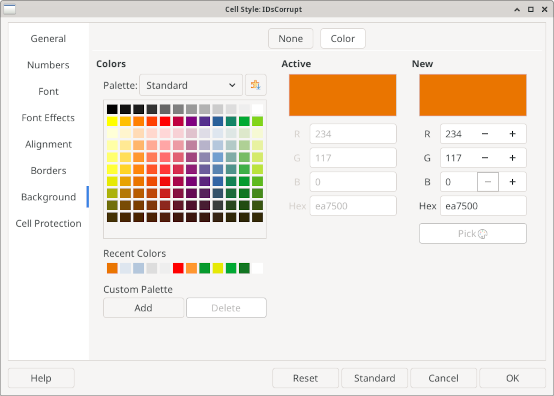
It can be conditionally formatted to have a warning background when the sum is not zero.
.
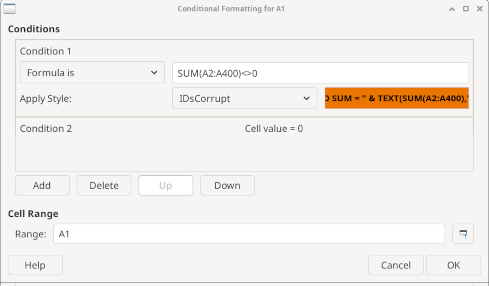
.
I think that will work, plus many more features ! Wow ! Thanks @fpy
.
It is difficult for me to pick out the changed cells based on their default ‘highlighting’. So I’m coupling the Record Changes feature with two appearance changes:
.
Following @EarnestAl suggestion in another thread from 2025:
I chose Light Blue 4
.
additionally, the markup to Dark Orange 1 following this sub-page of your link:
.
https://help.libreoffice.org/latest/en-US/text/shared/01/02230200.html
.
which says
You can change the display properties of the markup elements by choosing in the Options dialog box.
Relatedly, @Wanderer suggested ideas to limit the chance of errant changes:
.
There always seem to multiple official pages on a given topic. Anyway, for the @Wanderer suggestions here are 2 of them:
.
https://help.libreoffice.org/latest/en-US/text/scalc/guide/validity.html
.
and
.
https://help.libreoffice.org/latest/ug/text/scalc/guide/cell_protect.html
1 Like
Thanks. I’m pretty much on my final version of data, just adding keywords to facilitate SUMIFS.
.
Too bad SUMIFS doesn’t support Reference Lists. Not sure why it can’t.
.
Anyway I’m currently using meld (from gnome) and my CSV-diff approach as outlined here:
.
and my checksum method outlined here: