Create a column without contents, add contents later

Hello,
I want to create a column on a Libre Office Writer page which already has some contents (text). But when I create the column, text that is already on the page is automatically put into the column.

I want to make a blank column, to which I will later type in new contents. Think of a True/False test that you might have seen in school, where there is a column maybe 1 inch wide on the left side of the page, and the questions are already typed on the rest of the page. Then I want to open the document later and type in T or F beside each question, in the blank column.

Could you please either tell me how to make such a column, or direct me to the correct page of the wiki or user guide/manual. I did try to find it myself, but I could not.

Let’s see, my version is probably older… Oh look, I can just copy it:

Version: 24.2.7.2 (X86_64) / LibreOffice Community
Build ID: 420(Build:2)
CPU threads: 18; OS: Linux 6.8; UI render: default; VCL: gtk3
Locale: en-US (en_US.UTF-8); UI: en-US
Ubuntu package version: 4:24.2.7-0ubuntu0.24.04.1
Calc: threaded

And this is on Linux. Below is the first part of the system info. You probably do not need all those details.

System:
Kernel: 6.8.0-51-generic arch: x86_64 bits: 64 compiler: gcc v: 13.3.0 clocksource: tsc
Desktop: Cinnamon v: 6.2.9 tk: GTK v: 3.24.41 wm: Muffin v: 6.2.0 vt: 7 dm: LightDM v: 1.30.0
Distro: Linux Mint 22 Wilma base: Ubuntu 24.04 noble
Machine:
Type: Laptop System: Dell product: Precision 3591 v: N/A serial: Chassis:
type: 10 serial:
Mobo: Dell model: 0P80KX v: A00 serial: part-nu: 0CBB
uuid: UEFI: Dell v: 1.6.1 date: 07/18/2024

Thank you very much!

brynn
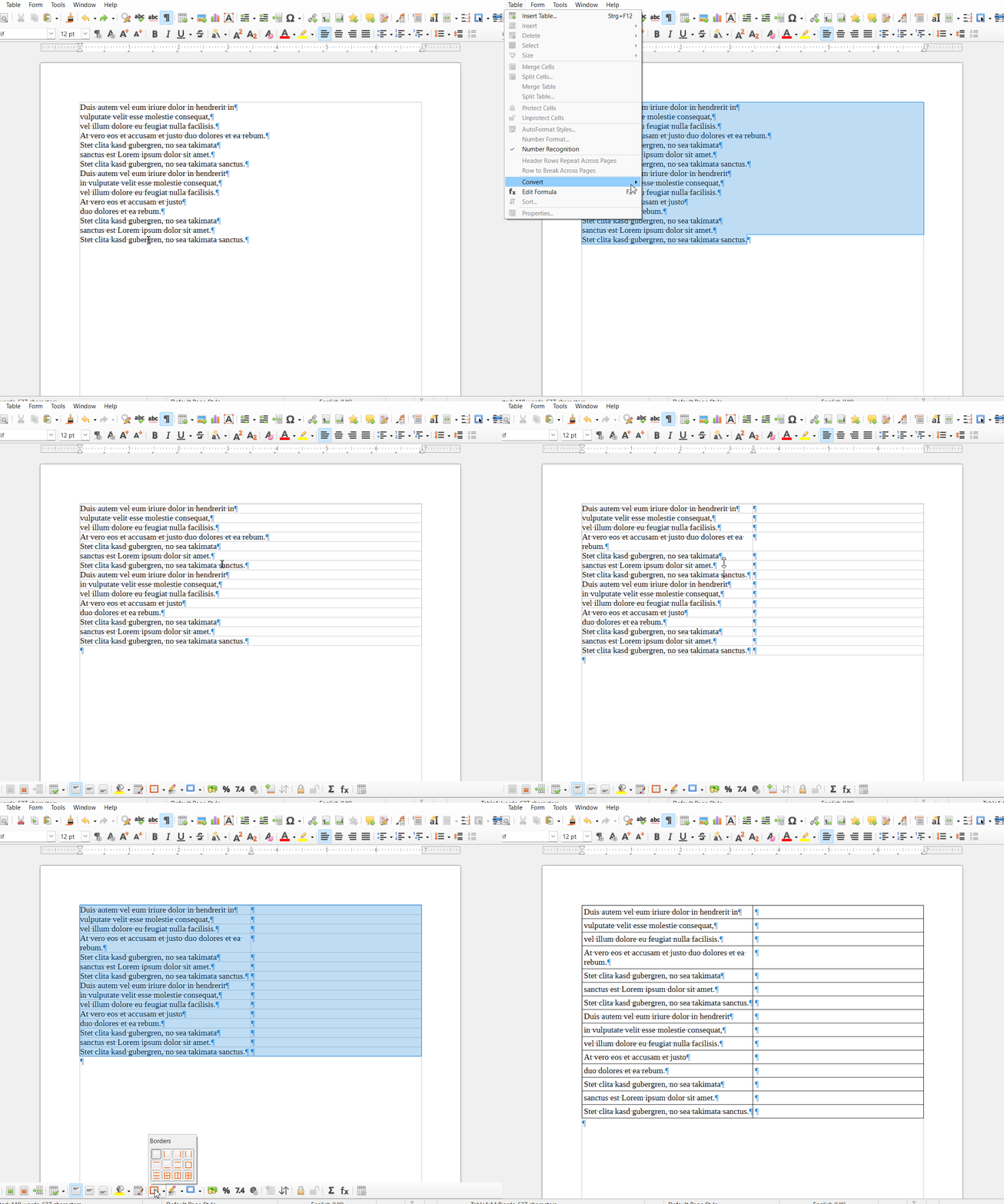
Actually this is a table, where each row starts with a blank column.
.
Is there a reason not to use tables? Maybe even use Calc (it can easily count your T and F also…

2 Likes

So I need to make a table, and cut and paste everything into it? Ok, I’ll give it a try.

Thanks.

Not necessarily.


soffice.bin_YZOahr8OPu

2 Likes

In case you missed it in the screencast: You can also add columns “before” your text

It seems your video starts out with the text already as a table. Is there some easy way to turn regular text into a table?

Ok, when I go to Table > Convert > Text to Table, I have a different dialog.

I might be getting there… Standby please…

Ok, I have 2 columns. But I can’t find where to make the first column narrower…

Well, I had a table with 2 columns. Is there some way to make columns without having a table?

Edit – When I try to do that, it automatically puts some of the pre-existing contents into the new column.

Well, maybe having a table is the only way?
So I just need to figure out how to make the new column narrower.

If I use Format > Columns, that’s when it puts pre-existing text into the columns.

So I have a table with 2 columns, but I need to change the width of the columns.

Thanks again.

Simplest method; place your cursor on the border between the two columns so the cursor becomes a double ended arrow, and drag the border to suit your needs.
If you want to make the column a specific size, place cursor in the table, right click and select Table Properties; adjust the column widths in the Columns tab.

2 Likes

Ah-HA! I think I got it!

Thank you very much!

I know manuals are old-fashioned but google reveals there is one:
https://books.libreoffice.org/en/WG76/WG7613-Tables.html

No, but you already found this.

Yes, but that columns work like articles in newspapers. There are no synced rows. That’s why I said, you need a table. So you have much bigger problems later, when you add your T/F.

No. As I’d used notes in the margin in TeX I constructed some paragraphs with negative indent for the first line and a tabstop years ago… I guess real notes in the margin would need frames in Writer and that is pretty advanced stuff for somebody who seems to have quite basic knowledge.

Oh, I did find the manual. I just could not find the part I needed.

Anyway, I think my problem is solved now.

Thanks again!

Edit - When I try to put the cursor in the other lines, the cursor shows up in the larger column on the right.

Hi again,
Well I did get the column I wanted. But I can’t type into it, as I wanted.

Well, I can partly type into it. I’ll have to try an show you a screenshot.

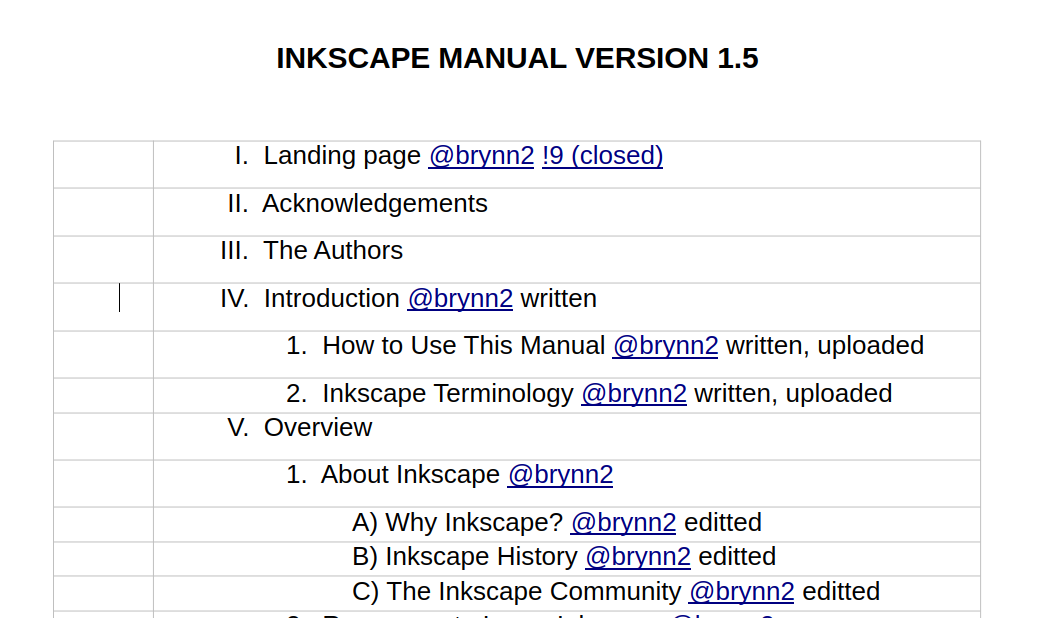
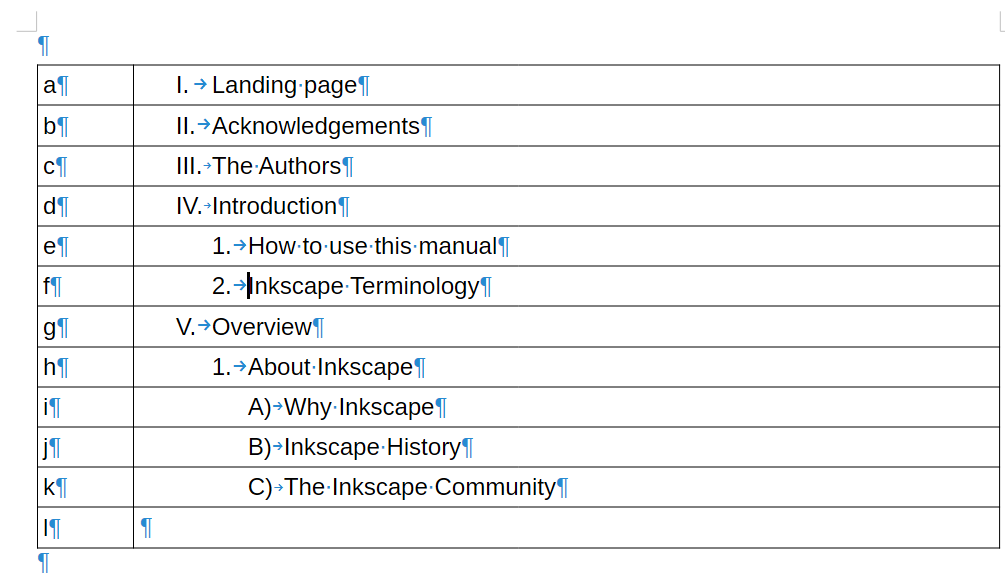
The text is in outline form. You can see in the screenshot, that the highest level of the outline is the Roman numerals. For the items beginning with Roman numerals, I can put the cursor in the column on the left. But none of the other items will accept the cursor in the new column.

How can I put text in every line of the column?

Thank you very much.

That’s not a problem for me:


138167 HB Table with outline.odt (14,9 KB)


With me:
Version: 26.8.0.3 (X86_64)
Build ID: bce0998afefdbc355585ca324285661a2170ba77
CPU threads: 16; OS: Windows 11 X86_64 (build 26300); UI render: Skia/Raster; VCL: win
Locale: de-DE (de_DE); UI: de-DE
Calc: CL threaded

You must clear the outline in the left column; select it and choose menu Format - List - No List (or just pulse F12).

Thanks. I finally got it working. Instead of using Backspace, I had to click the Decrease Indent button.

If you can’t tell, I’m sort of a perennial new user. I just don’t use the program very often.

But I appreciate your patience and trying to help!
Thanks again!

Edit – Apparently, without any prior warning, I have reached my limit for posting messages. So I’m trying to post using Edit. This is a reply to Lupp, below.

Please forgive me for being essentially a new user, who had no idea that there might be different kinds of columns.

Despite not knowing which kind of column I needed, I did manage to find an acceptable solution (by converting the text to a table).

It sounds like I could have, just as easily, created a different kind of column. But I found the table solution first, and it’s working just fine for me.

This problem is solved.
I apologize that I cannot mark which message contained the solution, because more than one message was involved.

Thanks again.

Or, Shift+Tab at the leftmost position of the line.

This isn’t actually a solution. I want to try a clarification without adding another comment to the many already posted.

The term “coulmn” isn’t unambiguous in Writer.
Columns occur as

  • a property of page styles.
  • a property of text sections.
  • a property of text tables.

Columns are to handle very different depending on the case.
There are examples and some explanations in the attachment:
disask_138167_Columns_in_Writer_Documents.odt (54.4 KB)
To the original questioner: Please edit the subject line and the original question to disambigute what’s the “real thing”.