
Dark Mode inconsistency

When in dark mode:

  1. text pasted from a CSV (for example) is rendered invisible. User must deliberately change font colour to AUTOMATIC to bring it into view.
  2. cell borders are rendered invisible. Not sure how to fix that yet.

Thank you, volunteers.

Version: 26.2.6.3 (X86_64)
Build ID: 8221e31b3ac356a1623c672912a3d2b492f7e3d1
CPU threads: 4; OS: Windows 10 X86_64 (build 19045); UI render: Skia/Raster; VCL: win
Locale: en-ZW (en_ZA); UI: en-GB
Calc: threaded

(I apologise if I’ve broken any rules; I have a day job and I am not a forumologist. Snark from moderators will be reported.)
Although you are not a newcomer to the site, you may find it useful to read This is the Guide… so you may get an idea of how things work; and perhaps you could provide the information suggested under More Details.

Thank you; version information appended.

The CSV was opened by what program? If the CSV is opened by Notepad and then copied and pasted, the Text Import wizard should open before the text appears in the spreadsheet. The text should appear as white.
If the CSV was opened by, say Excel then the text will take the default formatting from Excel; it will not be unformatted.
.

If you are pasting from Notepad or similar text-only program and you cannot see the cell borders then I would guess that you have set a default template for Calc. Click File > Templates > Manage templates, right click the template with a green tick and select Reset default. Now test

1 Like

@mrjjacobs, in addition to my colleague’s response:
You could conduct an interesting experiment.
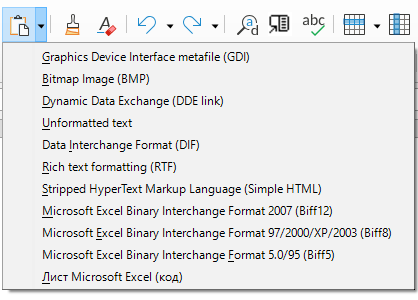
Instead of pasting directly from the clipboard, click the arrow next to the “Paste” button on the standard toolbar.
Try experimenting with the various available formats.
2026-10-17 134620