
The OLD libreoffice (version 6) used to have a concept of bookmarks to organize documents into lists (rather than bookmarking locations in a document). Does the new libreoffice support this feature? It was very useful to organize documents into various user-defined topics. Such as all my financial documents and spreadsheets in a “financial” topic. I know that I can view “recent documents”, but that is not what I am looking for. Sometimes I will not have updated a document in a year, so it has long since fallen out of the “recent” list. Maybe the term “favorite” documents might be more apt than “bookmarks”
Thank you.

IMHO, this looks rather like a question about computer usage and ergonomics.
In most OSes (you haven’t mentioned yours), your documents can be grouped in directories (called folders in the desktop metaphor). These directories bear names relevant to you, such as Finance, Errands, House utilities, …
All you have to do is open a directory and double-click on a document icon.
In case your documents belong in several “themes”, you can keep them in a “central store” and put “links” or “shortcuts” in the thematic directories. Double-clicking the “shortcut” icon opens the document. When you save, the central store copy is updated and the changes are available through all shortcuts.
1 Like
All my documents are organized in detail by folders (Windows 11). But, I have 1000s of documents, but I only need to access 20 or 30 of these documents most frequently. I would prefer not to have to open a file explorer and search for the document I am interested in. I would rather have a “favorites” list in Libreoffce (like the old OLD version used to have), so that I could very quickly and easily find my documents that are most important to me in a quick fashion.
I can’t seem to find the right topic in the help file, but see attached screenshot of the “Bookmark” menu in Libreoffice version 6 that allows you to save and select documents of high interest.
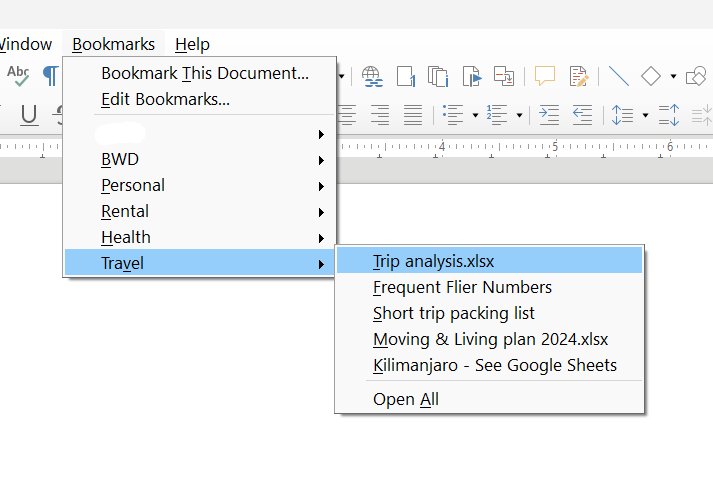
Hi Pierre. I attached a screen shot of the old “Bookmarks” feature. But I accidentally attached it to a previous user’s response.
May be this menu was created for some extension?
1 Like
@MatOffice it looks like you got it from OpenOffice, see Bookmarks Menu | Apache OpenOffice Extensions
Note the warning
This extension was not updated recently. It might not work with latest versions of OpenOffice.
I wonder if the Start Center would be helpful to you. You can pin documents so they stay on the list, but you can’t do much else.
The online help has some documentation, but the manual is better and has images.
The first manual on the documentation page, is titled, Getting Started Guide. In the PDF, look for Chapter 1, LibreOffice Basics > Getting Starting. Currently it is page 22. It’ll talk about the Start Center, which is the first thing you see when you open just libreoffice.
The one gotcha is the number of documents that can be shown. See this ask.libreoffice entry for increasing the PickListSize. I set mine to 100.
Notice the button in the upper right corner. It has some options that help clean up the list.
Also notice the drop-down filter which allows you to filter documents by type, writer, calc, etc.
Is it possible to organize the documents into directories. Even if all the files were in one directory, put a symbolic link in another directory that makes sense. I also have short aliases to change directories with long path names. I’m on linux.
Thanks. Some of those ideas could be helpful if I don’t find the exact solution that I am looking for.
OMG, that is the answer!!! And it still works even in the current version of Libreoffice! That you! So happy!
You are right. As someone else pointed to me the exact extension. It has not been updated in decades, but still works!
I did not try the extension, but I did read the description.
If the OpenOffice extension doesn’t work out, perhaps the Libreoffice Start Center with the pin option could be an alternative to the OpenOffice Favorites menu. If you have suggestions for features or improvements, I’m sure the Libreoffice developers would appreciate it. 