
Apparently, you can no longer change the color of the formatting marks in Write- they are hardcoded in light blue, which is difficult to see. i use LibreOffice on two computers. On one, I changed the formatting marks to red. I want to change the other one to red also. Is there any way to do this? I am using the newest version just installed today, and the installation changed everything on one computer, so I had to redo all my settings, and the marks are now light blue and I cannot change them back.
Which one? There are so many platforms (Window$, MacOS, Linux, …) that no one can tell which version is the latest one.
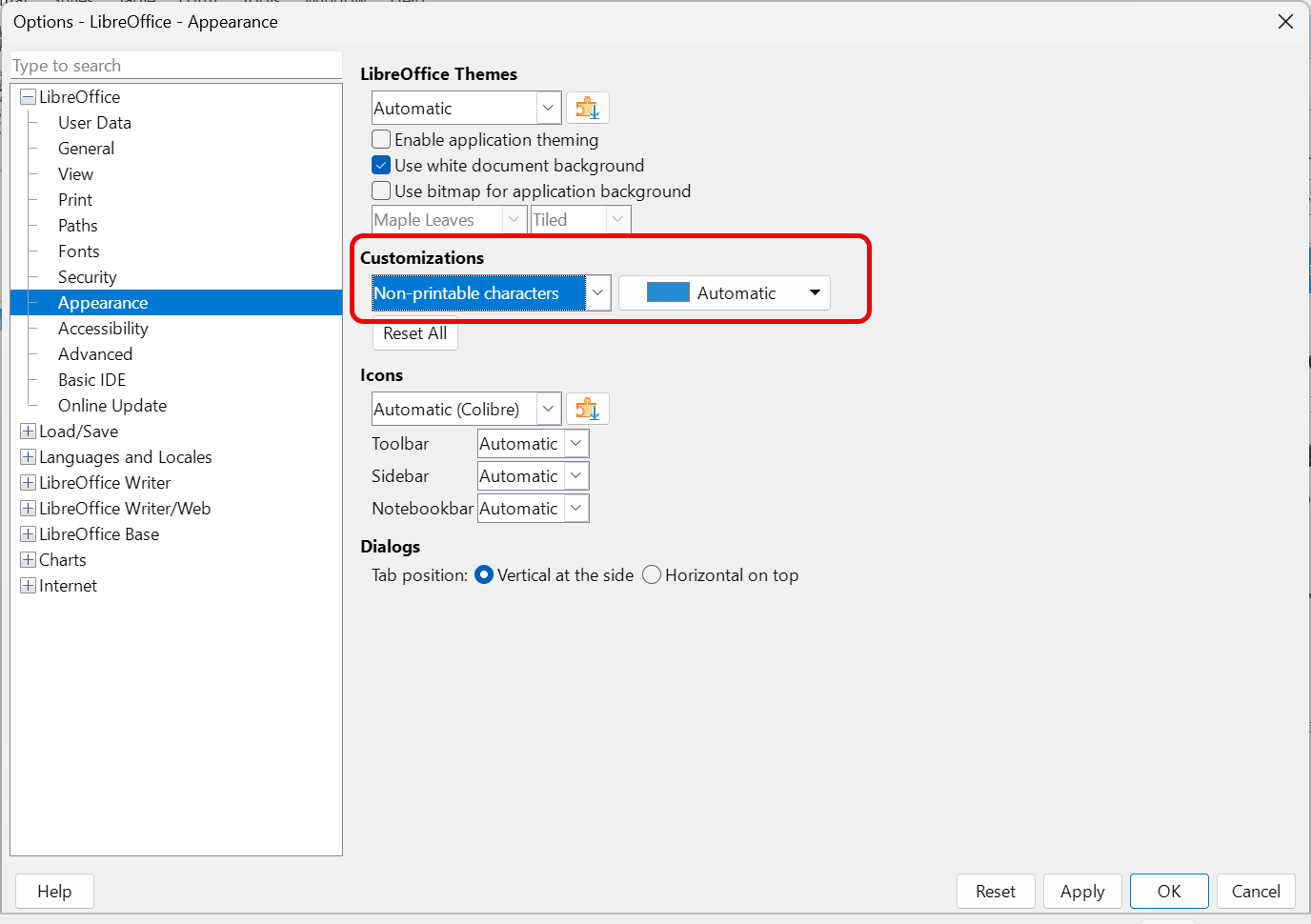
There are now tens of customisable items in the application(s) that the UI can’t usefully show them all without clutter. Starting with the 25.x (or perhaps even 24.x), the UI changed for a huge drop dow menu in Tools>Options, LO>Appearance. In customizations, select Non-printable characters and choose your preferred colour.
Thanks. Copilot artificial stupidity told me this was no longer an available option.
Thanks. Someone else pointed that out to me. Copilot artificial stupidity told me it was now hard coded and could no, longer be changed. Another user pointed me to the dropdown and I was able to change it.
Do the same on the other. 
Joke aside, how annoying it is not being able to remember how we did something a while ago!
Very- but it was years ago.