
If I need to get the values from one sheet to be used in calculations on another sheet can I just click the cells or do I have to get them by function?
There are many rows, how can i avoid the false 522 error?
It is unlikely to be false, if Calc declares a circular error then the
Formula refers directly or indirectly to itself
See Error Codes in LibreOffice Calc
You can use Tools > Detective > Trace precedents (Shift+F9) to find where the formula refers to itself
If i hit recalculate hard, then the error disappears.
You start by editing the cell in which you want the result of whichever calculation you want, and when you want to retrieve the value of a cell located on another worksheet you can click on the worksheet tab of the other worksheet and then on the relevant cell. Then, if needed, you can click on the worksheet tab where you are building your formula in order to continue it with whatever comes next.
__
For instance, lets say that you have 3 worksheets:
_ In $Sheet1.A1 there is a number, 5.
_ In $Sheet2.A1 there is a number, 6.
__
Lets say that in $Sheet3.A1 you want to add those 2 cells. You start in $Sheet3.A1 with an equal symbol ("="), then click on the $Sheet1 tab, then on its A1 cell, then type-in a plus symbol ("+"), then click on the $Sheet2 tab, then on its A1 cell, then press [ENTER].
__
The resulting formula in $Sheet3.A1 will be =$Sheet1.A1+$Sheet2.A1 and the result will be 11 in this example, adding the values of those cells from their respective worksheets.
You could also give the cell a name.
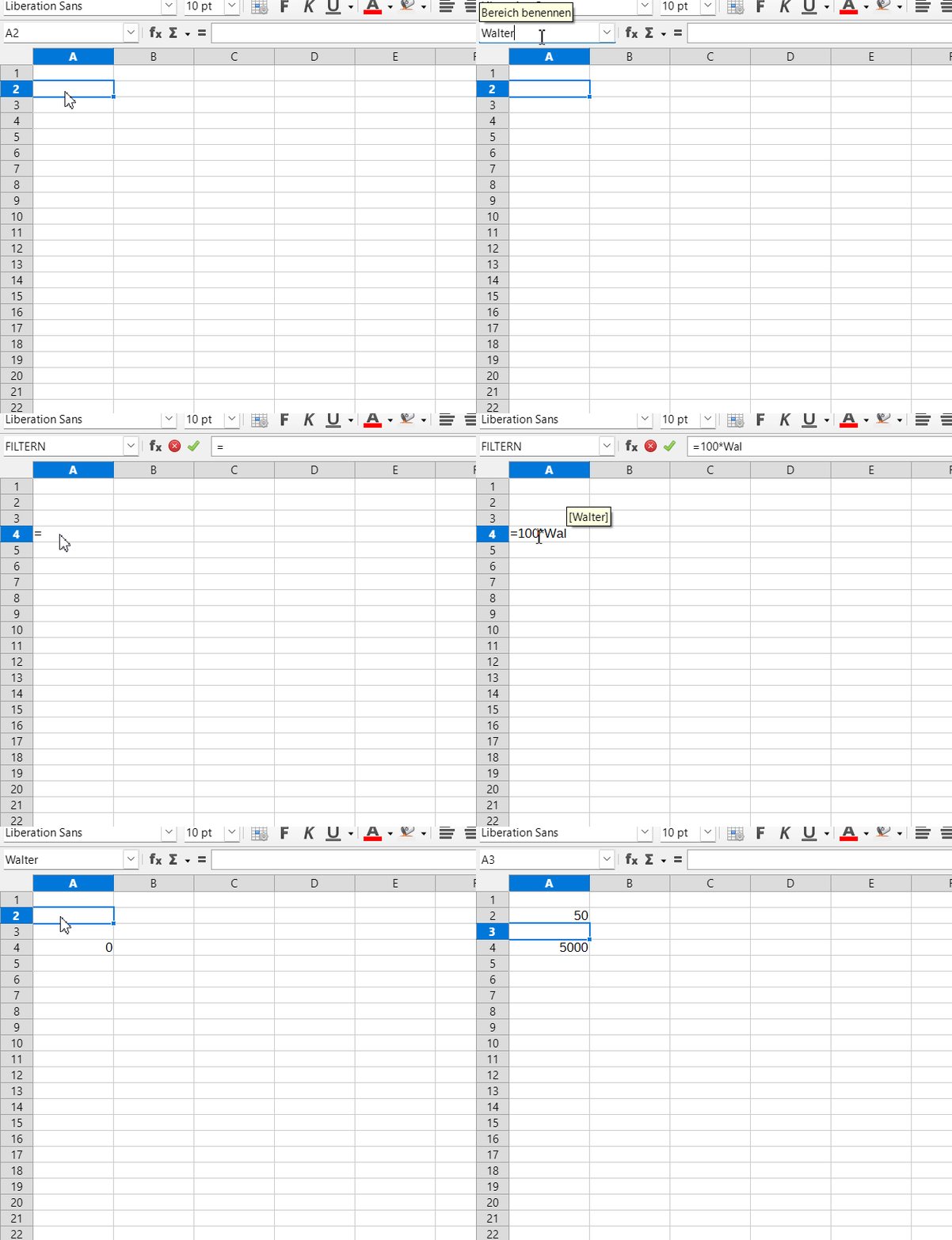
Lets take the same simple case I presented before.
__
In cell $Sheet3.A1, the formula should say =$Sheet1.A1+$Sheet2.A1. Now, lets assume that there was some mistake, and so instead of that expected formula, the actual resulting formula says =$Sheet1.A1+$Sheet3.A1. Note the second name of the worksheet, that points to sheet3 instead of the intended sheet2.
__
That would mean that in $Sheet3.A1 you would be referencing the same cell, $Sheet3.A1. That is an example of a “circular reference” error. There are more complex cases.
__
You need to review those cells in which you get an error, and find out which is the exact specific error in the corresponding formula. Correct the error and all should work, hopefully.
__
Without having the actual file (which I guess contains private information), and without knowing the actual intention of the formula in question, we have no way to tell you how to resolve the problem. You have to actually do the work yourself.
Then thing is that the error goes away if i click hard recalculate.
Hello,
You can bring the content of a cell from a source workbook into a destination workbook by opening both workbooks.
In the destination workbook, type = into a cell and then select the desired cell in the source workbook.
exemple
If the cell A2 in the source workbook =Source doc
="my cell source "&'file:///D:/Mes documents/aide LO test forum/LO Calc/source.ods'#$Sheet1.A2
give in the destination workbook
my cell source Source doc
Also you can use the function “INDIRECT”
=INDIRECT("'file:///D:/Mes documents/aide LO test forum/LO Calc/source.ods'#$Sheet1.A"&2)
I meant from one sheet to another in the same workbook, and without filling another column.
It is the same as already described above.
- maybe try in the same sheet first: Start a formula by typing
=then click in another cell. You can see the address of the cell you clicked is added to your formula. With some additional keys you can create more complex formulas than=a5+c5. Formulas are saved with enter-key or you can leave the mode with Esc-key. - now try the same as above, but after
=select another sheet and click a cell there. Hit enter and check your formula on the first sheet. It should show a reference to the second sheef.