Help with connecting to an access database for a new user

Good Morning

I have just installed Libreoffice 26.8.2.2 for the first time as a new user, and am having some teething problems trying to convert my existing access databases, I wonder if anybody could give me some guidance, I have looked at the Libreoffice help pages and the similar topics on this forum but don’t seem to be able to find an answer

I have clicked connect to an existing database and selected “Microsoft Access”, navigated to the

folder where the accdb filed are and selected the accdb filed that I wanted, libre office then lets me

save that as a ODF File (Newdatabase6), then I get the following error message :-

The Connection to the data source “New Database6” could not be established

The Connection could not be created, maybe the necessary data provider is not installed?

In Libre Office I have gone to Tools > Options > Advanced and ensured that the “Use a Java runtime environment is selected” and it is (Oracle Corporation 1.80_511, which I downloaded from the oracle site and it should be a JRE 64 bit windows offline) Under Class path I have installed “odjbc 17,jar” and this is recognised (These steps were in the libre office manual and by googling the error)

I notice looking through previous posts on the forum this is quite a common issue, so are the two truly compatable ?

Regards

Adrian

Compatibility? Not in the usual form, where we can simply open files from Word/Excel and this mostly works.

Databases is a completly different topic.
At best LibreOffice can access the data (tables) stored in the MS-Access-database. The forms available for MS-Office can not be used but need to be recreated.
IMHO most use the connection to migrate data to other db-formats, but parallel use should be possible.

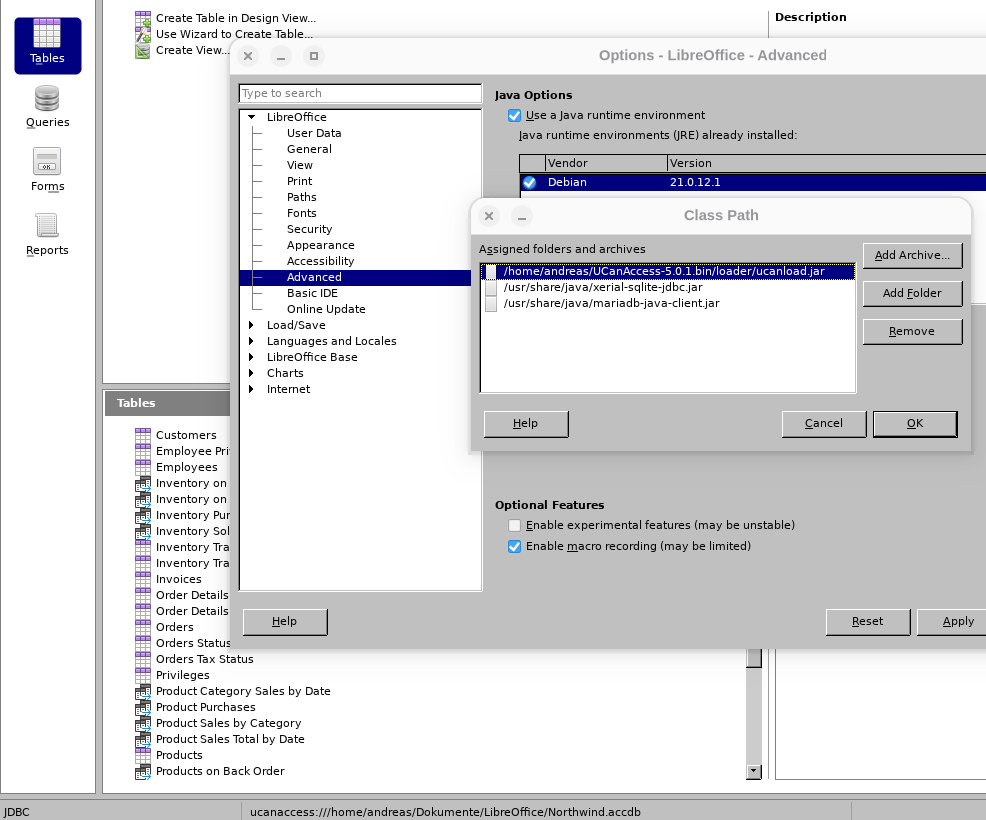
Next problem is availability of the database engine itself. It sould be available, if there is already MS-Access on the same macine/OS running, but may be need to be installed from M$. It is not available for Linux, there you need a driver like Ucanaccess.

If you are using jdbc or odbc-drivers you must not select to connect to MS-Access in the conecctions dialogue, but you select jdbc (or odbc). In the next step you can select or configure th connections.
I used mostly ODBC and have preferred to configure the cinnections first, then only select the pre-configured connection from LibreOffice.

As I’m able to grasp, currently there is no practical way to connect MS Access to LO Base.
:thinking:

Why not?

Where to download the .jar in the page?
 
We have MS Office 365 and 2 Access DBs in the W-11 machines (not this one) here. So I can try to connect…

Microsoft’s demo database “Northwind.accdb” on a Linux box with Java settings on top.

Look for the link tagged “distribution ZIP” or directly after the “standalone driver” at the github page I already linked:

PS:
On the github page the even link directly to the tdf-wiki:
https://wiki.documentfoundation.org/Faq/Base/How_to_connect_to_a_Microsoft_Access_database#JDBC_Connections_(Windows,_Linux_and_other_operating_systems)

PPS: I used the odbc-driver, as I was at a Windows computer at that time. Maybe Win10, maybe Win7…

:+1:tomorrow will try it!

As I was able to understand, it’s deprecated.
Like UCanAccess-5.0.1
:thinking:

Maybe, I used it years ago and it worked. As that databases origin were in Office 2003 a deprecated driver would be fitting.

:+1: will try to connect tomorrow :grimacing:

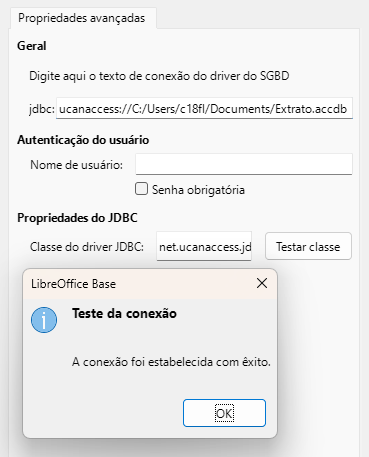
  • Driver = ucanaccess-5.2.0-uber.jar
  • String Driver Class net.ucanaccess.jdbc.UcanaccessDriver
    Access-to_LOBase