
Keyboard Shortcuts for Styles

As I write playscripts I have very specific styles I have to use for things like dialog and stage directions. In Microsoft Word you can set a style and then set a keyboard shortcut to trigger it. This means if I’m about to type some dialog I just have to click Ctrl+Shift+D and the current line changes to the dialog style.

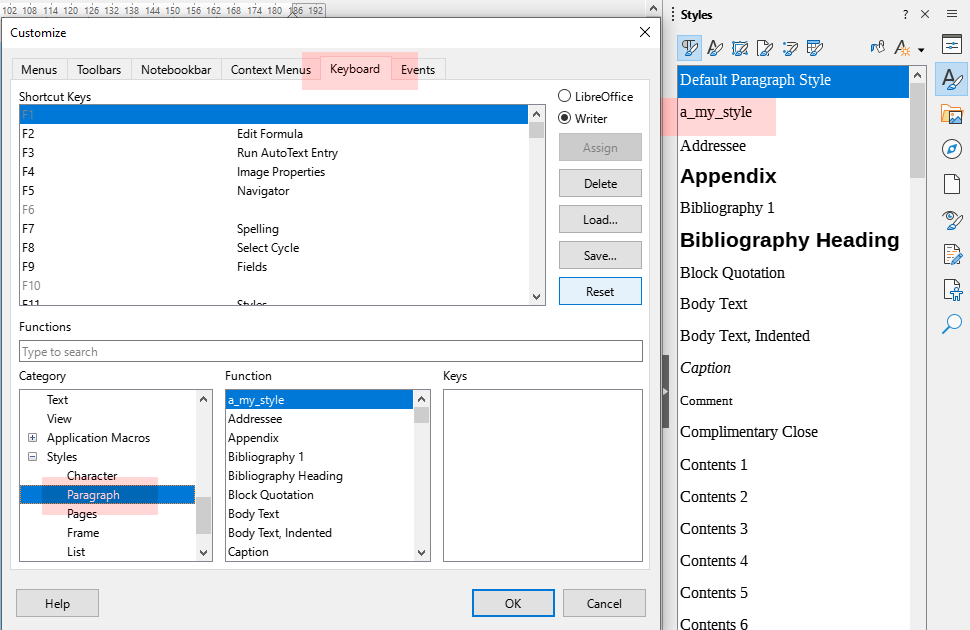
In Libreoffice Writer I can create my own style and I can go into Tools > Customise > Keyboard and set a keyboard shortcut to bring up a list of paragraph styles. But what I can’t do is set my own keyboard shortcut to trigger a particular style. It also needs to be more intuitive than Ctrl+1 or Ctrl+2.

Office has this functionality and it’s the one thing which stops me making the jump over. I’ve even tried setting up an Office doc with keyboard shortcuts which I know are clear in Writer but they don’t carry over.

I’m not even looking at them carrying over. But a feature to set a particular keyboard shortcut to a particular style would go a long way.

Thanks.
3 Likes

LeroyG… That’s it!!! Thank you so much. I couldn’t find it. That’s exactly what I wanted. You’re a superstar.

1 Like

Although Writer allows for keyboard shortcuts for a style, only one letter is allowed. It is so much easier to create and remember these style shortcuts if two letters are allowed, For instance, “My Responses” paragraph style could be saved as “alt-M-R” instead of “Alt-M”. Please see if this could be allowed in the next update of Libre Writer.

Feature requests should go directly to Bugzilla as Enhancements
https://bugs.documentfoundation.org/enter_bug.cgi?product=LibreOffice&bug_status=UNCONFIRMED&bug_severity=enhancement

Above is quoted from here

Cf. tdf#153302 - Function Suggestion: hotkey contains ‘serial’ key combinations

2 Likes

Just to have it here as an alternate way/workaround, a citation from the discussion of the bug-report:

Thus, you can also access styles, even custom ones, that get a keyboard shortcut assigned as soon as they are added to the menus: e.g. when I create a style called “supercustomstyle” and add this to the styles menu (vis tools/customize), I can now press alt→y→p (since it automatically gets resolved to “p”, since “s” and “u” are already taken)

1 Like