
Hello,
I noticed about a month ago that selecting text no longer highlights the selected region in Writer. The text is still selected so I can copy, delete, ect., but there’s no highlight of my selection. I am running libreoffice as a flatpak on Ubuntu 25.10, and my only extensions are Zotero and WritingTool.
Please test in safe mode, Menu/Help/Restart in Safe Mode
Please paste here the information on Menu/Help/About LibreOffice (There is an icon to copy)
I just tried this. The same problem remains. Here is the info:
Version: 25.8.3.2 (X86_64) / LibreOffice Community
Build ID: 8ca8d55c161d602844f5428fa4b58097424e324e
CPU threads: 8; OS: Linux 6.17; UI render: default; VCL: gtk3
Locale: en-US (en_US.UTF-8); UI: en-US
Flatpak
Calc: threaded
If you click Tools > Options LibreOffice > Appearance and, under Customisations, select Accent colour, then what colour have you got set? Does highlight appear if you change?
I don’t have any customization for accent color. I only have white as the document background for my dark theme.

Changing the accent color doesn’t seem to fix the problem.
There was a similar earlier question, No word/words being highlighted when selected when using Writer - #2 by EarnestAl . I am not sure why the highlight shouldn’t be black with High Contrast enabled but apparently it wasn’t. This is a screenshot from Windows 11 with Dark mode, White document background and High Contrast set to Enabled to emulate high contrast set in system.
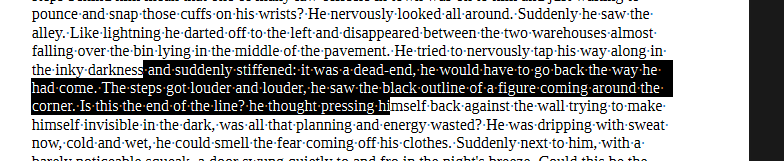
If setting High Contrast to Disabled fixes the problem then you could report a bug, How to Report Bugs in LibreOffice - The Document Foundation Wiki
BTW rather than setting Document background to White you could instead, in the same pane, tick the box Use white document background which I believe is default.
Thanks for your reply. I ticked the box for turning the document background white, and disabled high contrast in Tools > Options > Accessibility > High Contrast. And it works!
I cannot recreate the problem in my system. It would help others if you were to report the bug. Cheers. Al
I just sent in a bug report tdf#169738
[Edited by EarnestAl to add bug number)
1 Like