
Click on a file to open it with Libreoffice (.doc)
Libreoffice opens and keeps sending messges Quit or wait.
How to speed Libreoffice Writer?
Probably turn on printer, or set a pdf printer as default.
.
If you are using Windows, try installing the manufacturers own printer driver rather than relying on the generic Windows driver.
.
Please click Help - About LibreOffice, click the icon just after Version information to copy details to clipboard and paste into your question or into a comment
Thanks for your answer. No printing problem. The problem is: LO takes a long time to open a file.
I did not mention the version, because it is a generic LO problem. I am on Mac and Linux, everywhere the pproblrem is the time to open a file. And when the file is open it takes more time before one can edit the file.
The problem @EarnestAl had in mind, is no “printing problem”.
LO stores the used printer and tries to get its current settings on load. If ther printer is not available loading continues after a timeout, causing considerable delay.
You could try clicking Tools > Options > Load/Save > General and unticking the box Load printer settings with the document
If you save your files with embedded fonts, that too can make them slow to open.
or maybe not → #More_details Ask/Guide - How to use the Ask site - The Document Foundation Wiki
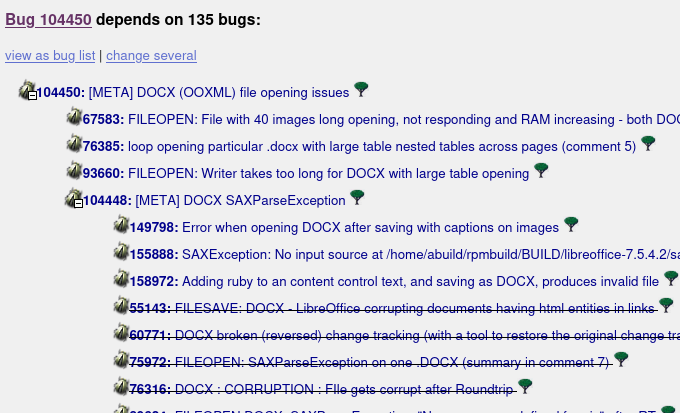
feel free to navigate 104450 – (DOCX-Opening) [META] DOCX (OOXML) file opening issues
Dependency tree for Bug 104450
Thanks for your answer.
So, it is not just a bug, but a build in problem.
I never ever print a LO-document, so why should a word processor add printing settings to a file?
Thank you
We don’t see your files, and I don’t know anything of your usage. It can come from templates you use or this may be completeley unrelated.
.
As you didn’t gave any details I can’t rule out “impatience on your side”, security settings causing delay, your files coming from remote places, slow activation of a installed java (seen that sometimes, updated Java then) and a lot of other ideas, wich will not help you.
There is tdf#150372 - which is about Writer’s slowness when showing some specific options, caused by dependency on printer settings. There may be other features depending on current printer settings, and they could be present in your documents. However, it’s not known what is your problem; some suggestions were given to you, but so far, there were some “discussion” from your side, but not a single “I tested this and that, and it made / didn’t make a difference”.
Even a direct “please post your version” resulted in “I didn’t post it because I think you don’t need it - and I won’t”.
Thanks for your answers and patience.
My version info: Version: 25.8.2.2 (X86_64)
Build ID: 580(Build:2)
CPU threads: 4; OS: Linux 6.17; UI render: default; VCL: gtk3
Locale: nl-NL (en_US.UTF-8); UI: en-US
Calc: threaded
The version is maybe no essential, because in my experience LO is always slow in loading.
On Tools, Load /save no load options on. all are off.
As I said, no printer settings, no printer added on this machine.
I tested open file from Files (file manager) and open from LO writer, no difference.
I use only 1-page documents no immages.
LO keeps sending warnings and when I choose Wait-option it will repeat that warming. The warming disrupts other programs I want to work on while waiting. (One warning to wait is enough for me)
Thanks for your patience.
this is actually gnome behaviour (not saying that LO is correctly handling this  )
)
if it may help, try tweaks like Disable force-quit or wait button - GNOME Shell Extensions
IMHO, the wait-or-kill message comes from your Linux system. On my Ubuntu Laptop, this is the same message for any application not updating the screen for some time.
fpy, thanks, this is some help.