
Paragraph Separator U+2029 as an invisible character

Problem

It appears to treat Unicode U+2029 (PARAGRAPH SEPARATOR) as an invisible character rather than a paragraph break when pasted(or type it via Unicode input).

This causes invisible attack risk and unexpected formatting.

Try it

here are 10 2029:
sample.odt (8.8 KB)

Reproduce

  1. Open a new document in LibreOffice Writer.
  2. Type blahblah+(PARAGRAPH SEPARATOR)+blahblah
  3. Enable View/Formatting Marks(Command + F10)
  4. Compare the result with blahblah+(Ordinary New Line)+blahblah

Behavior

  • U+2029 is completely invisible in the document.
  • It does not create a visible new paragraph or line.

Question

  1. Is this behavior intentional, or is it a feature?
  2. Any config or mod?

Additional context: macOS TextEdit

I encountered this problem while copying plain text from macOS TextEdit to LibreOffice. The U+2029 is a built in char in TextEdit that can directly input.

Version: 26.2.5.2 (AARCH64)
Build ID: cd7284b4cbbfeb507e630c1aac019f4157393acb
CPU threads: 8; OS: macOS 27.0; UI render: Skia/Raster; VCL: osx
Locale: en-US (en_US.UTF-8); UI: en-US
Calc: threaded

(use GAI for this post)
It works in the Gnome Text Editor (48.3)
But not here: “a b” and here “a b” (as preformatted text); there was a U+2029 between a and b, and was converted to U+0020 at saving the edit.

Anyway, to get ordinary paragraph marks, you can find it and replace with \n (with [x] Regular expressions).

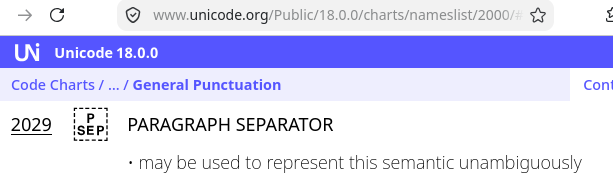
Notice the “may be used”:
image

Formatting and structuring directives in Writer (more generally ODF) are completely “out-of-band”. There is strict separation between text and other directives.

There is in fact no such paragraph break separator because paragraphs are some kind of primitive “objects” whose details are independent from each other.

This means you cannot manipulate “paragraph breaks” as if they were characters. When you enable View → Formatting Marks, Writer displays “hints” about paragraph limits as pilcrows (mirrored P). You can delete them to merge paragraphs or add new ones with Enter.

And, since a Writer document always contains at least one paragraph, this explains why you can’t delete the very last “paragraph break”.

When your document is stored on disk, paragraphs are encoded as XML elements <text:p …> contents of paragraph </text:p>. There are no explicit “paragraph breaks” representation between </text:p> and the next <text:p>`.

Summary: what you experienced is the expected behaviour, no bug here.