
This is the same issue as described in this post from September 2025, but that was marked as resolved without actually resolving the issue.
I’ve been moving around a csv file (mostly using my keyboard and cmd+up/cmd+down, sometimes with shift) in Libreoffice with and without filters applied, and every now and then a pink (Magenta) border appears around a group of cells. Keyboard navigation becomes locked to within 1 cell of the pink area.
I am in MacOS Tahoe 10.6.2, using LibreOffice 26.8.0.3 [X86_64]. This CSV file contains data and I’m just navigating around it to document the file structure, so I’m not editing any of the values in the cells.
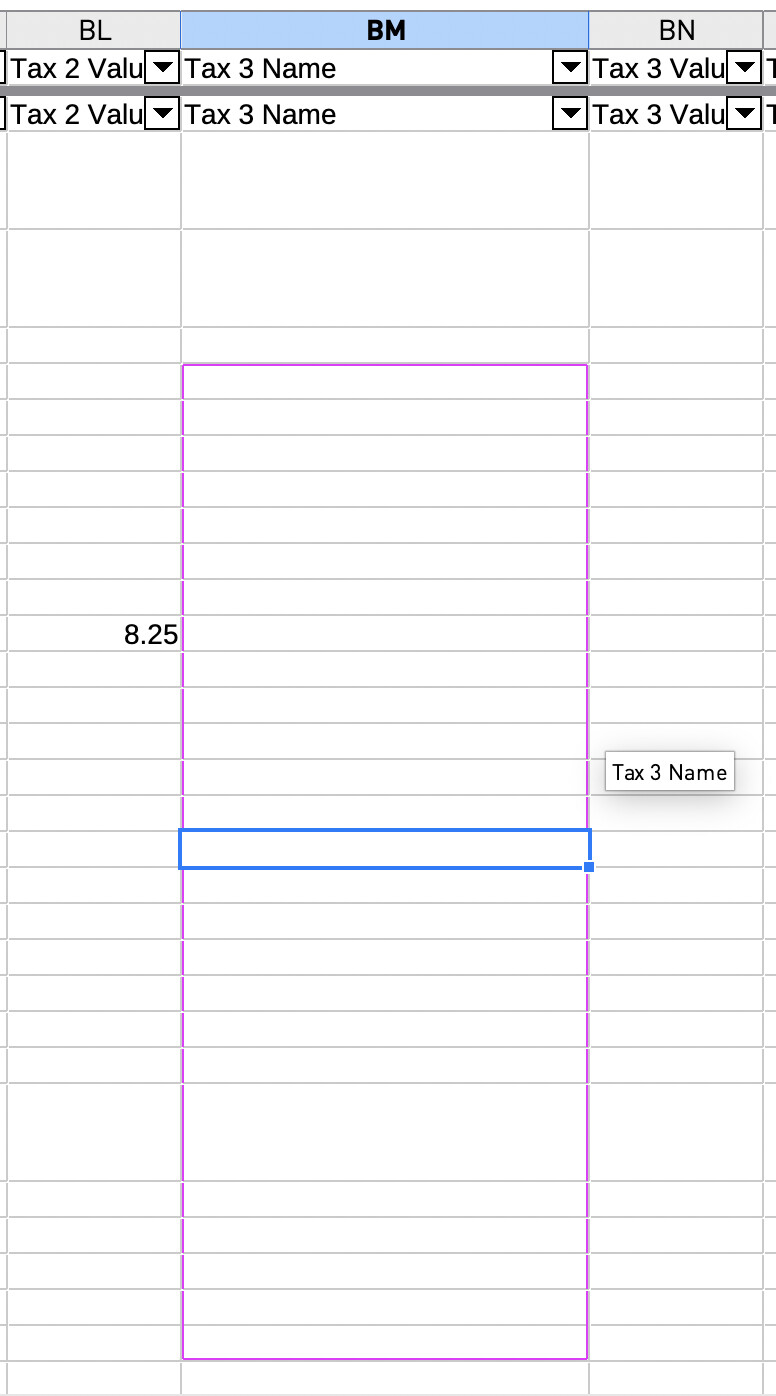
Selecting another cell and pressing enter or tab extends the area of the pink cells to include that cell.
Undo does not affect the appearance of the pink lines.
I do not have Track Changes on, so it’s not that.
When I click the “AutoFilter” button to remove the filters in the top row, the cells remain filtered.
The only thing that makes the pink section go away is closing and reopening the file, which suggests that I’ve activated a keycombo for some view setting/feature/tool that I can’t identify in order to disable.
I’ve reviewed all of the keyboard shortcuts (I don’t have any keyboard shortcut customizations, aside from entering cell edit mode when I press enter) and can’t find anything that appears to do this. I usually use Google Sheets but I use LibreOffice for files I need to open on desktop.
Can somebody explain what “feature” is being turned on here? That way I’ll at least be able to disable the keyboard shortcut.
Because these are CSV files, I have to manually reestablish the frozen rows/columns and filters when I close and reopen the file, so this hidden “feature” is really disruptive to my workflow.
Thanks in advance.