Printing envelopes froma data base

Thanks Villeroy, sorry didn’t mention the OS.

So now I can see the data sources in the data source window in the left pane however when I click on one of them (the tables icon) a message appears to say the data doesn’t exist. Anther message that appeared is - "The connection to the external data source could not be established. No SDBC driver was found for the URL ‘’**.

I’m including a screenshot to show you what is happening. Most of the mail lists are in fact all the same it’s my attempt to get one to open by changing the name. My last successful envelope printing was in June this year as you see by one of the names. Some have names deleted or added.

Screen Shot 2025-11-24 at 9.09.43 pm.png

This is a tree view. Each data source name has two branches “Tables” and “Queries”. Each branch can have many elements.
Click the triangle in front of “Tables” or double-click “Tables”. This shows the tables of a database.
If you get an error, the data source is registered but not available.
If you get the tables, click on a table, and the table data appear on the right side.

Thanks - that is what I am doing - click the triangle or double click but this is the error message I get for all the db listed. They are all registered but there is some disconnect going on. Is it to do with the naming of the db? Nothing appears if I click queries. As a desperate measure do I reinstall or upgrade the program this is 7.0.0.0 alpha 1? Thanks for your help. Treker 71

Screen Shot 2025-11-25 at 7.40.33 am.png

At least the “Bibliography” should show some data. It is a sample database shipped with the office suite

Anyway, next step:

  • Let your system find all files with .odb suffix, open them with LibreOffice and click on [Tables] in the upper right corner. Do you get a listing of table names? Does any table contain your data when you double-click on it?
  • Where did you enter the data you are missing now? Was it a spreadsheet? Then let your system find all files with file name suffix .ods.

Yes the Bibliography shows data.

Did a search through ‘help’ in LO and it found the one .odb file but when I clicked on it it comes up with the same message that it doesn’t exist. Not sure what you mean about click on tables? I can’t see anything in the upper right corner.

The file contains the names of the recipients is an .ods file and I can find that OK and it just opens up when I click it.

If you get the message the file doesn’t exist: Might be you renamed the file. So you have to change the connection for this database file. The “Registered name” couldn’t find the database file any more.

OK. Let’s connect that ods spreadsheet with a new database document:

  1. Note the registered name which shows no data and the location of your spreadsheet.
  2. In the data source window, right-click any data source name and choose “Registered databases…”. In the upcoming dialog, remove all the dead data sources.
  3. File>New>Database…
  4. Connect to existing database of type “Spreadsheet”
  5. Next step: Browse to the location of your spreadsheet.
  6. Next step: Yes, register the new database…
  7. Save the new database document.

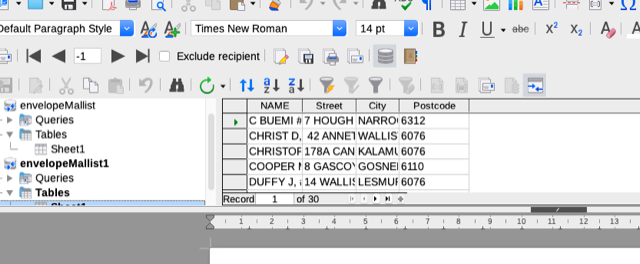
Now you have a new database document with 4 sections Tables, Queries, Forms and Reports. The tables section shows your spreadsheet contents as database tables. The data remain in your spreadsheet. The database document is nothing more than another representation of the same data. Obviously, it got lost somehow.
If the new database name does not equal the previously registered name, you have to re-connect the new data source with your serial letter:
Option 1: Open the dialog of registered databases again (right-click any data source).
Select your new entry, click [Edit…] and make sure that the registered name of your new database name is the same as the previously registered name.
Option 2: Open your letter, call menu:Edit>Exchange database… and point to the right table in your new datasource.

Thanks Villeroy - progress. You have taken me to parts of the program I didn’t know existed! The attached screen shot shows that I have registered a new database by save as and then leaving the file name the same but changing it when I registered it as a DB. So could now see the addresses in the right pane. Got very exited and loaded the printer with envelopes - BUT! It will not print it still cannot find it!
No doubt this very frustrating for you as it is me. Trekker 71

Screen Shot 2025-11-26 at 8.00.25 am.png

Rename the registered name for your datasource. The registered name should be “envelopeMaillist”, not “New Database mail25”.

Thank you Villeroy and Robert G for your patience and good suggestions. As I have pointed out before I’m very much a bunny in computer use!

However after much fiddling and mistakes I have managed to register a database when previously I didn’t know you had to register a data base or that such a thing even existed. For all the years I have been printing these envelopes I have never registered a DB it just sort of worked. OK I had trouble with Open Office (still do) and the wisdom of the community said install Libre Office which worked well until now.

I have deleted the not need files and have one only registered DB which has printed successfully - yay! BUT only one envelope at a time! If I try to print any more at once, LO crashes and goes into recovery mode. This happens repeatedly. So I try to print just a few and then I get the spinning wheel forever and I have to do a force quit at which point it needs to recover the document.

Probably because I have been playing around with so many DB and changing names the poor thing is confused!

Can you make some suggestions please to sort this latest glitch.

Treker 71

Did you close the Calc-file of the datasource?
Then I would try to print all content into a file, not directly to the printer.

Which system do you use? Here: OpenSUSE with LO 25.8.3.2

That is because the wizard for serial letters (mail merge) creates a database document automatically. In most cases you don’t need to do anything with that database document. However, you must not delete it.

  • You have a spreadsheet with your address data.
  • Now you have a new database document linked to the spreadsheet. When you open the database document, the status bar at the bottom of the database window indicates that this database document is connected with a spreadsheet. It looks like this:
    Spreadsheet_Connection_Statusbar
  • The database document is registered under a certain name. The name appears in the data source window with its queries and tables.
  • Your mail merge document (the envelope) contains various fields addressing a distinct column of a database table within the named data source. When you turn on menu:View>Field Names, you see the full reference as envelopeMaillist.Sheet1.Forename. That is the column below column label “Forename” on a table named “Sheet1” within a data source named “envelopeMaillist”.

If your new database document is registered under a different name, right-click any data source in the data source window and choose “Registered databases”.
Select your correct data source with the wrong name and click [Edit…]. Give the correct name “envelopeMaillist” to the data source.

Thanks Villeroy for your detailed reply

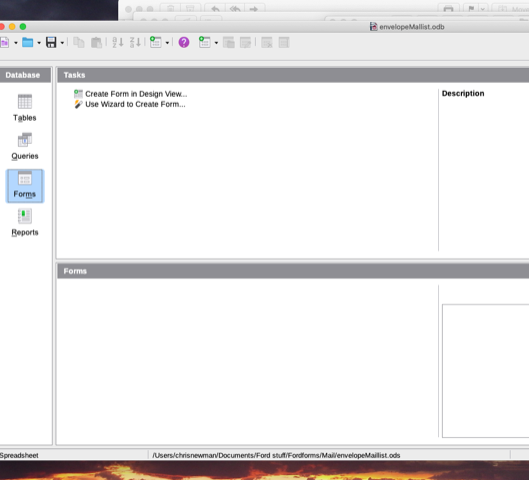
The mail list db data source window shows it is linked to envelopeMaillist.ods. The registered db is envelopeMaillist.odb. Is this how it should be?

There is only one registered DB now envelopeMaillist.odb

I checked the field names and they are all correct

Villeroy - Not sure if this will connect but also sorry to ask again but still having problems. Using your instructions from Nov 25 the system will not find spreadsheet I wish to link to.

I have now deleted LO 7.0.0 and have installed LO 25.2.2. But still have Open Office on the computer. I have tried to register the mail list spreadsheet but it says it doesn’t exist The envelopeMillist.odb is located in the documents folder but Libre Office cannot find it. Is this because it is regarded as an Open Office file? Should I now remove OO from the computer?

Treker71

Screen Shot 2025-12-06 at 3.41.21 pm.pngScreen Shot 2025-12-06 at 3.30.46 pm.pngScreen Shot 2025-12-06 at 3.30.16 pm.pngScreen Shot 2025-12-06 at 3.28.15 pm.png

This has nothing to do with OpenOffice. Just open all the files in question with LibreOffice.
[Spreadsheet] → [Registered database document] → [Serial letter]

  • Make sure that the spreadsheet with the address data exists.
  • Open both of your database documents with LibreOffice.
    I guess that envelopeMaillist.odb is the old one which lost the path to the spreadsheet and that New Database mail 25.odb is the new one which is connected to the spreadsheet (shows tables with data). Have a look at the status bars of both windows. There you see the difference. The old one might point to a non-existing file. The new one might point to your spreadsheet. This is the status bar of a database window with a spreadsheet connection on my Linux laptop:
    Spreadsheet_Connection_Statusbar
  • You may repair the old database document by calling menu:Edit>Database>Properties… You get a dialog with a [Browse…] button. Click it and point to your spreadsheet.
  • You may also continue with the new database document if it shows the correct data in the tables section.
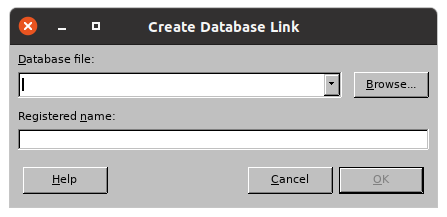
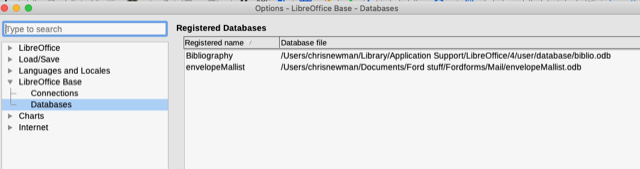
  • No matter which of the 2 database documents you want to use, the repaired old one or the new one, call the registration dialog for databases and add a working database document by clicking the [New…] button. The button shows the following dialog:
    Bildschirmfoto von 2025-12-06 12-34-22
    Browse to your database document and make sure that envelopeMaillist is the registered Name.
  • Now your data source window above the serial letter shows envelopeMaillist with some table(s), and when you click the table, the contained data are shown in the right pane of the data source window.

Your serial letter show be able to pull the right column data from the right table in the right data source. IF NOT, call Writer-menu:Edit>Exchange Database… and choose the right table within the right data source.

There seems to be glitch in the program and the one thing that does not work is the Browse button. Every time I have been pressing it I get the spinning ball for some time and then nothing. Same when I try to use the Open button - spinning ball and then nothing - it doesn’t show a dialog box asking what to open. Is there something I need to do or haven’t done?

This has made it impossible to select a data base or even open it from within Libre. If I go to the folder and click the file Open Office kicks in and opens it. The only way I can get Libre to open a file is to drag and drop it into the Libre ‘operating window’ for want of a better word.

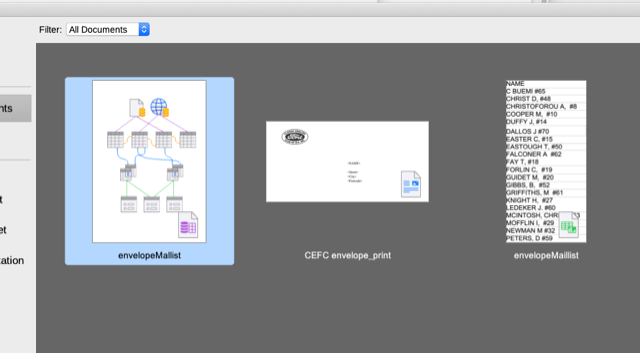
The spreadsheet I want is envelopeMaillist.ods and it is definitely linked to envelopeMaillist.odb as the screenshot shows

If I can Browse and Open that will make life a bit easier trying to complete this task. I have now deleted NewMaillist25 and envelopeMailist .odb from the documents folder. Now the Libre office window has the two databases I need to use but I cannot get the .odb file to appear in the registered databases

Screen Shot 2025-12-06 at 9.19.20 pm.png
Screen Shot 2025-12-06 at 9.24.53 pm.png

This is really disturbing. Do the database registration with OpenOffice and use that.
An office suite without file picker dialogs is unusable.
P.S. Ignore any misleading hint to upgrade OpenOffice. It detects that your files were made by some more recent program (which is LibreOffice) and assumes that there must be a new version of OpenOffice, even if you have the latest version of it.

Throughout this whole thread, I’ve noticed that you are repeatedly having issues with access to your files.

Did you give LibreOffice full disk access atfer installing it ?

This setting is activated in the system settings options, usually under Security and Disk Access.

At a minimum, LO requires access to all of the folders from where you might want to load a file. This isnot authorised by default when you install LO in currently updated versions of macOS, as Apple has tightened its security model progressively.

1 Like

Thank you All for you suggestions. Some progress! I opened Full Disk Access (under Privacy in a Mac - had to ask that question on the internet) and found that Open Office was not granted but Libre Office was OK - tried it twice before it was accepted.

So now I could browse as you see from the screenshot and I have the the .odb file in the registered database on the printing file
.
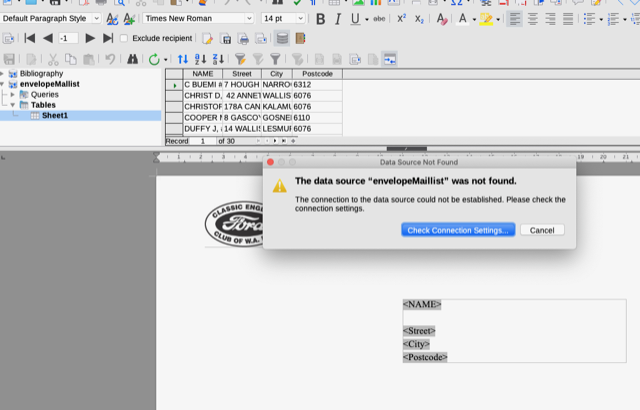
BUT when I try to print it says check the connection settings! Do that and try again same result. I thought I would try Open Office again which had worked for years and the same result.

I even tried exchange database which sometimes worked with OO but no joy. Something is not connecting.

Treker71

Screen Shot 2025-12-07 at 8.00.44 am.png

Screen Shot 2025-12-07 at 8.02.02 am.png

Screen Shot 2025-12-07 at 8.05.20 am.png

Have been digging, trying this and that but no joy. Have created and registered 2 new odb and when I try to load the data I can see it in the list for printing - click on it and it shows tables but that’s it - no sheet with the data on for printing. Not even an arrow in the tables ikon showing there is a sheet. I’m beginning to think there is problem with this download of LO 25.2.2 and perhaps I should delete it and load a slightly earlier version of LO.

Also re-checked Full Access. Quit LO and OO - unchecked and re checked the box and locked the change but no difference.

Treker71