
To upload, either edit your question or add a comment. The tool has an icon looking like a mail basket with an up-arrow. I think you can attach the 3 files without zipping them.
@ajlittoz — FWIW, because I iterate through so many drafts while I write (why not, since storage is cheap?), I always add the current (and often the time) to a file when I save it.
That being the case, I wondered if it would be of any import that the ODM of the “working” footnote manuscript is dated “2017-02-06,” i.e., 6 Feb 2017.
I don’t think the date itself is relevant. The important factor is the LO version used to save it on this date.
Yes, and that’s what I don’t know how to determine. You said that looking at the XML reveals the last LOW version to touch the file. I was hoping the originating version info was imbedded.
"New users can only upload 2 files," and I was trying to upload the ODM and two ODTs. ZIPs don’t seem to be on the upload utilitiy’s radar either. If I posted these on a personal storage account (say, GDrive or Dropbox) could I PM the link to you?
Create a ZIP file.
Change the extent from ZIP to ODT.
So you can upload the file here.
Anyone who downloads your file must then change ODT back to ZIP.
Footnotes-at-End-Test-zipped.odt (134.2 KB)
@ajlittoz, here you are. I hope you can ferret out the secret.
I apologize for the delay. When I pressed the “send” button yesterday, the ever-vigilant forum-bot kindly informed me that I had sent the maximum number of messages allowed to new users, and that I would have to wait 13 hours before sending my next missive. Oh, well — patience is a virtue to be mastered…
First result: the “chapters” were written with LO 5.0.3.2.
I’m trying to discover the setting to reset footnote number. Perhaps, there was no parameter forcing in this release when you switch from notes at page bottom to at end of document.
There are also “many” formatting “rrors”, the most serious of which is using Default Paragraph Style for real text. This style is the ancestor of all others and everything you set there forces you to override in other styles when that setting conflict with your graphical charter.
EDIT
It was very difficult but I found something. I think a change between 5.0.3.2 and now (7.3.4.2 on my computer) is to be blamed for the difference. From experiment, when you configure your footnotes for “end of document”, numbering is reset to “per document”.
In the underlying XML, if I force the setting for “chapter”, Writer behaves as you were used to. Consequently, code for it is still there. I suppose this parameter forcing was introduced to remove a case of numbering ambiguity for the common case where notes at end have no chapter separator.
Bug report is tdf#150207
The temporary fix for you is not obvious and may be dangerous for your documents. I’ll give a procedure in an answer.
Analysis your “chapters” shows that your formatting is rather “elementary” and can greatly be improved.
- don’t use Default Paragraph Style for your text; Text Body is the standard style for this
- you never use character styles; instead you apply manual formatting for bold, italics and other variations
- don’t use empty paragraphs for vertical spacing; instead customise paragraph styles; since you don’t pay special attention to the style of these empty paragraphs, some of them are Heading n and end up in the TOC forcing you to manually edit the TOC to erase spurious entries
- you number your chapters manually instead of relying on
Tools>Chapter Numbering; in case you shuffle your chapters, you’ll have to renumber manually
If this is motivated by your need for unnumbered chapters, you can always have unnumbered headings by pressingBksponce at the very beginning of a heading. This removes the number. - don’t use manual page breaks for forcing page parity (starting a chapter on a right page); you’ll have to check this manually whenever you edit your book; instead play with page style properties and their automatic sequencing
- instead of inserting chapter “separator” manually among the end notes (which is not reliable in case of edits and isn’t possible with real endnotes), attach an unnumbered footnote to a chapter heading; the corresponding note will be inserted at the right location and you can style it with any style you like. With fields, you can also echo the chapter heading automatically, so that you don’t need to type it again (and when you modify it, the field updates)
- you’re not consistent in your end-of-sentence horizontal spacing
Sometimes you use two spaces after a full stop. This translates to a<text:s/>element in the XML (I don’t know what it does but I’d recommend using a single space and letting Writer do the job; double spaces disturbs its job)
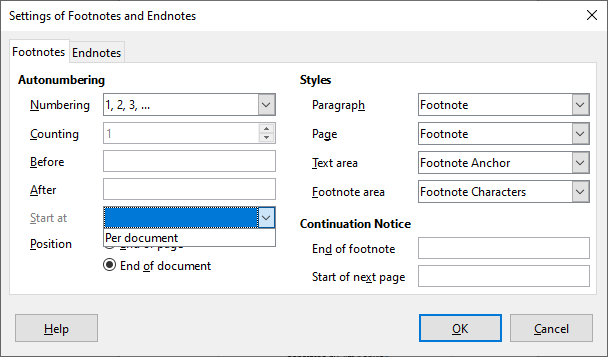
Note that for a new document, this is set to Per document, and there’s no way to change it to anything else, because there’s only one element in this list.
The Per document seems to imply exactly what is wanted, but works differently. Possibly needs investigation what changed this; I suspect one of Caolan’s welding commits.
@mikekaganski what I meant in fact was a “reset in the XML”. I found it through trial and error.
I filed a bug report (or is it a feature request?) at tdf#150207.
If you feel brave, here is a procedure to workaround a change between releases 5.0.3.2 and 7.3.4.2. It may very easily damage your document. Consequently backup your subdocuments in some directory before attempting the patch.
Work in your master and sub-documents without caring for effective note numbering. It is usually wise to work with the latest available LO release than with an outdated one. You benefit from new features, bug fixes and generally improved performance and better UI. When you’re ready for the final proof, follow the procedure:
- Save your master and sub-documents in some backup directory so that you have an up-to-date copy in case something goes wrong
- Apply the following patch to every sub-document
- Open the sub-document and save it .fodt; close
- Open the .fodt in text editor, preferentially one which has an XML operating mode (under KDE Plasma I use KWrite; under Mate, gedit is probably a good choice)
- Look for the
<office:styles>block
It seems to appear after<office:settings>,<office:scripts>and<office:font-face-decls>blocks. If your text editor is XML-aware, you can click on the margin triangle to “close” the block and decrease screen clutter. - At the end of this block, there are two
<text:notes-configuration …>elements, one for footnotes, the other for endnotes - The one for footnotes ends with an attribute
text:start-numbering-at="document"; changedocumenttochapter - Save
- Process the next sub-document
- Rebuild the updated sub-documents; for all of them:
- Open the .fodt version of the sub-document in Writer (may need a right-click to force launching Writer on it)
-
Don’t use
Tools>Footnotes & Endnotes**otherwise you’ll have to replay the preceding stance - Save as .odt without any edit
This overwrites the existing .odt; so check that the backup exists before allowing to overwrite.
- You can now open the master to verify that the notes are numbered as you expect.
Hmm. Sounds tedious, but not difficult, especially with the “safety net” of backup folder for insurance. Well, okay, maybe tedious and blood-pressure-raising for the first two ODTs. After a few successes, the “bravery” you mention will be unimportant. The big deal is the “little deals” — not unbalancing quotation marks, <>'s, and not clipping final /'s.
Throughout this process, I was wondering if it were safe to update everything to the latest version of LO. I was mainly afraid that’d I’d lose the “success” in the older file (the one from which I sent you the sample). Apparently that’s not an issue if the sample I sent you behaved as advertised.
BTW, you mentioned release 5.0.3.2. Since that’s not one of the ones to which I referred, did you just pull that out of thin air, or did you actually find it in the code of the files I sent you?
Other observations / questions:
-
I used an experimental ODT and sic’d the Mate Extract utility on it. Interesting unpacking! Is there any problem with using this utility? (Not for the process that you have described above; it’s just a general question for future exploration.)
-
On text-based files (e.g., CSS, HTML) I use Geany. Any problem with that app? As I recall, I can pick an option that lets it know I’m working with a particular type of file or language. In my test, it automatically picked up the fact that the FODT was an XML file.
-
After experimenting further, it looks like I can save a lot of time by just searching the open FODT on the phrase
'at="document"'. The line for footnote comes before the line for endnote; and apparently only the<text:notes-configuration text:note-class="footnote"line seems to contain the search string.
I just had a meeting canceled for me this evening, so I’m going to carefully experiment on two of the chapters in question, using your magic recipe. I’ll report back, and I hope to do so gleefully.
Thanks for all your help on this!
This is what is recorded in <meta:generator> at the beginning of the .fodt file (or meta.xml in the .odt).
No problem as long as you can patch neatly the .odt. I preferred to explore .fodt because I bypass the compression step.
Right, that quite a long time I haven’t worked under MATE and I forgot the name of the “standard” editor.
For your last point: use any search criteria as long as you hit the correct target.
I’ve thought a bit longer on my procedure. It can be simplified. Set the “chapter” attribute. Then, as long as you don’t reference Tools>Footnotes & Endnotes, the setting in XML won’t change. But if you reconfigure the notes, you must again patch manually the XML. Thus, the patching procedure needn’t really by applied as the last step.
BTW, have you read my last comment above the “answer”. I give you many points to care for to avoid trouble with edits.
I’ve tried the procedure 3 chapters. Very straightforward, no errors or wounded file. But also, so far no re-numbering joy. Is there a need/way to also do this FODT-like editing to the ODM as well?
Meanwhile, I’m going to upgrade LO to the latest version and then have another go at it. I’ll report back soon. I feel like we’re closing in on it…
The edits have gone without incident. In fact, the data available in the FODT is fascinating. In each of three files, the relevant footnote-entry code-line ends this way:
…style:num-format="1" text:start-value="0" text:footnotes-position="document" text:start-numbering-at="chapter"/>
I have updated to version 7.3.5.2 to level the playing field, but, alas…
…there is still no number restart, unfortunately. I even tried (during one experiment) changing the text:start-value="0" to a value of “1” in chapter 2; but that didn’t make any difference has since been backed out of the experiment, restoring the default “0”.
Works here with 7.3.5.2 otherwise I wouldn’t have suggested the workaround. Can you check that the attribute has not been reset by Writer?
No, there has been no reset. I’ve just re-exported the three ODTs to FOTDs and checked each in turn in my XML editor. The line in each sub-doc/ODT appears as I presented it in my posting yesterday. No change, but it was certainly worth checking, just in case.
This stalemate does leave me with a question and a… superstition?
The question is this: Is there a XML way to set the footnote “chapter” attribute in the ODM? I know the ODM’s styles overwrite and “disagreement” with the ODT sub-docs. Perhaps the ODM is “overwriting” what we’ve manually set in out FODT edits. And then again, you said you got it working, so perhaps this idea should be scratched.
The superstition is this: What if the difference between the working ODM/ODTs I sent you and the current non-working one has to do with the process of origin? I’m pretty certain I recall the 2018 ODM/sub-doc setup as having been created from the outset as an ODM to which I then added chapter ODTs. With the current problematic document, I had a full 13-chapter file; then I separated the “pieces” using LOW’s ODM-splitter function (the goal being to get chapter-based footnote renumbering in the collected footnote area). One would think it would make no difference; but then again, one would assume that the simple requirement we’re making of the footnote function to work without as much head-scratching as we’ve been doing.
Thank you, @ajlittoz, for your continued dogged patience on this issue.
Answer to the question: the contorted procedure results from the failure to find footnote configuration in the .odm. I found it strange because, as you noted, master configuration takes precedence over subdocs. In addition, collecting notes at end of document makes no sense in a single chapter. It is relevant in the master only. And it surprised me that it worked after fiddling “locally” with a parameter with “global” consequences.
And to add to the difficulty/confusion, while it is possible to save .fodt a master document, it is impossible (or I should say I could find how) to recreate a master from a .fodt. If you want to experiment tweaking a master, you must act directly on the zip’ped .odm.
Rabbit paw or talisman against superstition: in case your book is in the 500-page range (and your computer is sufficiently recent to offer at least 4-8GB), I think you may have a try with a single .odt (common text document). But due to the size of contents.xml, don’t save as XML to change the magic setting. Do that directly on the zipped contents.xml after extracting it and replace it after patching. Of course, do this on a copy of the original document.
Well, since I started with a one-piece ODT, “getting back” to that is no problem.
But since I’m new to fiddling with XML files, not mentioned “exploding” ODT files on command, I have an ignorant question regarding:
How do I put the genetically modified “Humpty” back together again?
FWIW, the book is ~230pp, of the 6in x 9in variety, so probably more like 150 U.S. “letter” size sheets. Both my systems have Core i7s and 16 Gb of RAM.