
I’ve tried many things to fix this, but can’t seem to find a surefire way to get rid of the gray bar that fills the space. With the ¶ button, I can control appearance of stuff like returns, tabs, etc. But it has no effect on the non-breaking-space. Well it does: when active, it causes a little blue circle to hover over the space. Right on top of that gray bar. I can change colors (to white) but then other stuff, like field shadings change with it.
Any help on this?
What is your LO version? Here, under 26.2.6.3, non-breaking space shading is controlled by ¶.
Iti is also possible that you have some “field” associated with this NBSP, such as an index entry.
If you still can’t find out, attach a reduced version of your document.
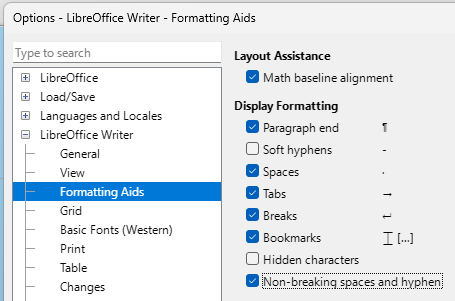
[ ] Non-breaking spaces and hyphen (menu Tools - Options - LibreOffice Writer - Formatting Aids)
1 Like
My version is 26.8.1.1
I noticed the shading didn’t go away after I installed the update. But I can’t say that the problem did not exist before that. I often compose text with all the formatting marks on using the ¶ button on the toolbar.
Toggling the non-breaking spaces option in the formatting aids does not seem to have the desired effect. The shading is there with and without that box checked.
Edit:
I had given up on this deal until this email notification came in. So I opened a document I had just started the other day, entered my version of an ellipsis, which is non-breaking space, period, non-breaking space, period, non-breaking space, period. The shading is not there. However, there is, on some imported text, a similar shaded mark following the final period in some but not all paragraphs. This does not go away using the ¶ key. That, in and of itself, doesn’t bother me because I will delete all that imported stuff or cut and paste from it before finishing the base document.
Re ReleaseNotes/24.8 - The Document Foundation Wiki, you can turn off the shading in Tools > Options > LibreOffice Writer > Formatting Aids. Untick the box Non-breaking spaces and hyphen and they won’t be visible
Yes, I know that. But that makes them invisible always. They should only be visible when I use the ¶ (Ctrl+F10), and not visible otherwise. What you see in the sample document is the always on condition, independent of the ¶. But if I follow your instructions they are then always off. And the graphic that ¶ reveals for a non-breaking space is a little blue circle at the top of each space. I have no clue why it is now (and apparently only in the document from which the example is clipped) a gray bar, in addition to the little blue circle.
Just tested with 26.8.1.1, and yes. Not sure if it’s the intended behaviour.
There is no problem with 25.8.7.3.
On Windows 11:
with 26.2.7.3 it works the same way as in earlier versions; the behavior changed in 26.8.0.1.
So it appears that the change was introduced in version 26.8.
2 Likes
It looks like it was “fixed” in Bug 165810 - Writer: non-breaking space hyphen have no field shadings in text even setting is on
.
If that is a “fix” it is exactly the opposite of what should happen, IMO.
Pressing ¶ or Ctrl+10 should toggle ALL gray shadings, if checked in the options dropdown. That the shading stays there always (unless forced to say a white color on white background), is a flaw.
You might like to add yourself to the CC list for Bug 174327 - Non-breaking space & Hyphen always grey highlight regardless of whether Ctrl+F10 is on or off
1 Like
No, because it is no binary situation. Fix switched behaviour from “never” to “always”, so the next group complains now.
Next step should be to integrate into the group you can toggle via GUI.
Perhaps you misunderstand. Using the ¶ button to turn on normally hidden items is a perfectly acceptable GUI toggle and there is even a “tweak” option to select which you wish to see/not see.
Except for the shading for non-breaking spaces. My only question is why does this condition exist for this one item? Especially when there already the little blue circle to indicate the space is not an ordinary space.