
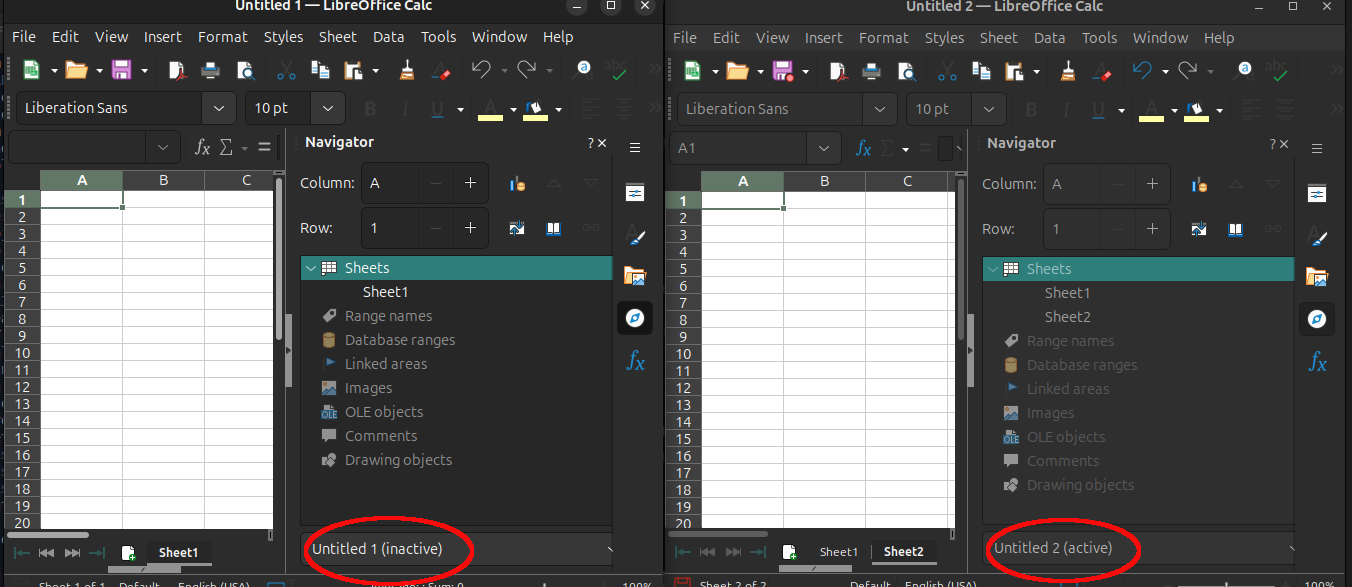
Two different open spreadsheets and the Navigator

I haven’t used this feature much in the past, so not sure what is going on. I am creating a new spreadsheet by looking at another spreadsheet. I expected the Navigator to represent the objects in the spreadsheet it is docked on, but as soon as I click on the Navigator in one spreadsheet the Navigator in the other spreadsheet changes. And by changes I mean it looks like a clone. It no longer represents the objects on its’ spreadsheet.
.
From reading the Navigator Help. Is it correct that the Navigator is not per spreadsheet file but represents all open spreadsheets and working as designed? :thinking:
.

.
Version: 25.8.4.2 (X86_64) / LibreOffice Community
Build ID: 580(Build:2)
CPU threads: 8; OS: Linux 6.1; UI render: default; VCL: gtk3
Locale: en-US (en_US.utf8); UI: en-US
Document
Displays the names of all open documents. To switch to another open document in the Navigator, click the document name. The status (active, inactive) of the document is shown in brackets after the name.

1 Like

HHHmmm…
.
I think I have another GUI issue that isn’t helping. By default VCL (Visual Class Library) is gtk3. Overtime I have noticed some GUI things are slightly off.
.
For example, VCL=gtk3 I do not see the dropdown box at the end of the Navigator that is circled in red in your image. If I look really hard I might see the top, but there is no way to get to it. Also, on the Start Center when I hover over the document icons, I see the text Thumbnail View in the tooltip. But if I change to VCL=gtk4, I clearly see the dropdown on the Navigator and the tooltips on the Start Center contain the fully-qualified location of the documents.
.
Until recently. I wasn’t aware of some of this. gtk4 introduces different issues. Although I have a light theme, Tools > Options on the right side is all dark, text and background, which is way worse :wink: There are a few more theme issues. But also, I like GTK3 so much more than GTK4.
.
To stay on topic, it appears this is my Navigator problem too. It behaves differently whether VCL is gtk3 or gtk4. :frowning:
.
For completeness, this is the command I use to use gkt4: SAL_USE_VCLPLUGIN=gtk4 libreoffice .
.
Link to LibreOffice Environment Varliables.

tdf#103182 (GTK3) - [META] GTK3-specific bugs
How to Report Bugs in LibreOffice - The Document Foundation Wiki

Thank you. I have reported bugs in the past. I did see the bug on the Start Center, but not all these gtk3 bugs in one place. Good to know and something to look through. It didn’t register :face_with_monocle: in my brain that these were bugs until my recent hanging out here and other folks asking and answering questions. :slight_smile: Live and learn :muscle: