
Way to import range from google Sheets data

Hoping someone has an idea here. I am working on migrating a google sheet into libre calc. However this spreadsheet depends on imports from someone elses google sheet. I have not been able to find a way to do this in libre calc does anyone have any ideas/help for me?

Example of the import command in Sheets: =IMPORTRANGE("https://docs.google.com/spreadsheets/d/1FSq7kdz3VzGQKcUN8O3Rxo2mgCA1rTv04Oap3rrFFI4/view#gid=1463625803", "Front Page!A:R")
In the following thread you may find examples, how to do this and also trouble lurking. I guess google does not like their services being used from outside…

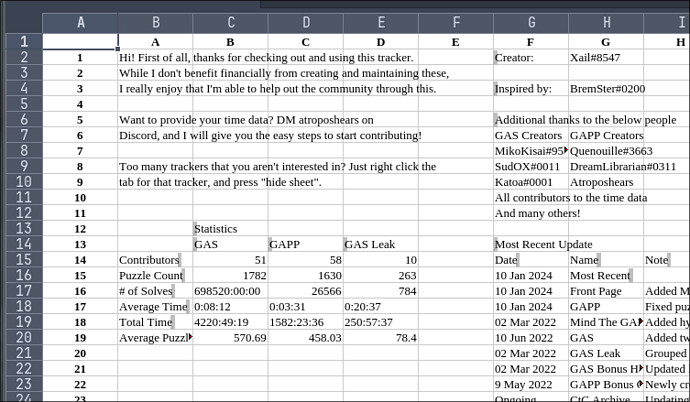
I did take a look into that and i was able to get the import to somewhat work. However, it seems that when pulling the data it pulls the column letters and row numbers in along with the import which definitely is not ideal. So need to figure out a way to refine that down.

For example using https://docs.google.com/spreadsheets/d/1FSq7kdz3VzGQKcUN8O3Rxo2mgCA1rTv04Oap3rrFFI4/view?headers=false&gid=1463625803 as the data source link does allow me to pull in data but it pulls the column headers A-R and a ton of row numbers along with it thus breaking things.

image

though the underlying data i am pulling from isnt using the “Publish to the Web” functionality so that also might be impacting how refined I can make this pull

I never worked with imports from google-sheets, but for similiar projects I prefer to use one separate import-sheet and reference this from other sheets in the same .ods-file.

Yeah I am using a seperate sheet for the import portion but all my formulas are already accounting for the columns and rows not being shifted like that. i could technically make it work from here it would just be messy. I think this is as close to perfect as its going to get so ill just have to decide if I want to pursue rewriting the calculations and such to accomodate for this method or not. Thank you for your help!