I don’t know the answer and I don’t even know what you mean.
Can the SQL processor call out to a Windows function? I have no idea. ROW_NUMBER() is a native SQL function, right?

I don’t know the answer and I don’t even know what you mean.
Can the SQL processor call out to a Windows function? I have no idea. ROW_NUMBER() is a native SQL function, right?
I have no idea how to get HSQLDB information out of LO. I have the hslqdb.org Web site and SQL documentation, but I have no idea how to get any “what DB version is installed?” information out of LO.
I clearly do not know what I am doing. I run SELECT DATABASE_VERSION() and get 1: Access is denied: DATABASE_VERSION in statement [SELECT DATABASE_VERSION (]
Yes: a Window Function.
Google something like
libreoffice base hsqldb embedded
Ah, a Window function not a Windows function.
It is listed under System Functions in the HSQLDB documentation.
Charles
Geez. So I am using V#1.8 but working for doc from V#2.7. No wonder I am confused!
I see a caution against upgrading HSQLDB.
Is there a doc somewhere that would cover how to export an HSQLDB database to some other DB engine supported by LO, and if so, what DB to use?
Charles
@Villeroy can explain you how to set up an updated HSQLDB database.
HSQLDB is an excellent DB engine. But version shipped within LO is an obsolete one. They never upgraded it.
Besides: you should never use embedded for real “production” work.
I know how to create Firebird or MariaDB from scratch. But not how could you export this existing one.
From @Ratslinger code there:
Sub Versao(Evt As Object)
	Dim F As Object, Con As Object
	On Error GoTo Erro
	F = Evt.Source.Model.Parent ' Form from where routine is called
	Con = F.ActiveConnection
	print Con.getMetaData().getDatabaseProductVersion()
	Exit Sub
	Erro: MsgBox "ERRO " & Err & Chr(10) & "na linha " & Erl
End Sub
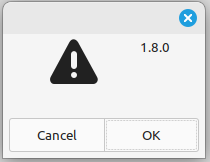
Got it. The answer is always 1.8.
Here are my problems:
So I am kind of at a disadvantage and “stuck.”
I just downloaded Firebird. It looks like a decent product. I will try to give it a go. I will see if I can’t by some chance export this one database to external Firebird.
The database in question is one single database. There is only one “real” table – not counting little read-only tables that drive some pull-down or map 1, 2, 3 to Monday, Tuesday, Wednesday. The table has 261 rows and 25 columns. It is critical to what we do.
There is one significant form and one significant report. The report is fairly complex.
Charles

Firebird is provided with Base.
Base >
Connect to an (non) existing Database >
Firebird External >
Create new > […]

@CRDF I am grateful for you help but I am too stupid to grasp what you are trying to say.

Are you saying 25 columns is too many? What are you suggesting I should do? I didn’t design this database, I inherited it.

Are you saying I should not have downloaded Firebird. Where would it be? How would I activate it?
?
Just explained above…
But as you are considering to set up a new DB, I suggest to check the normalization. You may not have experience with Relational DBs but
, so it’s easy to grasp the “normal forms”.
If you want to use ROW_NUMBER(): It isn’t available for internal HSQLDB. You could use it with internal Firebird database.
Internal Firebird is experimental. So it needs experimental features switched on for creating such a database…
.
For internal HSQLDB something like this would help:
SELECT "a".*,
 ( SELECT COUNT( "Sequence" ) FROM "Clients" WHERE "Sequence" <= "a"."Sequence" )
 AS "Row_Number"
FROM "Clients" AS "a"
For COUNT you will nee a field, which should never be NULL. So best would be the primary key of your table.
https://forum.openoffice.org/en/forum/viewtopic.php?f=21&t=86071
Install a macro and the zip archive of HSQL 2.4.1.
Put the lib/hsqldb.jar in subdirectory “driver”.
Run the installed macro.
2.4.1 was the last version able to upgrade HSQL 1.8.
You may replace hsqldb.jar with a later one and run the macro again in order to upgrade from 2.4.1.
The most relevant part for HSQL 1.8: Chapter 9. SQL Syntax
Text tables in chapter 6: Chapter 6. Text Tables
The documentation of any later version is contained in the downloaded zip archive.
@Villeroy This is SUPER helpful. Thank you. Let me try to parse this in detail over the next couple of days.
@Villeroy this is SUPER helpful. Thank you again. I have read through the linked post on the AOO forum. I have downloaded HyperSQL 2.4.1 and understand how to set up the folders.
I am only unclear on one thing:
Python needs to be enabled which is the case if there is a menu entry Tools>Macros>Organize>Python. Ubuntu Linux installs LibreOffice without the Python bridge. Add package “libreoffice-script-provider-py”. Under Windows you have to re-run the installer and add this package if it had been deselected.
I have Python macro support. I see 8 macros under Tools/Macros/Organize Macors/Python.
I don’t see ExtractHSQL. I tried re-running the LO installer but there are no “options” other than a choice of installation folder. I don’t see any option to select or de-select any particular components. How do I get ExtactcHSQL or how do I get it installed?
|OS Name|Microsoft Windows 11 Pro|
|Version|10.0.26200 Build 26200|
Download the attachment from Apache OpenOffice Community Forum - [Python] Macro to extract and reconnect embedded HSQLDB - (View topic)
It’s a Writer document with a push button installing the macro.
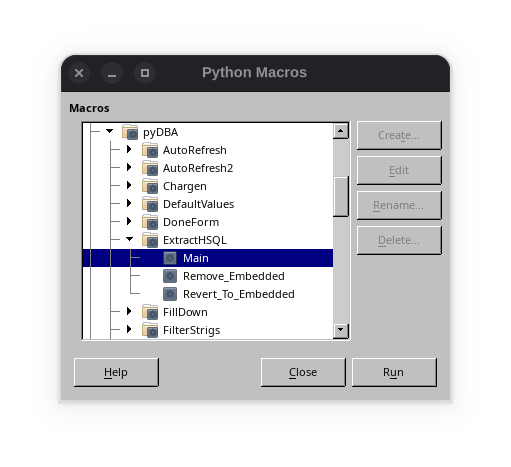
Within your profile folder, the path to the script is Scripts/python/pyDBA/ExtractHSQL.py
