
Writer: creating table with merged cells, unable to adjust column widths or add more columns

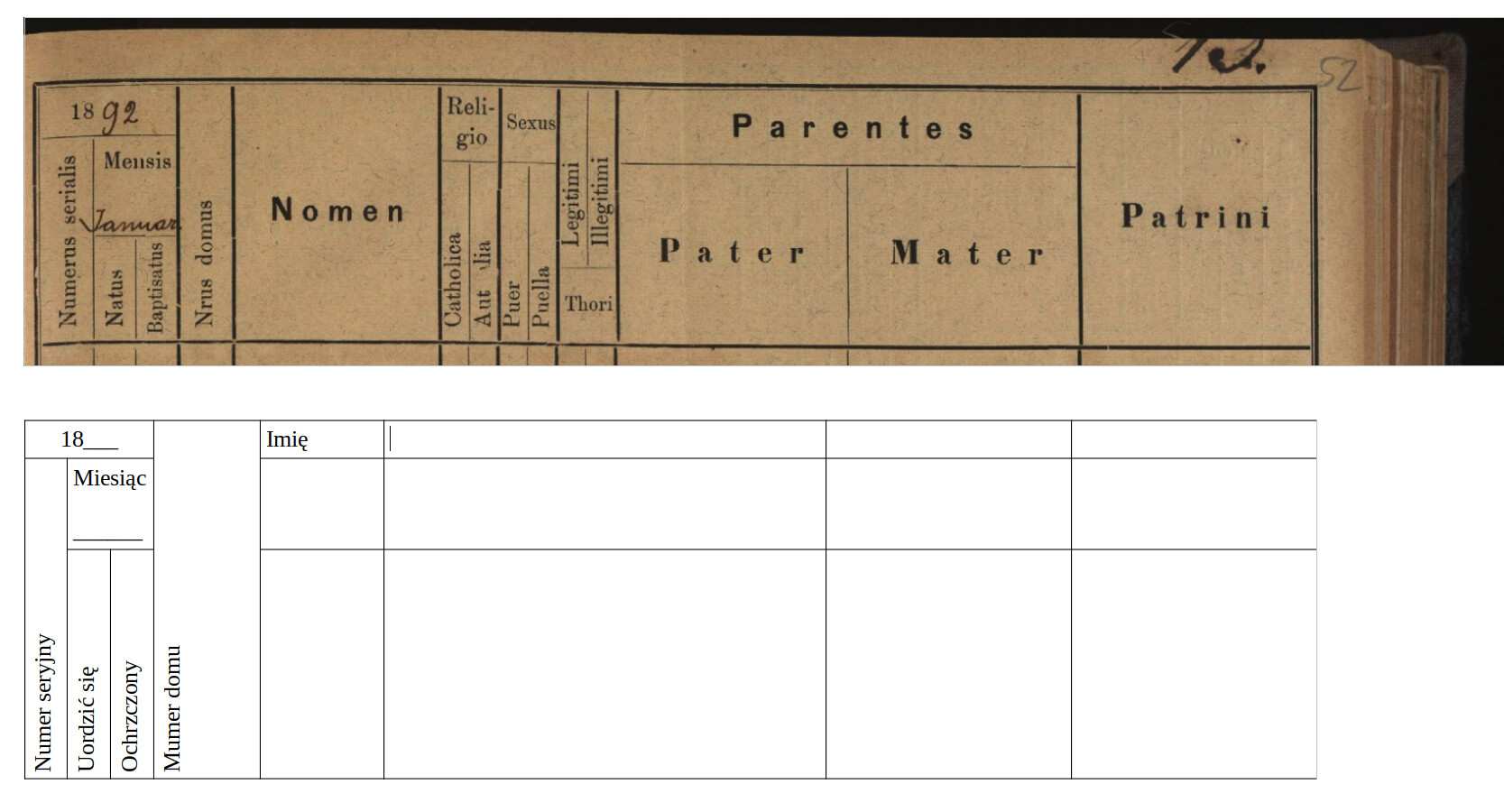
Hi. I’m trying to recreate a table that has merged cells and it’s causing a lot of difficulty it’s not possible to add more columns or adjust columns widths.

My workflow

  1. I started with 10 columns and 3 rows (no issues here)
  2. Then moving from left to write I merge cells as needed and then I add the text to be vertical.
  3. After a few operations I reach many issues that makes this process extremely difficult
    • unable to click and drag to adjust columns. For some I can and for others I can’t
    • I will use right-click to specify column width but then all other columns get expanded or squeezed
    • sometimes the table freezes and I can not adjust anything

I’m not sure what the issues is or how to go about making this process more seamless. A possible solution is for me to use LibreOffice Calc but I would prefer to stay within Writer.

Edit:
OS: Linux Mint Debian Edition (LMDE 6)
Version: 7.4.7.2 / LibreOffice Community
Build ID: 40(Build:2)
CPU threads: 6; OS: Linux 6.1; UI render: default; VCL: gtk3
Locale: en-CA (en_CA.UTF-8); UI: en-US
Debian package version: 4:7.4.7-1+deb12u14
Calc: threaded

screenshot:
Update:
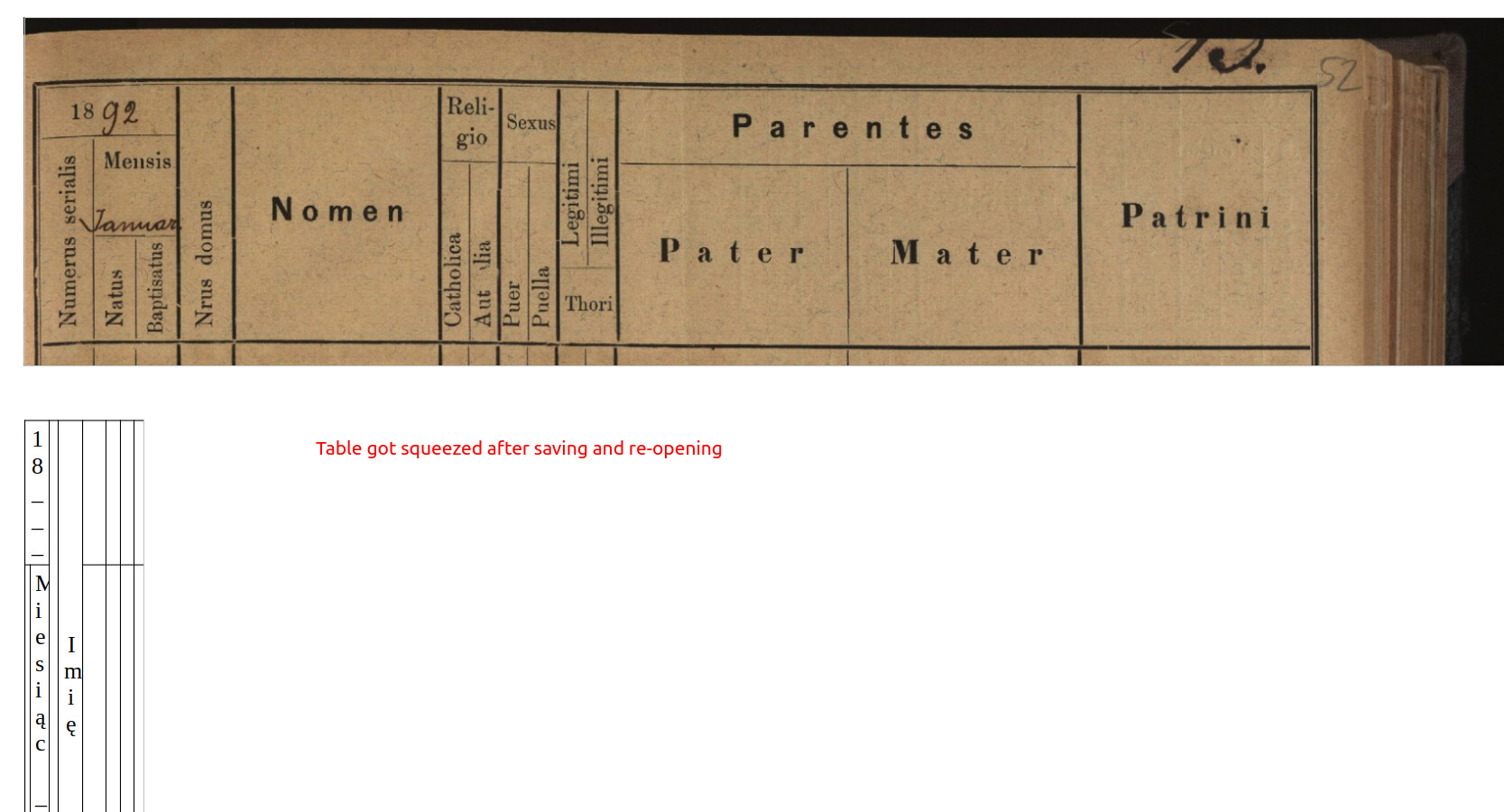
After I re-opened the file, the table got squeezed. I think this might be some sort of bug.
File I’m working with:
translate headings latin to polish.odt (958.9 KB)

File where the table got squeezed:
translate headings latin to polish, table squeezed.odt (957.6 KB)

For all inquiries, please specify: operating system, LibreOffice version (four-digit, e.g., 26.2.3.2). Thank you.


Initial consideration:
If you specify a total width for the table and that space is already fully utilized by existing columns, you cannot add new columns or widen existing ones.

The easier way…
… is to create all the columns the same way when setting up the table.
If I counted correctly, there are 14 columns.


Writer Guide Tables

Hi @Hrbrgr Thank you for the prompt reply. I’ve edited the original post to include my OS and LibreOffice version.

You are correct, there are 14 columns total.

The challenge I’m facing that even after setting up the 14 columns it becomes next to impractical to merge and re-size them. It does seem buggy because whether I can not move or select a column.

For now I’ve went with the Calc route because I need the table. I’m happy to provide more info if it helps trying to troubleshoot this.

The right approach is important!
Column widths must always be specified from left to right.
For the rough layout, you can click and drag the column lines.
For fine-tuning, define the columns via the context menu.
Right-click the table, select Table Properties, and go to the Columns tab.
Enter the correct value for column 1, then for column 2, and so on.
Once all the columns have the correct dimensions, you can merge the required cells.


137194 HB translate headings latin to polish.odt (741,1 KB)

For my pattern-document, I edited the source image beforehand and fitted it into the document.


With me:
Version: 26.8.0.2 (X86_64)
Build ID: 9bc445578031fecf56086729d8e4940c77e14d65
CPU threads: 16; OS: Windows 11 X86_64 (build 26200); UI render: Skia/Raster; VCL: win
Locale: de-DE (de_DE); UI: de-DE
Calc: CL threaded

1 Like

I had a similar “solution” like @Hrbrgr.
Writer seems to be not the right app for that purpose?
See attachment. Comment in it.


TableSqueezedGrantler.odt (71.5 KB)

1 Like

Oh, yes!
You just have to know how it’s done. :blush: