
Conditional formatting will be very helpful for me, but it’s a black box with respect to Styles. See screenshot. With Show Previews checked, there are no previews. And there are dozens of Styles. How does one work with this? Is there another way I have not discovered? Thanks.
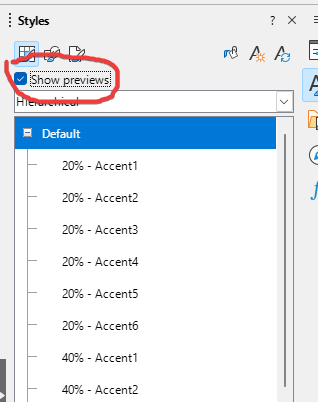
Bug 151142 - UI: Font Preview in the Styles sidebar is not working for Calc
Workaround: In a separate sheet, fill some cells with numbers and apply a cell style to each cell then rename the cell styles to give a meaningful name
1 Like
If you don’t like some conditionally applied cell style, change it.
A macro dumping cell styles @ selected cell:
Sub Dump_Cell_Styles()
cell = ThisComponent.getCurrentSelection()
if not cell.supportsService("com.sun.star.sheet.SheetCell") then exit sub
adr = cell.getCellAddress()
sh = cell.getSpreadsheet()
styles = ThisComponent.StyleFamilies("CellStyles")
n = styles.getCount() -1
rg = sh.getCellRangeByPosition(adr.Column, adr.Row, adr.Column, adr.Row +n)
for i = 0 to n
	cell = rg.getCellByPosition(0, i)
	style = styles.getByIndex(i)
	s = style.getName()
	cell.CellStyle = s
	cell.setString(s)
next
End Sub
1 Like
With courtesy, my issue is and was, having no way (AFAIK) to view the appearance of a style before applying it.
You got a link to a bug report about it not working.
.
You got a manual workaround and a more automated one. What more do you expect we can do given that we are users like yourself?
The problem I see I is that the cell styles in your screenshot don’t have meaningful names, compare them to the names listed under Status cell styles: Bad, Error, Good, Neutral, Warning.
You can CC yourself to the bug report to stay informed on progress and to register your interest in getting the bug fixed
3 Likes
Hi,
could the StylesReporter extension be of any help?
Not perfect, by any means, and not a graphic tool, but you can get Calc “reports” about the styles in your documents (Calc, Writer).
1 Like
My most humble apologies for having caused offense to “EarnestAI”
LibreOffice Calc visual styles.pdf (141.4 KB)
But I have followed some of the advice and attached my own legend to this post.
I was blissfully or stupidly unaware of the complexities of Styles and merely wanted to do conditional formatting for visual discrimination based on cell contents.
It might make more sense of the styles if you arrange them by Hierarchical rather than All Styles.
1 Like
Drop the idea.
A cell style describes 92 properties, many of them structured, some as trees.
The most relevant style properties for Calc are structured or complicated.
How should (e.g.) a preview of a specialized number format look? It can contain internal conditions defined by its format string.
What about border formats? ...
Well, a few style properties, mainly character propertes could be previewed. What use?
1 Like
Hello!
In Excel, when you hover over a style name, the result of applying the style is displayed in the selected cell(s) on the sheet.
1 Like
I concur with the above responses.
What I do at this time in Calc, if I create the style, I use meaningful names. If I need to see the styling, I right click the style in the Style Manager and select Edit Style…