
Calc Book Keeping Balance Issue

Hello,
First post here.

I wanted to create a simple Calac spreadsheet. I have all the headlines sorted.
The main categories are listed as in this screen shot…
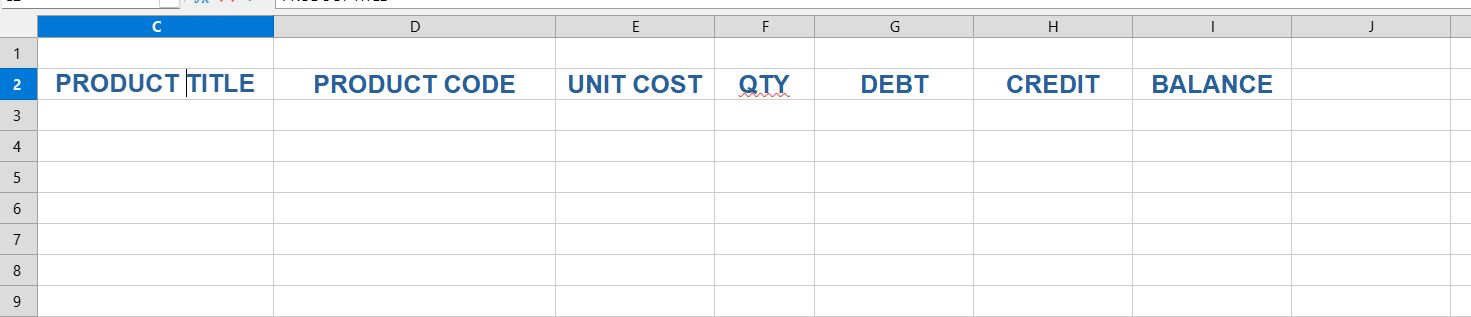
Unit cost * QTY is easy, and I allocate the formula to both Debt and Credit, and in Ballance I put Credt-Debt (=H3-G3).

But that’s the end of it all. As I add to credit and debt the balance does not work, and I get double ups in the debt and credit fields.

It was a simple idea that became complicated.

Any ideas on what’s happening?

Book keeping.xlsx (9.7 KB)

Thanks for your helps

Apparently not - there is this topic.

There are no formulae or data in the file you have provided, so it isn’t possible to see your problem.

Maybe you mean Debit, not Debt?
Using a scattergun approach, here is a sample spreadsheet covering more than you asked for. Some of the cells are protected as they contain calculations. To remove the protection, click Tools > Protect Sheet
Balance should be Existing balance + Debit (a negative value) + Credit
Book keeping129771EA.ods (15.7 KB)

2 Likes

Thank you for helping out. It should help guide me a bit. Defintely a great help.

Curiosity; Is there a way to make the empty cells more aesthetically pleasing than having all the £ bits going all the way down, and just having them blanked out?

All the best and thanks again.

You can read the chapter dedicated to calc of the Getting Started guide And also the complete Calc guide (and other guides)

Thanks for all the helps - much appreciated :slight_smile:

My possibly overcomplicated spreadsheet needs zero values there. You can suppress zero from displaying but that seems to me to be a dangerous practice.

If the spreadsheet does not need to look up the prices then you could have it blank. Then you would be trading off accuracy for aestheics.

HI :slight_smile:

My balance cells stay up to date from either the debit or credit entries.

Consecutive debit/credit cells can still be dragged down if there is a series of entries one after another. See my little example below, where we have a series of Credit entries.

However, I need to re apply the formula following such a sequence in the appropriate cell - in my example, the debit cell… if I want to make it look … “pretty”.

<note fullstops added in to represent blank space, because the text editor cancels out multiple spaces>

Example:

Debit - Credit
. . . . . . . 10.00
. . . . . . . 10.00
. . . . . . . 10.00
5.00
^^^^
Re apply formula here.

That’s the way I’m working it, and it seems to be okay.

There is not a single accounting application which is built on spreadsheets. Accounting applications are built on databases.

2 Likes

Ola @FredM, segue sugestão…

Não salvar em Excel, perde a Macro…


Hi @FredM, here’s a suggestion…

Don’t save in Excel, you’ll lose the macro…

Book keeping_GS.ods (16,0,KB)

1 Like

Thanks for everyone’s inputs, which is appreciated.

I’m very new to all of this. I just thought Calc would be a sort of good idea to keep tabs on incoming and out going invoices and sales and things like that. I thought it was the sort of thing you used because a lot of people talked about using Excel for this sort of thing.

It is one of the most common misunderstandings in computing history. Spreadsheets are inadequate for book keeping and all kinds of inventories. Dedicated database software for all these tasks exists since the beginning of computing history in the 60ies or so. Book keeping on spreadsheets is complex, prone to errors and incomprehensible except for the single person who designed the spreadsheet.

1 Like

Ola @Villeroy, se for normalizada a maneira de alimentar as planilhas, com formulários e proteção em áreas restritas, é possível tem algo muito bom.


Hi @Villeroy, if the way spreadsheets are populated is standardized, with forms and protection in restricted areas, it’s possible to have something very good.

I have not seen anything good in 30 years.

Levando em consideração que @FredM, não informou o volume de itens, estou considerando ser pequeno, por isso, creio de uma planilha possa resolver.


Considering that @FredM didn’t specify the number of items, I’m assuming it’s small, so I believe a spreadsheet could solve the problem.

No specific nnumber of items. Just the odd sales and expenses (usually more outgoing than incmoning). I copy and paste the layout below it to begin the following on year, linking up to the previous ballaqnce.

What was the volume last year?

People who find such solutions on the internet will try to scale it up into the millions for all kinds of transactions. Then they pass it over to untrained employees unable to insert rows and fill down formulas and copy/pasting away your carefully setup validation.
ask129771.odb (31.8 KB) can deal with millions, adds time stamps, accepts only positive debit/credit values, does not accept duplicate items. A one-line macro may even auto-update the table grid in the “Entries” form.

P.S. Have you seen what happens to your spreadsheet when someone clicks a sort button while the cell cursor is in your transactions list?

1 Like

My volumme level was 11 :wink:
Sorry, Schiavinatto, it was too good to resist (see This is Spinal Tap if you didn’t get that one).
But seriously… it’s just for basic keeping tabs of sales items. At least I can see at a glance debits and credits and other basic things. Volumes… a few items may be in a month. Sometimes none at all.
Thanks Villeroy for the file - I’ll check it out after a while.
All the best :slight_smile: