
In tabbed interface, I can find “Page Column” in Layout->Page Columns. But where is the Column option which can be found in Standard toolbar interface? It can be applied to a paragraph instead of a full page.
Maybe you mean section inside which you can set the number of columns regardless of the page setting?
Select the text. In the menu, click Insert - Section and in the Columns tab of the dialogue, set the desired number of columns.
BTW if you cannot see the menu, click the icon with tooltip Menu bar on the extreme left of the toolbar to toggle visibility of the menu.
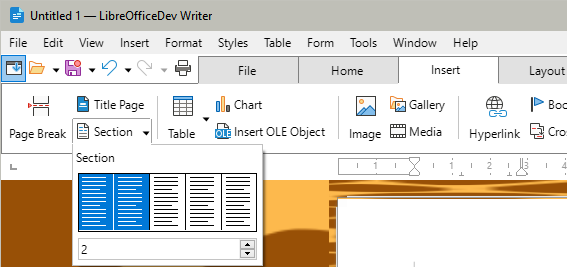
You can use the tab Insert >Section
Use the triangle on the right to choose how many columns you want
To be pin-point accurate, a section is always inserted inside a page column. This means that if your current page style specifies 3 columns, a n-column section will result in a 3×n columns layout. You can’t reduce the number of columns in a page with a section (shame!). Same for a text frame.
Even when a section is nested in an “outer” section, its base layout reference is still the page or frame base configuration. Consequently, the section is completely independent from the enclosing one: you can have a 1-column section overriding a 4-column section.
1 Like
thank you!