
Connect 2 columns

I have a CALC sheet with 2 columns; Address and Date that I often sort on one or the other.
The other day I did a sort and thought that I included both columns. I hadn’t !
Luckly, I had a backup done only an hour before, so all were recovered intact. WHEW !

Is there a way to connect 2 columns so that they are ALWAYS sorted together and can’t be sorted separately ?

As always, you guys are fantastic !
⌡im [THE BookMan]
Among many other things, a database makes it impossible to disrupt records.
With 2 columns in Calc, I would always select a single cell and use the quick-sort buttons.

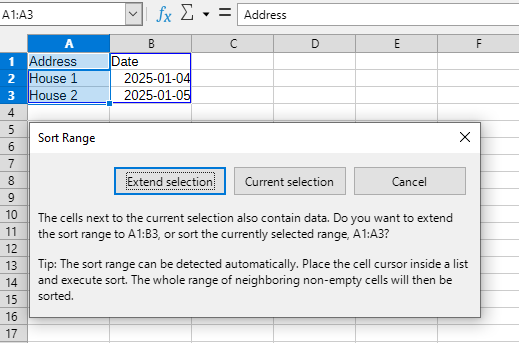
Calc warns of this danger.
Here’s what happens if we select cells A1:A3 and click the sort button:
2026-01-04 194042

1 Like

Or you could have simply used Edit | Undo or Ctrl+Z

1 Like

Selecione as 2 colunas, ( não pode haver coluna em branco na seleção ), digite Ctrl + Shift + L , foi adicionado auto filtro, clique na setinha e faça a escolha.


Select the 2 columns (there cannot be any blank columns in the selection), type Ctrl + Shift + L, an auto-filter has been added, click the arrow and make your selection.

Always? No. There are always ways around…
.
I prefer to use a database, as @Villeroy suggested.
.
If in Calc combine the names and addresses with a unique character like “Jim | somwhere” and use two additional columns to extract name and address with LEFT() and RIGHT().
Now, you can use the extracted columns as criteria to sort the table.
If you only sort the column generated by left/right you have still the original data in the combined column.