
Edit > Track Changes > Compare Document

… doesn’t exist. The last item in the menu is ‘Protect’. Videos online show ‘Protect’ followed by ‘Compare Document…’ and ‘Merge Document’.

Version: 26.2.0.3 (X86_64)
Build ID: afbbd0df0edb6d40b450b0337ac646b0913a760c
CPU threads: 4; OS: Linux 6.1; UI render: default; VCL: gtk3
Locale: en-CA (en_CA.UTF-8); UI: en-US
Calc: threaded
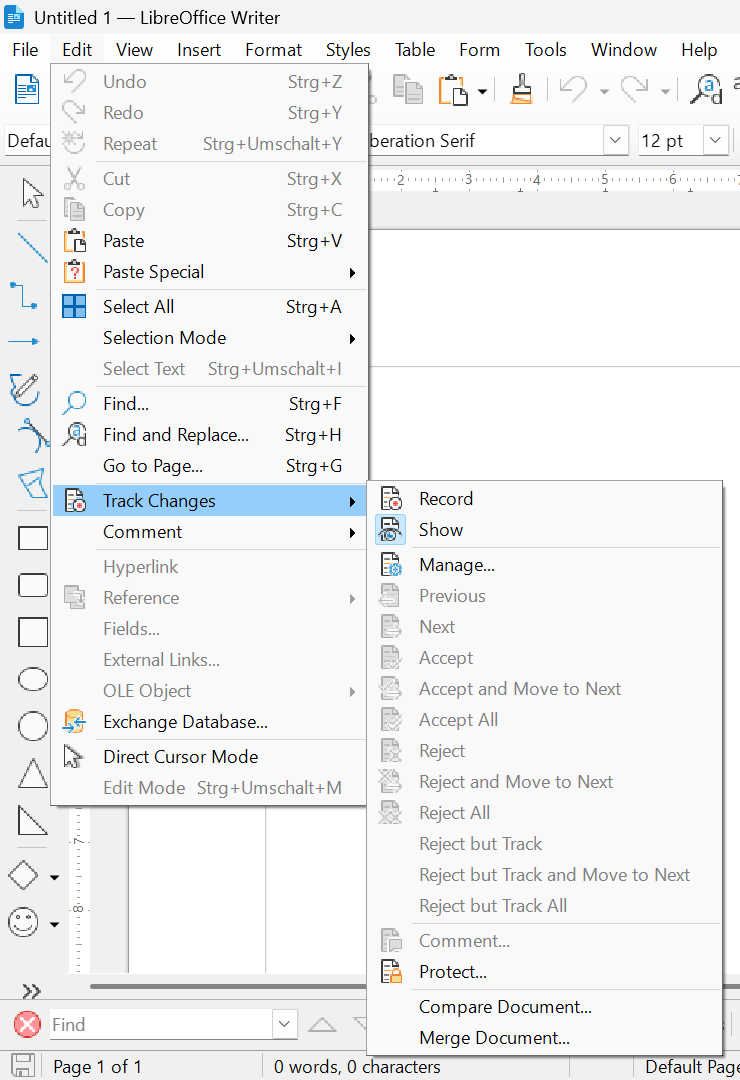
Which one?
Which LibreOffice version?


With me:
Version: 26.2.0.3 (X86_64)
Build ID: 620(Build:3)
CPU threads: 16; OS: Windows 11 X86_64 (build 26200); UI render: Skia/Raster; VCL: win
Locale: en-US (de_DE); UI: en-US
Calc: threaded

My data is in my post, no? The videos don’t matter since your own screencap shows the menu items that i don’t have. I posted something a while back, that when LO opens, I get messages that certain libraries are missing:
.
Could not find platform independent libraries
Could not find platform dependent libraries <exec_prefix>
.
Could that be part of the problem?

Version 24.8 does NOT have the problem, the two menu items are there.

I don’t no.

Most problems of this kind occur with the Linux operating system, for example because LibreOffice was not downloaded and installed from the LibreOffice website.

That’s where I got it. Looks like a bug in the latest Linux version.