Find All in Calc

Hi,

Is there a way to have Find All search in Calc return a search result list page like how Works used to create? Like to have each line found with that search term presented together in a list, as if having the results listed on its own sheet kind of thing?

Thank you very much!

Do you mean click Data > AutoFilter and select items from the list in the drop down box at the top? See below.
RandomFakeNames&AddressesFiltered.ods (17.3 KB)

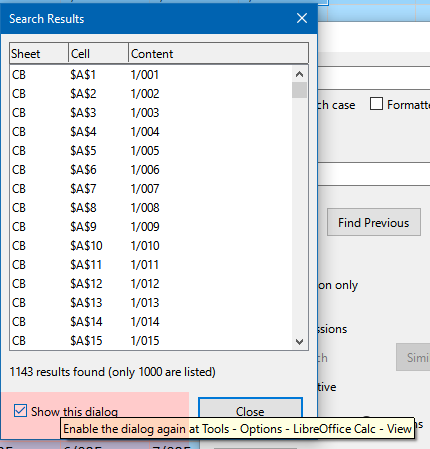
With Menu>Edit>Find & Replace [Ctrl+H], all results are displayed in a window. Clicking in one make go to the cell, while the window is still accessible.

1 Like

imagen
imagen

3 Likes

Thank you for the details.

1 Like

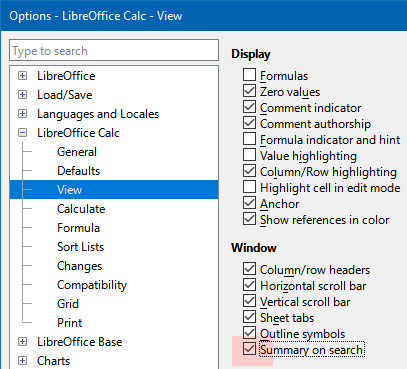
Thank you very much for this, yes, we were able to make it this far in the first pic there. So, will unchecking the Summary on search all the lines found in search, listing them in the way Works used to do as well?

Like, say one is searching a keyword to ‘find’ and it finds that keyword in column D, on several lines which have info in columns A→L - Works used to pull all those lines together and create a results list with not just column D, but all the info from A→L without all the other lines of the sheet that didn’t have the keyword in them, just ones found in the search :thinking:

Again, thank you very much!

For example, one is searching to ‘Find’ a keyword in the sheet and it finds that keyword in column D, but it’s also on several lines which each line has info in columns A→L - Works used to pull all those lines together and create a results list with not just column D, but all the info from A→L without all the other lines of the sheet that didn’t have the keyword in them, just ones found in the search :thinking:

Thank you very much for the assistance!

You could define a Standard Filter and perhaps let it write the result to a new sheet:
Define a database range for the source area. Data> Define Range
Select the range: Data > Select Range
Create a Standard Filter: Data> More Filters > Standard Filter
For each column use the query Contains and enter the keyword you are looking for in the Value field. Combine these queries with OR. When you have used the last query item, new ones will be added automatically. Thus is, you are not restricted to 3 columns.
In the Options part check option Keep filter criteria. Then you can later set the cursor into the source area and use Data> Refresh Range , if something in the source is changed.
In the Options part check option Copy result to: and enter the top-left cell of the target area.
AskFindAll.ods (10.3 KB)

2 Likes