
Footnote style changes but no 'df' indicated

So I’m trying to apply the good advice I’ve had here to avoid ‘df’ and use styles.
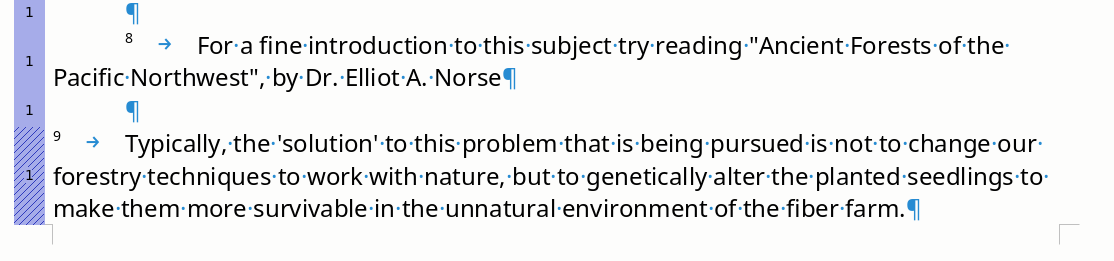
… but my footnote style is changing there with no ‘df’ showing. I’m getting a hint what’s going on cuz in ‘Paragraph Style: Default Paragraph Style’ there’s something to the effect: ‘Next Style’, so I’m thinking that there’s a ‘proper’ style change that’s not considered a ‘df’. Anyway I’d like all my footnotes to be the ‘9’ style, with no tab before the footnote number. How can I apply that to the whole doc?

A hint might be that I changed my default paragraph style to include the automatic 1/2 indentation on the first line, and it seems to thus indent the footnote number, but I’d rather it indented after the number but keep ‘normal’ paragraphs auto indented. Or is that pushing my luck?

Direct Formatting (DF) has effect on different “layers”. When it acts on “typical” paragraph parameters (mainly geometry settings), DF is reported by a hatch in the Spotlight colour bar at left of paragraph.

This is the case in the screenshot above for note 9.

You also have a pernicious DF form (which is not reported by Spotlight): vertical spacing with empty paragraphs. If you want to space apart your notes, it is much better and reliable to change the Spacing parameters in Indents & Spacing tab og Footnote built-in style. Otherwise, a page break could send the empty paragraph to next page and leave extra white space between the note separator and the first note on this page. Worse, you could see the separator with white space, alone at bottom of page if there is no other footnote.

Writer knows how to ignore spacing after at bottom of page. I recommend you distribute evenly the spacing between Before and After for a more aesthetic look.

Customise built-in Footnote paragraph style. You have no Tab before the number: it is an indent: Before text changes the left “margin” and First Line Indent sets a specific one on the first line (positive or negative).

Easy: define Before text indent for the left edge of note text; let’s say 1 cm. The number can be sent flush to the left margin with a First Line Indent of -1 cm. There is no need to create a tab stop. Where you’re in hanging indent context, the left indent behaves like a tab stop.

Hmmm, it’s not changing anything at all. Somehow not being applied no matter what I do. F11 > Footnote … there’s a tan box with a 0 in it just before ‘Footnote’ … I wonder if that’s relevant? Nothing like that in front of any other style. Yeah, nothing can be changed, so somehow it’s not biting.

Understood as far as space above … funny that is applied without any issues.

If you can’t find the DF, send your document (at least only the offending page).

Right now I’ll just kill all the df’s I can find. Back to you when that’s done. I see what you mean about empty paragraphs being very imperfect spacers.

Ok, it seems that some of the footnotes are ‘Default Paragraph Style’ and others are ‘3 Footnote’ … with the ‘3’ being in a little tan box. So the trick will be to change the former to the latter. In the main menu, neither ‘Format’ nor ‘Styles’ seems to offer a conversion to ‘3 footnote’.

I’m seeing that those little numbers are the count of the styles I’ve edited.

It comes down to how to swap one style for another.

You don’t “swap” a style for another. You apply the desired style.

For paragraph styles, put the cursor in the paragraph and either select the style from the drop-down menu in the toolbar or double-click on the style name in the side style pane.

Note this won’t remove DF.

Don’t stress yourself with the “3”: it is a number added by Spotlight to discriminate unambiguously styles which may be highlighted with similar colours. The real style name is Footnote.

Making good progress … how do I turn off the ‘df’ highlighting? It’s sure good to have it available but sometimes I’ll want it off.