
Hi,
I thought I had already posted this… || EDIT: yes, indeed. Corrected (I’ve combined the two posts here)
So, you think you can send your work from Libreoffice, I mean, Libreoffice Writer, to the print house?
You’re not wrong. You’re right, you can.
a problem (that’s no longer a problem)
Even though your book is text-only, black text-only, the print house will tell you:
your PDF has to be in CMYK color space…
and you look for this function in LO Writer, and won’t find it…
the solution:
First off, don’t be sad! You don’t need it.
Sure, the Libreoffice development team could add this functionality, as an option at exporting to PDF:
export PDF in CMYK color space, with all text being **pure black**
  (not rich black, which is a CMYK mix).
BUT regardless, at many places they’ll do this conversion for you for free.
“google” (use duckduckgo) “convert PDF RGB to CMYK”
3 websites:
a Swiss company:
https://www.pdf2cmyk.com
a Hungarian company:
https://www.presspdf.com/about?lang=de
also known as micropress.hu
Not 100% free, but the paid options are like friendly, too. Plus, if you place an order, using their online converter complex will be all free.
and the Danish company:
pdf.dk
They’ll also convert to PDF/X formats. They are great! A very friendly company.
solution 2:
We can use Ghostscript. It’s F&OS.
When we’re talking about black text and black vector graphics “only”,
the conversion to CMYK is absolutely simple. No need to add an ICC profile whatsoever.
We just need pure black: 0/0/0/100 (C/M/Y/K).
Ghostscript is also cool because with it you can add mediabox and trimbox to your document.
Here is a ghostscript code block which turns your document to CMYK, and your text to pure black.
(ONLY for illustration purposes, to prevent blind copy-pasting if you know what I mean – I do  )
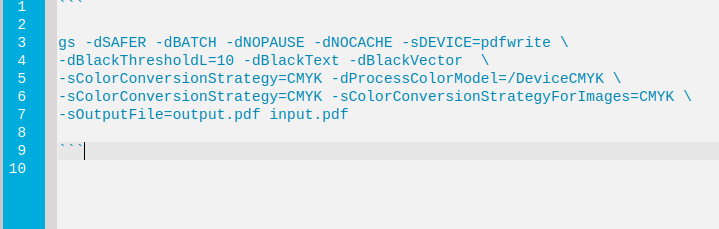
But here is a simpler ghostscript code, something to start with:
check ink coverage of your document.
gs -o - -sDEVICE=inkcov a_pdf_file.pdf
plus: work with printing in mind
When writing a book, use black letters only.
Use styles, no direct formatting (like bold, italic – these can be done using styles, too).
Enable “print text in black” (in Options / Writer / Print)
And use only vector graphics, see Inkscape.
And order a digital proof before printing a book