
How to exclude a row from totals based on a negative value

I’m at a very basic level for spreadsheet stuff and could do with some help on this one. My dad passed away a few years ago and we are currently putting his lifelong (and huge) model car collection through auction. I’m trying to keep track of the 4500 models on a spreadsheet to know what sold and for how much and what needs to go back in etc.

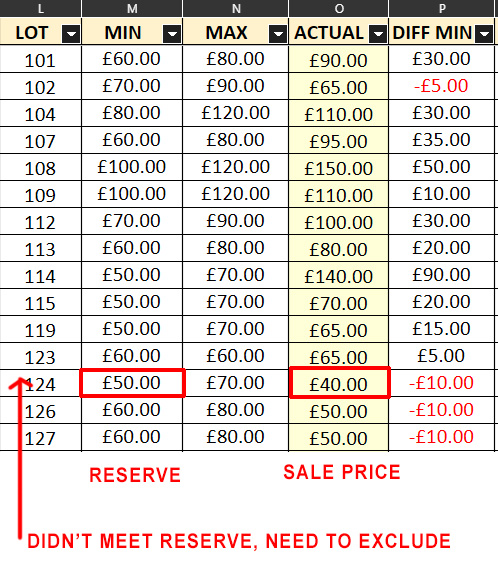
In the section of the spreadsheet below there is a lot number, the min and max valuation of the lot, the actual value reached at auction and the difference between the actual value and the minimum estimation. When the actual bid is below the minimum estimation we have an option to put it back in to another auction or take the bid obviously. I’m trying to track the total of the bids (ACTUAL column) which is straightforward but I’d like to subtract from that total every bid that missed the minimum estimate and this is my problem.

I thought I could use the difference column (DIFF MIN) to show which lot missed the minimum estimate as a negative and then use that negative to remove the corresponding lot bid (ACTUAL) from the total of that column but I’m stumped as to how to do this, can anyone offer some advice please?
If I understand correctly, you want to recursively overwrite a manually entered value using a formula?! No software can handle that!

My hope was to say - total all values in ACTUAL column but exclude any entries on a row with a negative number in the DIFF column. Surely there is a way of doing that?

000_LO-CALC_non-observance negative values_032928.ods (16.9 KB)
The function is =SUMIF().

1 Like

That looks like it might work, thanks very much!

Just a couple of points, what is the dollar sign for in the first formula? and is there any way to make it mot just greater than zero but equal to or greater than? that way if a bid just meets min estimate it’s still counted.

[Tutorial] Absolute, relative and mixed references

Replace ">0" with ">=0" in the formulae.

1 Like

The reference to cell $C11 makes column C absolute, i.e., fixed, while row 11 without the $ sign is flexible and always adapts to the current row, for example, when copied. With $C$11, you refer every reference, regardless of where or to what, to this fixed cell coordinate. With C$11, you fix the row, and column C is variable. With C11, both coordinates are variable. This variability is used when you insert or delete a row or column in between, whereby the variable reference changes automatically. With $C$11, you have to adjust it manually.

1 Like

yes, think mathematically. <0 for negative values. =0 for only NULL.

1 Like

Thank you. robleyd

That’s great, thanks very much for all your help koyotak, works perfectly!