
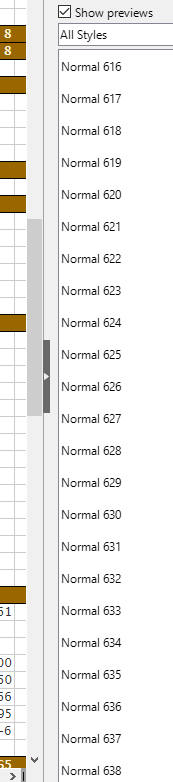
Hundreds of 'normal' styles in calc

Why do I have hundreds of ‘normal’ styles in Calc? I can’t be the only one but I can’t find a reference to the issue.

Parts of the spreadsheet were originally from Excel so I suspect that may play a part.

I haven’t done any real troubleshooting because it’s a nuisance but doesn’t impact functionality or noticeably impact performance and I wouldn’t know where to start getting a baseline then tracking when it occurs.

Update - Sorry - should have tried this before posting. I thought I’d tried deleting them before but maybe not. I’ve selected and deleted them all and will update the post if they start reappearing.
The Delete option is grayed out when the style is applied.

Thanks Leroy - I was pretty sure I’d tried deleting them before. I’m guessing they came across in an imported sheet (or as part of the import process) that I’ve since deleted.

May be so?

Sub tryToRemoveUnnecessaryStyles()
Dim oStyleFamilies As Variant
Dim oCellStyles As Variant
Dim oElementNames As Variant
Dim i As Long, sAnswer As String
	sAnswer = InputBox("Enter the part of style name and the macro will try to remove unnecessary ones", "Remove Unnecessary Styles", "Normal")
	If sAnswer = "" Then Exit Sub
	oStyleFamilies = ThisComponent.getStyleFamilies()
	oCellStyles = oStyleFamilies.getByName("CellStyles")
	oElementNames = oCellStyles.getElementNames()
	For i = LBound(oElementNames) To UBound(oElementNames)
		If InStr(oElementNames(i), sAnswer) > 0 Then
		On Error Resume Next
			oCellStyles.removeByName(oElementNames(i))
		On Error GoTo 0
		EndIf 
	Next i
End Sub

Thanks John