
Why would you deliver such rubbish Go back to 25.8 immediately and scrap this 26.2
LibreOffice installation or uninstallation does not remove user files.
Use your operating system’s file manager to find your files in their usual location
after a night and a day some how forumlas were displayed along with the blue forumla markes. I had no idea what was going on then with the help of a friend reading her phone as I knew they were markers and forumla as all my spread sheets went hash tag on me. But the hardest part was finding the stupid little switches that turned things back to normal after 4 instals a registery delete of libre mentions in the registery and also deleting the libre folder after uninstall seriously one should just be able to uninstall libre then reinstall it with typical settings even a restore to an earlier day didn’t do a thing…At 70 reading fine print while trying to make sense of terms and words that have no meaning to ma as I left school when I was 15. However I got there and fixed it and the thought crossed my mind how many other victims are out there of the forumla double switch you only need the one toggle switch in View not also in options that is just stupid. What started all this was the text box tools on the second tool bar dissappeared first
Good thing I was able to rebuild my files and spread sheets from the 5 computers I have without them I would have been cactus and my good memory helped a lot.
I’ve had 7 hours sleep in 48 hours and I’m a carer I have been for 45 years and I still don’t understand why such clever people …
… make no backups in 5 years?
.
I read your posts twice, but still didn’t understand neither your problem nor your “solution”.
1 Like
Maybe Tools > Detective > Remove all traces?
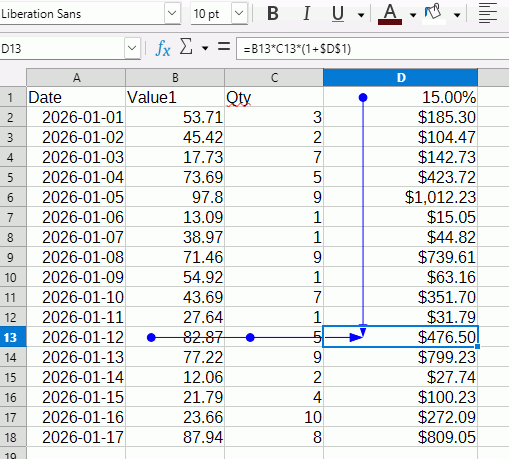
Before uninstalling and editing registry you could:
- Look up in a manual, English documentation | LibreOffice Documentation - LibreOffice User Guides
- Look in Help
- Describe the problem here, not the effect on you nor how you are feeling, but describe the problem you have encountered. Maybe provide a sample document or sometimes a screenshot. The only clue you have provided apart from the tag Calc is the quote at the beginning of this comment.
2 Likes
That would be ideal but I have long vision and require reading glasses so the text most used is what my computers ares adjusted and for some reason since smart phone have been used the finer print in apps and menus and instructions the print is too small compounding this I had a stroke 25 years ago while doing databases in it 2. which effected my ability to read and place it in my memory properly and I was already predisposed to learning by hearing. Getting struck by lightening in 2016 also didn’t help. I have just never seen such a complexed program since CorelDraw. I guess the switch to forumlas is a good way to hide your figures but I honestly couldn’t find my way back there there are so many options to take to find that switch its like a winning lottery ticket combination of numbers. That is why it would be brilliant if you couldn’t find a switch you could just reinstall if the switch also reset on an install as exiting spreadsheets are already set. I used to use apachie but NDIS changed acceptable extensions for files and apachie aren’t acceptable. While I could do spread sheets then save in Libre, I wouldn’t be learning how to use Libre so I have to stick with it to learn it and it’s so much harder than Gizzmo’s and Gadgets. It was like change engine and gearbox and wheels etc Libre is like finding every single part in the car. I’m getting to like Libre I didn’t at first this was a good learning session about Libre and my manners when I get flusted. Thank you for your patience with me. Also when I read stuff and turn the page it’s instantly lost and if I read complex letters like legal or medical with big words I get headaches and my brain goes foggy. Hence why I asked my friend to read for me She doesn’t know this as I don’t like telling people but in this case I was rude and had bad manners.
Yes I had backups heaps but every time I used one it would go immediately like the spreadsheet before it did I actually had to isolate this notebook until the problem was solved. once you realise many people made Libre you realise the links in the menus aren’t designed by one person . The website I built the links are all in the specific way my mind works these links are made by many and there for descriptions of switches vary as do their location and I’m starting to realise its a very complexed program. I think I’ll get an exercise book to write down the combination of links to switches.(tick boxes)
Switching from displaying calculated values to displaying the underlying formula - menu View | Show Formulas - will toggle formula display for the current spreadsheet only. Shortcut key is Ctrl+` (backtick, below the tilde on a keyboard you are likely to use in a country that has NDIS).
Going to Tools | Options | LibreOffice Calc | View and checking Formulas under the Display section will force formula display on ALL spreadsheets.
I have an asus notebook Ctrl + equals the asus menu information on my notebook.
Thank you for that instructional directory I have started a link location file.