I build a lot of DIY projects for my motorcycle. I use Inkscape as a graphic design program. In Inkscape, I create the images for the parts I’m going to build, then I export these images as a .png file. I then insert the .png files into a writer document, and cut the images out to use as templates for cutting the parts out. I’ve been using this method for years with great success.
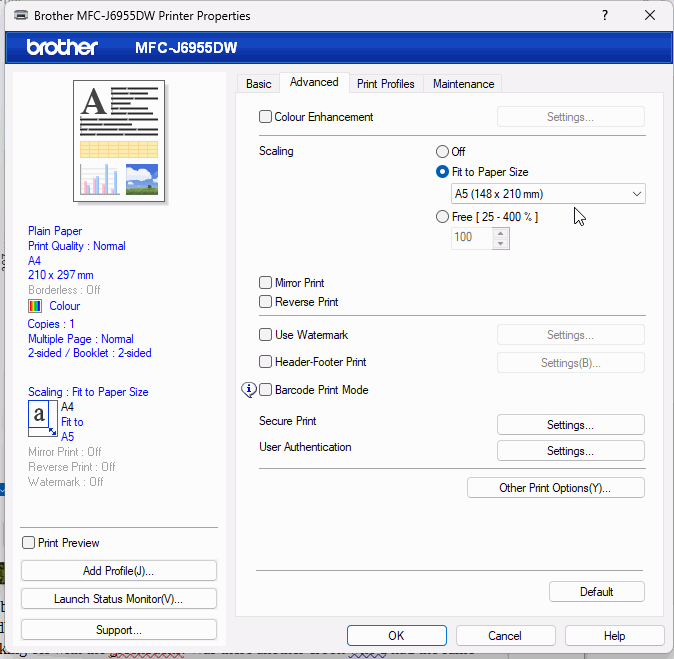
However, today when I tried it, I found that the images inserted into the writer document were not printing at their correct size. Inkscape will tell me how large the image is, and when I export it as a .png into a writer document, and I check the properties tab for that inserted image, the sizes between the image in Inkscape and the image in the writer document is consistent. However, when I print that document, the image is not the correct size; it is consistently undersized, even though the properties for the inserted image in the document tells me that the image size matches the image size from Inkscape. This ruins their use as a template.
I tried this method both on my HP laptop running Windows 11, and on an older Dell laptop running Windows 10. The undersized image occurs on both computers. However, when using an Apple computer with Libreoffice installed, the image will print at the correct size when I insert the image into a writer document.
The same printer, a Brother MFC-J1010DW, was used with all three computers.
I have no idea why this is happening now, as it has never happened in all the years I’ve been doing this. Can anyone offer any ideas about how to fix this issue?