
Hi,
When I type in Writer, normal text, the Navigator which is on the right side-bar, jumps up and down between headings. To be clear, I’m not clicking on headings in the Navigator or changing headings in the main text, I’m simply typing and while I’m typing the Navigator repositions the heading up and down as if it has a life on its own.
Anybody any idea what causes this and how to fix it?
I’m working on a long text 450 pages 13MB.
1 Like
As you type, the first heading goes down below the second heading?
The Navigator or the selection of headings?
The headings stay in order, but the whole list moves up and down on the screen as if I’m scrolling through them, which I’m not, as I’m typing text.
Actually, it’s the navigator in the sidebar that does this. I’ve tried the navigator in a window, and it doesn’t has this behavior. I now put the navigator above the sidebar, because that’s how I’m used to working on my text. And it works fine.
No idea why the navigator in the sidebar does this, but not the navigator in a separate window.
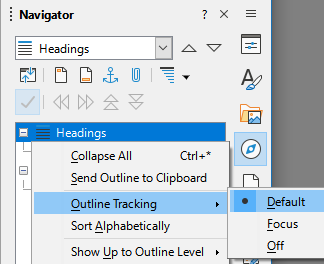
Set the Headings - Outline Tracking to Default.
Hi LeroyG,
Thanks, I’ll give it a try, seems to be fixed at the moment.