
possible bug: sometimes can't type in writer (except space bar)

Hi, I have this problem and I assume it’s a bug:

When opening an .odt file (didn’t test other formats) all my key strokes don’t do anything except for space, which works. This only happens sometimes, even with one and the same document. It’'s not a user permission problem, I checked.

The issue seems to need a shor moment to ‘activate’, meaning I can type immediately after opening the document, but then after a second or so I can’t any more.

Issue seems to fix itself if I just leave the document open for a minute, but more testing needed.

Version: 26.2.6.3 (X86_64)
Build ID: 620(Build:3)
CPU threads: 16; OS: Linux 7.0; UI render: default; VCL: kf6 (cairo+wayland)
Locale: de-DE (de_DE.UTF-8); UI: de-DE
Ubuntu package version: 4:26.2.6.3-0ubuntu0.26.04.2
Calc: threaded
It is possible that the file is very large or not well-structured.
In such cases, LibreOffice may struggle with page numbering.
Check the bottom line—the status bar—to see the progress.
How large is your file?
Does it contain a great many images, or perhaps very large ones?
How do you apply formatting—directly or by using styles?
In what file format are you saving it?
Does the problem also occur with a new, empty file?


You might consider uploading your file here so that someone else can take a look and examine it.

thanks for your answer. I just had the problem with a file containing nothing but a few web links, so it’s definitely not a problem with too large a file. This time I couldn’t do space bar, either, but removing characters worked. I don’t know yet if it can also happen with empty files, I’ll try to test it. I’ll do a bit more experimenting in general and upload a file once that’s done.

Hi, so here is a file that has the error.
test2.odt (8.8 KB)

This file had some text in it which I since deleted and the error is still there. So far I was unable to replicate the error with a completely new file that I never typed into. It seems what fixes the error is not actually waiting, but doing a right click. Left clicking into the document doesn’t fix it but apparently as soon as I right click and then close the right click menu with a left click again, typing suddenly works. So I assume this must be related to wayland or something.

No problem with you “empty” file. Here: LO 26.8.3.1, Fedora 45 (Linux 7.3.4) with KDE Plasma desktop (hence VCL kf6). Differences: LO version and distro family.

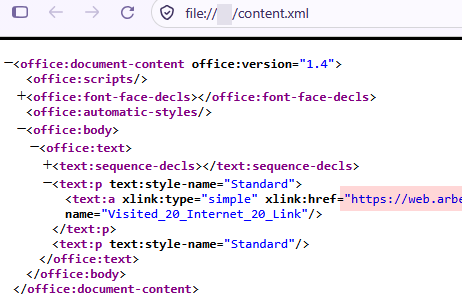
In the content.xml subfile there is a link. I’ll ask something maybe stupid: Could it be that Writer tries to open it in an hidden dialog?
image

1 Like

ah that is one of the links I had in the text of the file before I deleted it. Now I’ll have to test if the bug only affects files that contain or contained links.