
Problem with endnote text flow in PDF export

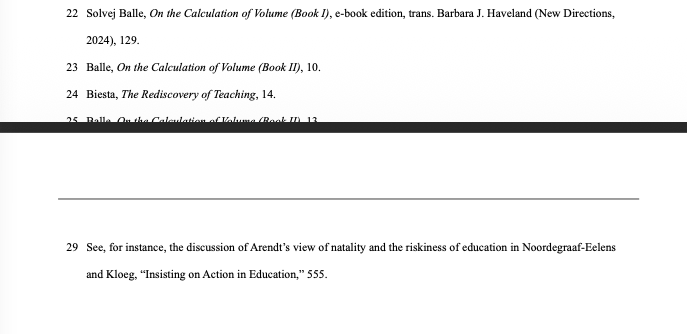
I am having a problem with text flow in endnotes…as you can see in the image, endnotes are not breaking at the end of a page. at some point, they do break–you can see that endnote 25 is partially cut off, and then 26-28 presumably are invisible, beyond the bottom of the page… but then for some reason endnote 29 appears in full at the top of the next page. I compared the Text Flow settings in the style editor with the Body Text style–they are the same, and Body Text breaks across pages without problems.

the attached image is from a PDF export, but the problem is identical in Normal view within Libre Writer itself. ideas about how to fix this?
image

Please attach a sample file(s), reduce the size as much as possible without private information, and paste in the answer the information in Menu/Help/About LibreOffice, there is a copy icon.

Please paste here the information on Menu/Help/About LibreOffice (There is an icon to copy)

I restarted the program and reopened the file and the problem was fixed. I have no idea why. For what it’s worth, here is the program version/OS info. Thanks for your reply.

Version: 25.8.4.2 (AARCH64)
Build ID: 290daaa01b999472f0c7a3890eb6a550fd74c6df
CPU threads: 10; OS: macOS 26.2; UI render: Skia/Metal; VCL: osx
Locale: en-US (en_US.UTF-8); UI: en-US
Calc: threaded