Recover password Calc sheet xlxs

I am using Ubuntu 24.04.3 LTS and Libreoffice 25.8.

I have a Calc sheet, xlxs format. I recently changed the password to a new one. For the life of me, I can’t remember it. I thought I wrote down the “new password”, but no dice. The only thing I can think of is that I must have fat-fingered it when I entering the new password.

Thanks,
Rich Ramik

This is kind of a report. (What’s "xlxs" / Is your 'sheet' actually a single sheet or the complete document?)
= =
What’s the question?

  • “Can LibO correctly encrypt and later decript spreadsheet files as .xlsx?” ?
  • “Can a forgotten encryption ‘password’ be recovered?” ?
  • “Is there support for checking lots of possible passwords?” ?
  • ???

Please realize that I personally can’t answer any question concerning xlsx-files.

Lupp:

Thanks for responding to the question. Actually the question should have been:

  • Can a forgotten encryption ‘password’ be recovered?

However, after reading your response I realized that is not what I really wanted to ask.

At this point I just want to DELETE the password. Would appreciate any information you could provide on how I could accomplish this.

Thanks,
Rich Ramik

Once again:

The file saved with a password is actually encrypted.
You can’t just “remove the password”, because encryption would otherwise be useless.
If just single sheets are protected with a password, I could remove such a protection from the sheet editing the unencrypted .ods file, at least I did it in a few cases many years ago. Somebody may also know how to do so with Excel files. I don’t.

Hi @richramik1, when the file is from LibreOffice, there’s a password to open the file, and I don’t know of any alternative to remove the password. However, if it’s a spreadsheet file, it’s possible by editing the internal content.xml file.

See also: FAQ.

Sounds very interesting. What is the location of the “content.xml”???

It is part of the Calc file. Quoting Wikipedia:

The OpenDocument format supports the following two ways of document representation:

  • As a collection of several sub-documents within a package, each of which stores part of the complete document. This is the common representation of OpenDocument documents. It uses filename extensions such as .odt, .ott, .ods, .odp … etc. The package is a standard ZIP file with different filename extensions and with a defined structure of sub-documents. Each sub-document within a package has a different document root and stores a particular aspect of the XML document. All types of documents (e.g. text and spreadsheet documents) use the same set of document and sub-document definitions.

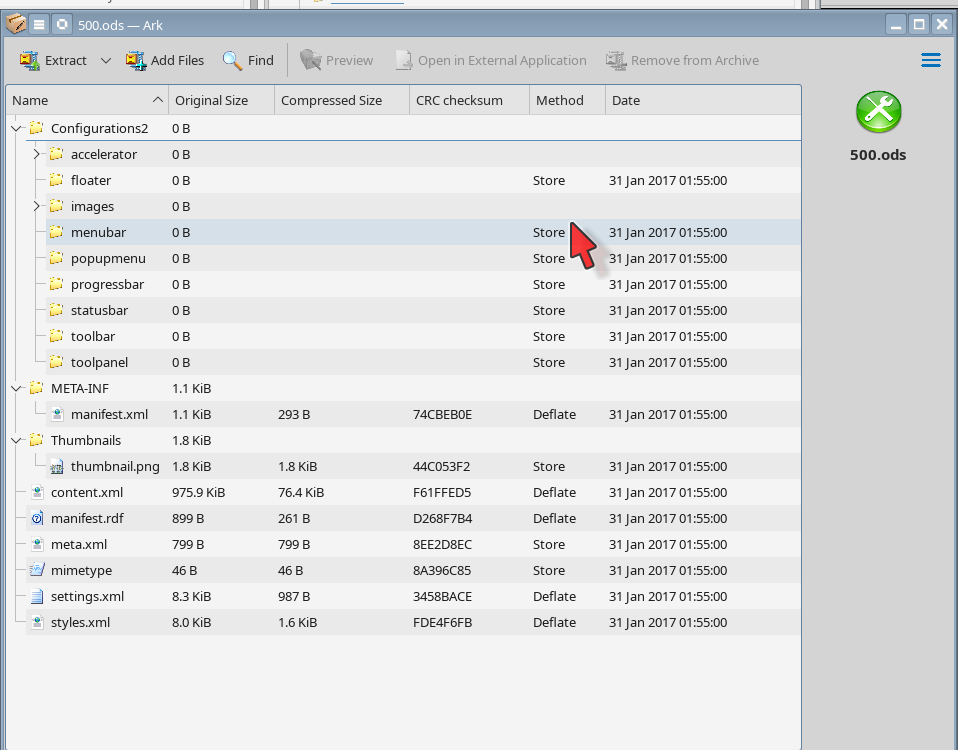
If I extract a spreadsheet file I see this:

You may need to rename (a copy of) your file as .zip to allow whatever archive program you use to open the file.

xlsx will have a vaguely similar format; I don’t have an Excel file to look at.

Note that as mentioned above, if the file has been password protected, it is also encrypted and opening as an archive is not possible.