
Since quite recently I have the problem, that text import (CSV import or Paste command with the according dialogue) doesn’t work properly any more.
When I select any delimiter but tab, comma and semicolon, this is not honoured, and the content is imported uninterrupted line by line in one cell in each line.
I’m on Windows 11 pro, LO 25.8.4.2, German locale.
Since I couldn’t find any bug filed concerning this, I suppose it’s a usage problem. But I don’t have the slightest idea.
Best regards
Joachim
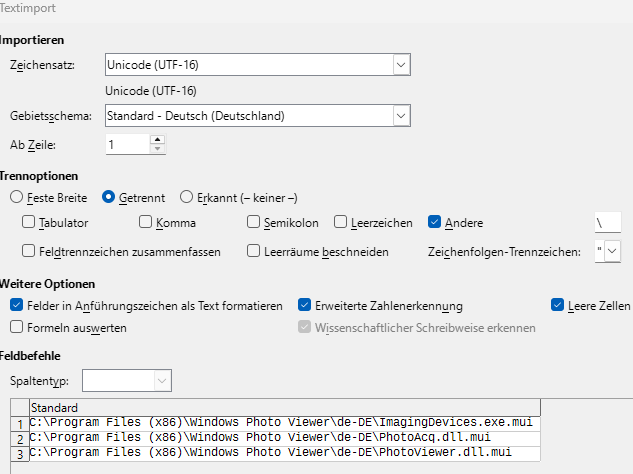
The last five options don’t have any influence.
Please post some (first) lines of your csv and a screenshot of your setting, when you do the import. Otherwise don’t expect any useful answers.
Works for me, once the “automatic” option is off.
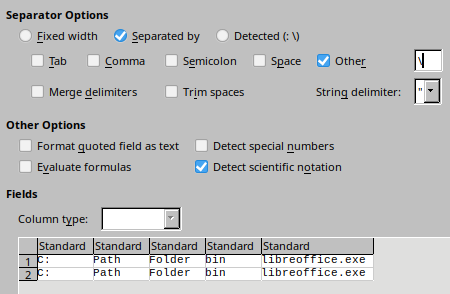
On your machine, it would even detect the backslash by itself! I wonder, what’s wrong on mine.
Maybe nothing. Could you de-select “Felder in Anführungszeichen …”
Work-around: Import as one column and then menu:Data>“Text to columns…” (Text in Spalten)
That’s what I meant with “The last five options don’t have any influence”. This and the four other options under “Other options” don’t change anything about this problem.
BUT:
You made me try to change the String delimiter from " to ’ - and now it works!
So the problem was, that the whole lines of my text input were enclosed in double quotes and the delimiters are not used inside strings.
I wonder, if this behaviour has changed.
This would actually also have worked. Because the import would have stripped the lines of their double quotes. (See answer above)
IMHO nothing changed here, but maybe compare your datasources. Path-Information is sometimes only quoted, if you have a space inside the path or filename.
And this is why we always recommend
I tested with
C:\Path\Folder\bin\libreoffice.exe
whereas your data look like
"C:\Path\Folder\bin\libreoffice.exe"
1 Like