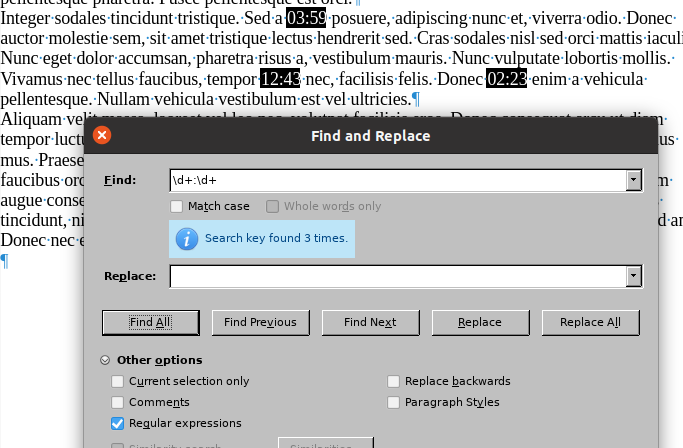
I want to find digits like 0:56 or 6:56 in Libre Writer. I assume I need to use wild cards in Find and Replace. I have searched the web to no avail, can anyone help
Thanks
Version: 7.6.5.2 (X86_64) / LibreOffice Community
Build ID: 38d5f62f85355c192ef5f1dd47c5c0c0c6d6598b
CPU threads: 12; OS: Mac OS X 15.2; UI render: Skia/Metal; VCL: osx
Locale: en-GB (en_GB.UTF-8); UI: en-US
Calc: threaded
Hi tried both of those solutions neither worked it just says ‘search key not found’.
I’m very surprised there isn’t a simple way of achieving this [as there is in Word]. Unfortunately I can’t run Word on my Mac
Thanks for your time
Correct reading is: search operates either on whole document or current selection. But, most important, regexp hit can’t span paragraphs. The expression can only target contents of a paragraph (there is no descriptor for the paragraph mark itself; ^ and $ are locations – not data – respectively at start and end of a paragraph). The range of a regexp is strictly internal to a paragraph, consequently something like $^ which tries to delimit a paragraph break will always fail.
It follows that the replace part will also be pasted inside a paragraph.
There is an exception: ^$ allows to hit on empty paragraphs, including the paragraph mark. It is used to eliminate empty paragraphs which should not occur in any document because they bear no information (and they cause failures in formatting/layout during editing sessions when they are reflown unexpectedly).
Tip: Regexp searches will only find matches that are contained with a paragraph. They will not find matches that span across paragraphs. For example a match consisting of the last word of a paragraph and the first word of the next paragraph would not be found regardless of how the regexp is constructed.