
What are grey Ⅰ characters in Writer?

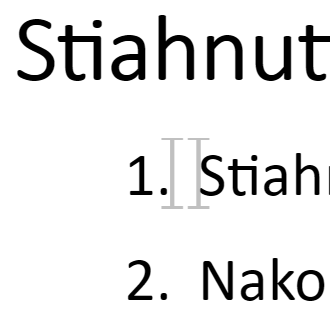
When I paste text from Google Documents into LibreOffice Writer it contains grey Ⅰ characters. These usually occur at the beginning of headings and could not be selected or removed by deleting the text around them. Unchecking View > Field Shadings hides them.

What are they and how could they be completely removed from the document?
Advice to paste unformatted text won’t help me, I want the text formatting but without these characters.
They are not non-breaking spaces.
LibreOffice Writer

That are likely “Bookmarks”. You can see them in category “Bookmarks” in the Navigator in the sidebar.

Those are formatting marks which don’t print nor export to pdf; they are there to assist the writer of the document know what is there. If you remove them, then you remove the cross reference relating to it.
.
I like to see where the references are but if you don’t want to see them, then click Tools > Options > LibreOffice Writer > Formatting Aids and under Display Formatting, untick Bookmarks and OK.