
I love you guys more than paying for Zuckerberg’s New Yacht and Private Island, BUT the Anarchy stream has become a bit much and counter productive. Please spend some time developing Style Sheets which conform to commonly used APA, Chicago, and Turabian style manuals that the rest of the existing world HAS to conform to. I have now spent DAYS trying to turn off the Auto This and Correct That technology that is not helpful when attempting to conform to the rules of English that are forced upon students like my husband trying to write in APA style. Take it one step deeper and incorporate an LLM/AI that will save time cutting and pasting from Deepseek, ChatGPT, or Gemini into LibreOffice.
There no “Style Sheets” in LO Writer. There are templates which contain styles and initial contents upon which you can base a document.
APA, Chicago and Turabian are only some of the “personalities” for documents. There are many many others.
Of course, it would be nice to have all those formatting conventions already at hand. But, this calls for a methodology to use them. Are you driving your Writer documents with styles without any direct (or manual) formatting? Are you following the Writer philosophy?
If the answer is no, you could have all the formatting templates you want, you’ll still endure pain to achieve the aesthetic requirements.
You’re welcome to try and implement a template and make it available to the community.
PS: personally, I don't enable the "Auto This and Correct That" because they are provided as a quick'n'dirty courtesy feature for common day-to-day tasks and, IMHO, are not fit for sophisticated jobs like APA. Also I have my own preferences. The key issue here is to adhere to the style philosophy which removes many of the needs for auto-this-and-that.
PPS: contributors on this site are mainly users like you, not developers.
PPPS: I had a quick search on the internet and it appears neither APA, Chicago nor Turabian are freely available. I have no idea if some compliant template can be developed without copyright issues.
I downloaded this template and analysed it. It is quite amateurish and exhibits many flaws, probably due to insufficient understanding of all Writer features and lack of clear styling philosophy. The consequence is the forced necessity of direct formatting here and there.
Table concept is not mastered. Captioning should be reviewed. Lists are a real mess and there is an excessive number of list styles (once again because the feature is not mastered). Inline “headings” don’t behave like headings. Frame styles are not used (resulting in direct formatting). A single page style is used across the whole document while it is customary to layout differently the cover page and front material than the topic pages (but I don’t know what APA says). Many “structural” page breaks are manual, which shows that the paragraph style organisation is not thoroughly thought over. Text flow properties are neglected in several areas when they would avoid undesired splits.
There are other templates to search for.
I don’t understand this plea.Which “features” do you want to disable? Writer does not impose constraints on authors. You can use whatever “style” you need.
The “autos” I can think of are
-
AutoCorrect (see
Tools>AutoCorrect>AutoCorrect Optionsto disable) - AutoText (needs pressing F3 to activate; so, don’t press)
- table “styles” (very badly implemented; a real nightmare; don’t use them)
Then a “style” is implemented through Writer styles (paragraph, character, page, list and frame). The degree of automation is yours; can ranged from none to very sophisticated.
The best way to format a document is adopting “semantic” styling with separation of contents (or significance) from appearance. The document should only contain the narrative with semantic markup (styling). All formatting directives are encoded in the styles which are collected in a template document.
You select the template to use before creating your document. The document remains associated with the template during all its life. With the help of TemplateChanger extension, you can however switch from one template to another one and, provided your document is strictly and fully styled --and-- style names are the same in the templates, your document magically adopt the personality of the new template.
I don’t see why current Writer does not allow what you are looking for. The only missing bits are reliable professional templates for the various styles. Unfortunately, access to the specifications requires a subscription fee and implementation of a template probably requires careful study of intellectual property rights.
Is your text consistently styled? Writer is based on styles. And when you require compliance with presentation rules, styling becomes mandatory. Otherwise you meet the kind of problems you experience.
Contrary to what you state, Writer has much more control on layout and formatting than M$ Word because the latter lacks many style categories, namely character, page and list.
My best recommendation is: start reading the Writer Guide for an initiation on how to drive Writer and continue with excellent Bruce Byfield’s Designing with LO (available from the same link after pressing “More” and scrolling a bit) which explains all the benefits you can draw from styles.
1 Like
One option:
- Is your text a single huge paragraph, with line breaks instead of separate paragraphs?
Another option:
- Are your paragraph styles autoupdating?
1 Like
That is good.
I’m not sure what this means. It’s not enough to clear the direct formatting or MS inherited formatting. If the source was a MS document, you will only be safe if you paste as unformatted text in a new document.
- Open the
Stylessidebar (F11). - Secondary click on Default Paragraph Style
- Choose
Edit Style - In the General tab, unmark [ ] Automatic update from document
- OK.
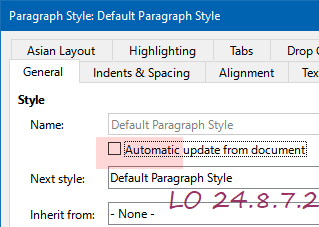
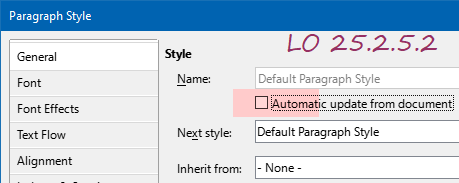
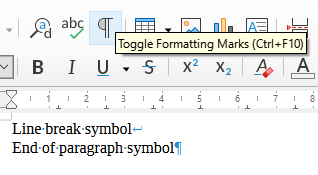
That is what you see after Step 1. Now go to Step 2 (right click on Default Paragraph Style), etc.
The problem is that a large manual cannot be reduced to to a simple template. As an exercise I started to create a template with some of the simple rules for students. I got as far as some paragraph styles.
Firstly, Default Paragraph Style is not used for text; it is there to set common attributes that are inherited by its child styles. Any setting of an attribute in a child style cuts inheritance and it cannot be restored except by Reset to Parent which resets the entire tab to transparent, that is use settings from its parent.
In this case, I left Font at Liberation Serif, 12 pt and I set the line spacing to Double.
Body Text (Ctrl+0) is intended for the main body of the work and follows every Heading n style. I left the Font untouched, the Indents and spacing tab was reset to parent.
Heading paragraph style is not used in documents, it is there for global changes to Headings. As it seems the font and font size remain the same throughout the document regardless of purpose, I reset to parent for the Font tab. Note that if you want a different font face for headings then set it here.
Heading 1 - 5 (maximum number of heading levels) for the Font tab and the Indents and spacing tab I reset to parent. I made changes only to comply with what I read here, https://apastyle.apa.org/style-grammar-guidelines/paper-format/headings . Note how Heading 4 and Heading 5 are created, type the text of your heading (with a full stop at the end to comply with the specs) add a space and start writing the body of your paragraph. After a few words, select the text for your heading and press Ctrl+4 to apply an inline level 4 heading, or Ctrl+5 for a level 5.
There is a lot of work yet to do for this to be a proper template but I suppose that is part of the learning process.
APAv7TemplateEA.odt (12.9 KB)
1 Like
That is the part that also annoys me whenever I set up a new install of an office suite. Autocorrupt, we can do without.
Please note that sarcasm is not productive. Neither is it conducive to actually acquiring help around here. It may make you feel better, “in power” as it were, but I advise against overuse.
Note also that document templates (which is the common name for what I assume you are refferring to as “style sheets”) and applications are two separate elements. LibreOffice development tends to focus on the tool, not on the desired outcome.
An aside
A provider of hammers may also make a selection of furniture you can assemble with it, or building instructions and materials for DIY.
- IKEA provides ready materials. Just piece them together.
- Your local lumber/woodworking outlet might provide DIY plans in order to sell more of their raw material.
- Your local hardware store probably doesn’t.
That said, your local hardware store probably went out of business a decade or so ago, and the skilled people there may now be self employed - think FOSS.
Another aside
Microsoft is not Meta. You may be contributing to someone’s yachting experience if you subscribe to M365, but I do not believe that this someone is Zuckerberg.
Back into focus
When your document needs to conform to certain standards, the best people to create templates for that are the people who built the standards. If they will not do it, you have to do it yourself based on their “blueprint”.
You appear to state here that the AutoThisandThat is so badly unconfigurable/unstable in LibreOffice that you need to go back to Word. My experience is exactly the opposite. When I have turned something off in LibreOffice, it stays off. In M365 apps, autocorrupt respawns at will (its own will, not mine). This may be due to the fact that I use M365 only at work, and here the powers that be (aka. ICT management, above my level) may have implemented enterprise wide policies for this to happen. IDK, but that is how it appears.
Also, the Microsoft approach to text styles, a kind of hybrid character/paragraph style, is in some cases easier to come to terms with than the LO counterparts. Those “hard walls” between character, paragraph, list, page and frame styles are sometimes inhibiting, but when you get used to them, I find that the rigidity helps to think of your document in a more structured way. That is of course a personal view. (I am not talking about the mess known as “table styles” here.)
Big problems will arise when you start using styles properly, and switch between different applications having different approaches to the whole matter of document styling.
- In most cases you can skip a bit back and forth between LibreOffice and OpenOffice, because they are based on the same paradigm (albeit using different generations of the ODF standard for their file formats ; I have yet to see significant problems arising from this).
- If you go back and forth between Microsoft and Libre-/Openoffice contexts, you have a mess. You often don’t know about the mess before it is too late. It will be a mess. The instant you have a document with more than one page, and transitions from MS to LO or vice versa, you have a mess.
Bottom line: If you have an important task to solve and time is tight, use the tool which you are comfortable with (MS Word in your case at the moment, apparently). When you have the time, create the templates you need in a more structure oriented tool (LO) and base future documents on those. Explore the possibilities of styles. It takes time, but if you write a bit it will be worth it.
2 Likes
Thank you for your support! Sad that these conversations would lead to that end. Financially you have certainly already contributed more than anyone would expect.
Your recent experience here notwithstanding, both the software suite and available support for LO are generally good. Not perfect, but in many ways better than what the market leader supplies.
The selection of ready made templates may be the area where it is most significantly lacking. Compared to that, Microsoft does bundle a large selection of ready-to-use templates with their suite, but I find that they are more geared towards visual impact, rather than formalized design guidelines.
I am not one of the gearheads you initially addressed, but still feel that I know my way around the applications and the style interface/paradigm of LO. Given time, I may look into the document centered issues you are highlighting. You have caught my interest there. Templates are forming in my head. Whether they be achievable, IDK. Time may show.
The application centered issues (with automated “interventions” reactivating, and that other default settings may be more desirable) are for the proper gearheads to address.
1 Like
Please delete my account.