Writer: Duplicate a page from a downloaded template

Hi all, I have downloaded a template for address labels, however the .docx only provides a single page (see attached file). I want to duplicate this page several times, however I can’t figure out how.

Clicking the final cell and inserting a page break does nothing. I also can’t select multiple cells at a time to try and copy-paste (this also means I can’t format the text of multiple cells at a time which is its own problem). How do I do what I want to do? Thanks in advance.

A4-21.docx (32.2 KB)

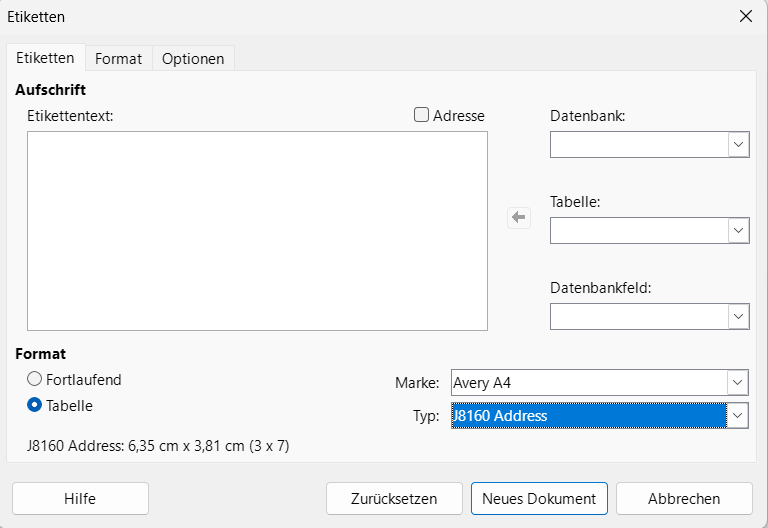
What labels are they for? Did you try File > New > Labels > Labels and enter the brand (paying attention to different Avery regional differences) and Type?
In the Options tab you probably want to tick the box Synchronise contents

Not sure what you mean by your first question. They’re address labels to attach to envelopes. Also they’re not Avery-brand, they’re these TownStix ones. Maybe an Avery template will line up, but maybe not. Is there not a way to duplicate the page in the file I had attached?

Avery A4, J8560 Clear Address appear to be the same size.

2 Likes

@majhi

1 Like

Normally you are doing a single address on many labels such as for a return address, in which case you can print single sided and choose Pages 1,1,1,1 for 4 pages

Or you are doing different addresses on each label with the addresses coming from a spreadsheet or a database.
For the latter, you probably want to look at the pages for mail merge in the Writer Guide, download from English documentation | LibreOffice Documentation - LibreOffice User Guides or, for French, FR/Documentation/Publications - The Document Foundation Wiki

1 Like

Each cell will have a different address which is why I need to create multiple pages in a single document. Avery A4 J8560 does appear to be the right size as you mentioned, however I’m still running into the issue where I can’t select all the cells and paste them on the next page.

For mail merge, you don’t copy and paste, you add fields to one label and then synchronise the labels so all three labels have the same field. To print, use the mail merge print.

If your addresses are on a spreadsheet, then you’ll need to register that as a database.

It might sound daunting but it works very well and takes less time than copying and pasting many addresses.

All I’m trying to do is duplicate the same blank label template on multiple pages in the same document. That’s my ultimate goal here.

Most addresses are handwritten in a notebook so I’ll need to type them manually anyway. As such, a database wouldn’t be the most practical solution.

Then you can simply write your envelopes by hand and don’t need to buy any labels.

1 Like

A4-21.docx is probably the worst-designed document I ever saw: It combines frames with single-cell tables and drawing objects.

From Writer point of view, you’ll meet tons of problems. The document (which is not a template in Writer technical context, but simply an “ordinary” document) has been converted from DOCX to LO internal format. Specific DOCX features have been approximated" resulting in the mess.

It is nearly impossible to select and copy page contents. When you succeed, if you paste in a paragraph below the empty one, everything overlays the existing cells (because all frames have attribute Allow overlap)… When you finally happen to insert a page break and paste on the second page, I am not certain that the frames and tables are correctly aligned because the empty supporting paragraph seems to bleed into the top margin. This “supporting” paragraph is important because all objects are anchored to it and frames/shapes are positioned with manual coordinates.

Trash this document or process it with M$ Word. Make your own (there is practically no added-value in A4-21.docx). @EarnestAl already made a wise suggestion: use the Labels feature, at least to generate a skeleton page you can fill-in manually afterwards if you don’t want to copy your address book into a Calc spreadsheet.

Okay thanks, that’s a very clear explanation. Much appreciated!

I found the solution in the meantime: 4 different files combined into one PDF. Not the ideal solution, but it works fine and better than making my own template or database