Access2Base - to open a Report

Hi.
First time trying Access2Base Library…
 
In biblio.odb I made a “Report2” that works fine.
Via Button in a Form I’m trying to open it (next step will be filter via ListBox parameter).

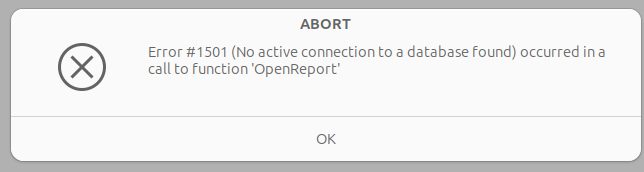
  • DoCmd results in Error
    Access2Base_Error
  • Via “standard” LO’s Basic way it opens up :ok:
Option Explicit
Sub OpenReport2(Evt As Object)
    GlobalScope.BasicLibraries.loadLibrary("Access2Base")
    GlobalScope.BasicLibraries.loadLibrary("MRILib")
    Dim Rpt As Object
    On Error GoTo Erro
    DoCmd.OpenReport("Report2")
    'ThisDatabaseDocument.ReportDocuments.getByName("Report2").open
    'MRI Rpt
    Exit Sub
    Erro: MsgBox "ERRO " & Err & Chr(10) & "na linha " & Erl
End Sub

What I’m missing?
I guess it may be because of the Event Source: DoCmd does not identify the Form and it’s connection :thinking:
But anyway: how to implement it?
For DoCmd one must set up an explicit connection in the script?
Thanks in advance.

Without Access2Base:
BiblioForm.odt (11.0 KB)

The button belongs to a form connected to the “biblio” table.
The name of the report to be opened is stored in the push button’s property “Additional info”.
I added a report “Report1” to my “Bibliography” database.

Yes, thanks. It will be very useful to me, as was that example to open a Form from another via 2 Writer docs – without Base interface.
 
But my goal here is to learn about Access2Base – as I never did it before.
I have used Access some years ago and still have it in 365 on our W-11 machines.
Next step = filter via ListBox: user selects Title and Report opens up showing just that book data.
Like in a Form, but in a Report of course.
 
Trivia
This occurred to me while drafting the Report and adjusting the rows in @cpb’s SQL grouping algorithm in Base Reports: How keep Report Header from forcing new page for detail
 
Edit
Wow! Report is the one that shows the Bug :grimacing:

All you need to change is Report1 to Report2 in the button properties (my mistake).
Then my sample form opens the report although the form is not embedded in the Base document.
The Base document is loaded invisibly and opens its own database connection before loading the report.
In case of embedded forms, just call Open_Report_Button with 3 arguments odb-document, (hierarchical) report name and True (indicating a report rather than form).

Yes, Report2 opens up fine of course. These free floating Writer Forms are absolutely new and alien to me.
After completing the filter via DoCmd, will try to parametrize yours also via ListBox:

  • bound = Identifier (of course)
  • visible = Title

@Villeroy:
Thank you very much for the instructions. These free floating Forms are an amazing resource.
To filter the Report via Access2Base DoCmd failed :frowning_face:
Tried all combinations I could imagine for the 4th parameter (WHERE) to no avail.
But was able to insert a ListBox in your Form, alter the Query1 to set the parameter and run the Report. It was straightforward.
 
Thank you again.

You can build them on Calc sheets as well.

There seems to be a statement missing like:

Application.OpenConnection(ThisDatabaseDocument)

to make that DoCmd knows what is the CurrentDb().