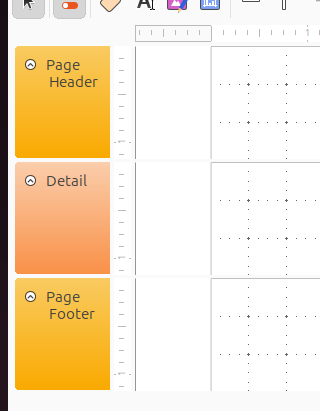
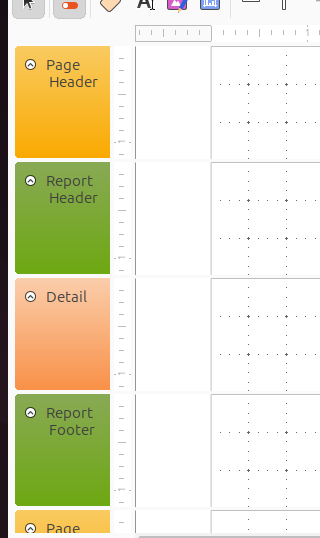
Base Reports: How keep Report Header from forcing new page for detail

I want a report with a header that prints only once, no matter how many pages the report has. Based on the example in the doc I added a Report Header. Voila! It prints only once. But it forces a new page for the first detail item – in other words, it appears on a page by itself. How do I make the detail appear on the same page as the Report Header?

I have no Grouping defined and Force New Page is set to None everywhere I see it.

Version: 25.2.7.2 (X86_64) / LibreOffice Community
Build ID: 5cbfd1ab6520636bb5f7b99185aa69bd7456825d
CPU threads: 14; OS: Windows 11 X86_64 (10.0 build 26100); UI render: Skia/Vulkan; VCL: win
Locale: en-US (en_US); UI: en-US
Calc: CL threaded

Thanks,
Charles
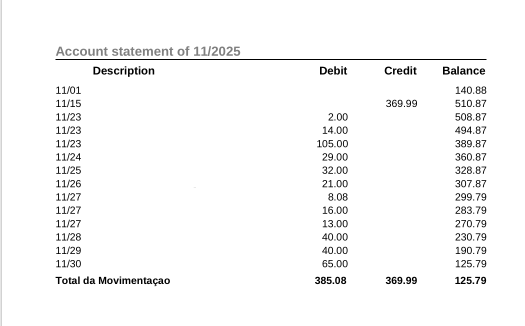
Did you check the height?
Because here this does not happen…
Following image of an 1 page .pdf from a simulacrum of printed monthly bank statement.
Take notice of

  1. Report header.
  2. Report footer with summary.

Extrato_1page

Check the height of what? Currently – I am still hacking – my report has

  • Page height 11 inches
  • Top margin of .5 and bottom margin of .26 inches
  • Page header of .97 inches, set to Visible No*
  • Report header of .46 inches
  • Detail sections of 2.32 inches

There is no question but what the Report Header comes out on a page of its own.

*I set the Page Header to Visible No because with it Visible Yes, I get

  • First page consists of Page Header + Report Header and nothing else
  • Second and subsequent pages consist of Page Header + detail

@SonomaCharles Please add an example file.

As I was able to understand studying this,
Page Header BEFORE Report’s :open_mouth:
is a notorious bug of LO’s RB…
In I can’t make a report in Base @cpb proposes a very clever grouping algorithm via the SQL Report source.
But it requires fixed height fields and then developer to calculate (fixed) fields per page.
I tested it using the biblio DB table: 13 rows @ 1st page and 17 afterwards. But there are just 20 rows. It must be checked for rows filling several pages of course.
Report13_17_RPP.pdf (78.0 KB)

@CRDF Page header: Header of a page. Report header: Header of a table.
There is only one page style available. You could set header and footer of a page and content from the first page up to the last page will be the same. Header and footer are outside of the area of text content. So the first step for me is: Set page header to “not visible” in a report. Set page footer to “not visible” if you don’t need it for page numbering.

:question:
As I understant, is is the Header of a… Report.
Like my dummy “Statement of month/year” above.

But as I understand OP ask for
Report Header
Page Headers

:thinking:

@CRDF Execute a report. Press “Edit Document”. If not set by default: Press View → Boundaries. The whole content of the report will be shown in tables. One table for every section of the report.

@SonomaCharles We need an example database file for having a look why the report header will only work with a /following) page break for you.

Be it…
But as I understand the request, he wants a layout like a bank printed statement.
Report Header: “Statement for…” blah, blah, blah…
If there are more than 1 page, in each:
Date | Description | Credit | Debit | Balance
repeated on top of each = Page Headers.
And on Page Footers: Page m of n
 
Create Report Template
CreateReportTemplate
 
Insert Report Header + Footer


And it not just shows up below, it also prints out below!
I checked this behavior in the biblio dBase, trying to answer the thread.

@CRDF : Please have a look at the original first report for this thread: Seems the Report Header automatically forces a new page. Nothing written there about page header. So we need the example database for having a look why the automatical page break happens there. I couldn’t reproduce this with
Version: 25.8.4.2 (X86_64)
Build ID: 290daaa01b999472f0c7a3890eb6a550fd74c6df
CPU threads: 6; OS: Linux 6.4; UI render: default; VCL: kf5 (cairo+xcb)
Locale: de-DE (de_DE.UTF-8); UI: en-US
Calc: threaded

Thanks all!

What I want is simple and I think what LO is supposed to do. What I want is a report consisting of

Header (of some sort; I don't care what it's called); detail, detail, detail, detail, ...

With “Header” appearing only once no matter how many pages the report occupies, and with no page break after “Header.”

Let me clean up my hacked-together report at little bit and see where we go from here. It might not be until Monday. Thank you again.

Charles

Well not exactly sure what the problem was but it has gone away. I deleted the Page Header and Footer (which I did not really want but was using to hold some fields that I thought I might want later) and now the Report Header behaves as I describe above.

Charles