
It must be a Document scope (level) Event, because the old Sheets will not be changed when a new one is created. The peredefined Document-level and Application-level Events are available in the Events TAB of the Customize panel.
And you can create new Events (see the documents linked in my previous posts)
.
Have you installed one of the excellent object inspection tools: MRI or XrayTool? With these tools you will able to inspect the programmng objects like the documents, sheets, events and many others. The tool will list the available properties, methods, and others…
1 Like
Here is my new sample file. The new macro (assigned to a Button) will create a new sheet named “SheetX”, and then it will assign a macro to the the desired Sheet event.
SheetEvent_Sub_AddSheet_AssignMacro.ods (18.4 KB)
1 Like

Sorry, I have not tried that the assigned macro works or not on the new sheets…
Thank you!
.
Here is the fixed version:
SheetEvent_Sub_AddSheet_AssignMacro2.ods (18.4 KB)
Have you installed one of the excellent object inspection tools: MRI or XrayTool? With these tools you will able to inspect the programmng objects like the documents, sheets, events and many others. The tool will list the available properties, methods, and others…
I have not, but I’ll look into it. Currently I’d say limping along on the standard built in watch, which is useful, to a point.
I’m probably missing something, but… I opened the fixed version, and I see the EH macro code there. But I do not see any events connected when I open, Tools > Customize … which event is it that I should be thinking about there?
Okay so to clarify further, no, I do not want to use a form button. Rather I want to put an appropriate doc EH into action, looking for a handful of realistic suggestions.
My sample is for ASSIGNING A MACRO to a SHEET EVENT. The sample macro will launch on the Button Event.
YOU must find or create an another Event (of the document) for automatic launching the macro to create a new sheet, and assigning the parsing macro to the sheet event.
.
What event or condition do you want to use for this task?
How many new Sheets do you want to add to the document (only one or more)?
.
Be careful: most of the the events can occur many times, therefore the assigned macros will run periodically (Recalculate event, Sheet changed event and others will be raised more than once.)
1 Like
As far as I know, Calc does not fire document events when the user adds or deletes sheets. In comparison, Excel has an Workbook.NewSheet event when a new sheet is added, and Worksheet.BeforeDelete when a sheet is deleted.
A (theoretical) workaround is to use the XUndoManagerListener listener. This is a long way around this, and has a number of quirks:
- The document’s Undo mechanism may be disabled or locked.
- Undo events have localized titles that need to be defined for the current user interface.
As always in such cases, we need to consider whether the potential payoff is worth the effort. 
1 Like
Thank you all for the responses and suggestions. I let it rest for a bit and I can appreciate the button attached macro approach. Probably the only way to avoid potentially modifying general Calc behavior, and which is probably the best possible alternative approach to what I was initially envisioning.
Edit: short of diving into some dev contributions and identifying, let alone adding, strategic LO and/or Calc events.
Follow on question of the button… what are the arguments? From experimentation best I can figure one, the event args.
Next question, how to isolate which mouse button. But backing up a step from there. Mouse pressed is rather imprecise and inappropriate IMO. For that matter so is mouse released. Literally in most dev environments, that amounts to mouse down, mouse up, either of which lacks proper debouncing comprehension. Rather, what is the analog for “mouse click”?
With pressed, there is zero discernment between left and right mouse buttons, both appearing as 1 in the args. Middle has some isolation showing as 4. But again, pressed i.e. mouse down leaves users prone to debouncing multiple clicks i.e. actions. Not what we want there.
Best I can determine execute action is the best analog to a proper click event.
But overall, why not just NAME THE EVENTS ACCORDING TO INDUSTRY STANDARDS, down, up, pressed, click, double clicked, etc. I am positve also the lack of left right comprehension, both values 1, is probably a BUG. Right probably intended as 2 a defined enum or literal somewhere somehow, is my guess.
There are features and functions, that LibreOffice gets from the actual operating system.
There are features and functions, that are duplicates in the LibreOffice (for example the Open/Save dialog: you can use the dialog of the actual operating system, or you can use dialog of the LibreOffice).
And there are features and functions, that exist in the office suite only.
.
The LibreOffice is a open source software. You can decide that:
- you will use the existing features (even if they are bugous)
or - you will develop modified and new features for the LibreOffice.
.
If you feel that a function is bugous, then you can report it in the relevant bug report sites:
https://wiki.documentfoundation.org/QA/BugReport
The right click of the mouse appeare as a “doubled clicking” in my LO, by the usage the API function: once will appeared as the mouse Button 1, and then it is appeared again as the mouse Button 2.
(The left click is Mouse Button 1 and the middle button is mouse Button 4.
I just checked it by the Xray: it is appered twice at only one calling of the xray:
.
Xray oEvent.Buttons
.
Right click, the second appeare of the Xray panel (the value of the Buttons parameter equals 2 now):
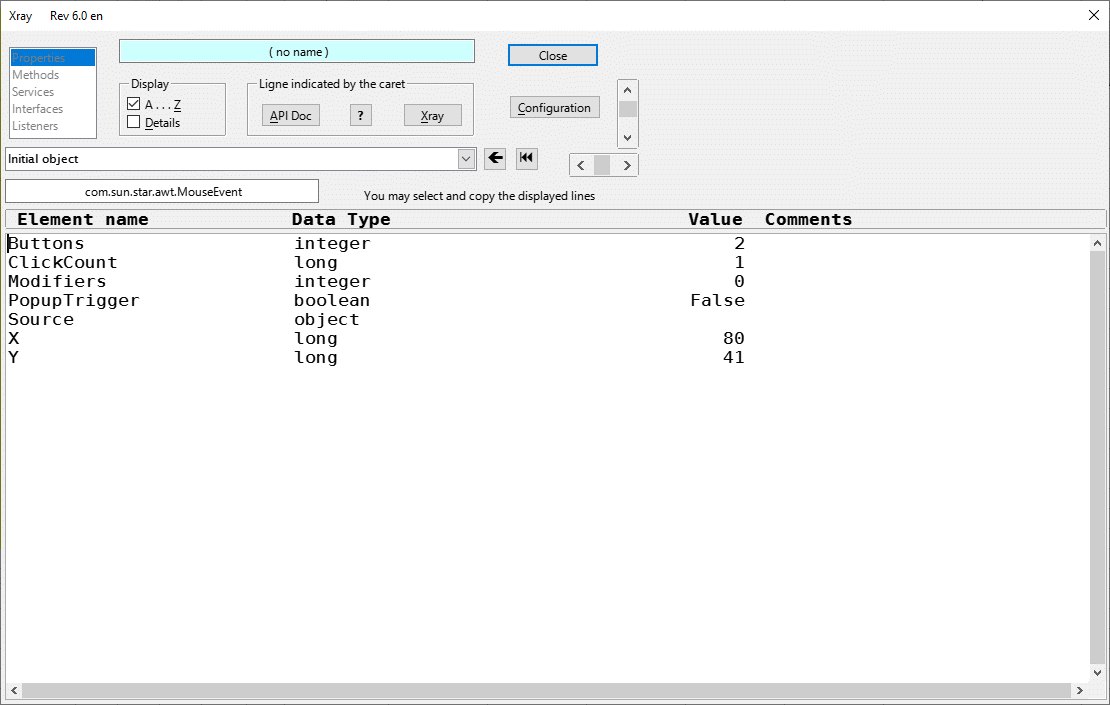
The right click of the mouse appeare as a “doubled clicking” in my LO …
Point being, I think execute action is the far better choice, all things considered.
Which being said, thanks for the button suggestion. That’s about as effective an approach as any all things considered.
The LibreOffice is a open source software. You can decide that…
Also, duly noted, thank you. If the one starts out weighing the other, will consider it. Thank you.
@Zizi64 , I changed your example a bit:
- added some more stupid stuff to the “Double Click” event, just to show that you can copy more than one event handler
- slightly changed the code of the
AssignMacroToTheEventOfANewSheet()procedure - now all non-empty event handlers from the current sheet are copied to the new sheet - added the line
oDoc.getCurrentController().setActiveSheet(oSheet)to make the macro behave like the usual Calc behavior (the new sheet becomes the current one) - inserted commands into the Sheet menu and into the context menu of the tabs - to show @mwpowelllde that the button is not the only way to call the desired macro.
See SheetEvent_menu.ods (65.6 KB)
1 Like
Question on the fixed version understanding the EH props and so forth.
Seems like a rather circuitous meta data’ed route connecting EventType to Script, then identifying the Script path uri. Have I got an accurate perspective re: that meta association?
I see some comments in there re: xray. Is that a requirement? I do not get .Events, or cannot plan for OnChanged, without xray? Or was that simply a dev tool help?
Thanks for clarifying…
The XrayTool and the MRI (basicly) are object inspection tools only. They can list the existing Properties, Methods, Services and others of the programming objects.
The macro will work without the XrayTool, without the MRI.
.
The API description is a huge and very techical document.
https://api.libreoffice.org/
.
It is hard to find the relevant information in it, and hard to understand them. The object inspection tools make easier the programming for me.
1 Like
The webpages linked for you before contain some code examples. I hope that you have read them…
I just actualized them based on the actual lists of the XrayTool. I am an amateur programmer only.
Fair enough fair enough. Yes, it is not especially easy to drill through the docs. I have found these fairly helpful, although the format is somewhat geared to the dev-minded, any structured thought approaching it should be more or less accessible, however. i.e. starting with “Sheet”, although I will grant you, the naming conventions are a bit cryptic, and do not always line up very well with the canonical names.
https://docs.libreoffice.org/sc/html/classScTableSheetObj.html