
Extracting time from a huge number in hours

I have this situation, for example:
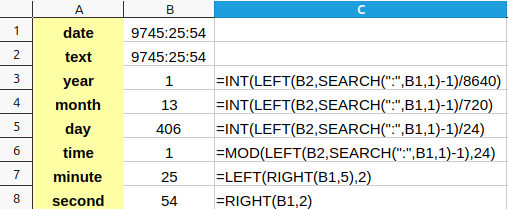
1
What is shown by these formulas is another interpretation of the date. How can I get the number of months that remain after subtracting the 1 year from the date, and the number of days after subtracting the years and months already calculated?

Also, i tried to concatenate all the values obtained in these cells, but it shows me the #Value! error. The date has a function in the back (SUM), and if i try to introduce the number by hand i get a date and hour type of cell, even though the cell is formatted in [HH]:MM:SS. How can i solve this?
Thank you.
emy1_132308.ods (16.6 KB)

Do you really expect us to rebuild your spreadsheet from a screenshot?

1 Like

Attached.
Never meant that. I thought you can respond from your head, without trying.
Reattached the calc file with the concatenate function.

Did you read and understand what was posted here?

Repeated in short: Neither months nor years can be used as units in durations because they differ in length. (To a minor extent also days.)
In addition: A day has 86400 seconds (24*60*60 = 24*3600).

If you don’t worry much about exact meaning, you can use the function DATEDIF() which looks to me as if invented by MS. It disregards the mentioned facts, but even this nonsense function doesn’t try to give a reminder in real units.
emy1_132362Re.ods (19.0 KB)