
I have a macro that takes ages to run (it’s fetching lots of internet pages). Libreoffice decides it’s crashed and asks if I wish to wait or shut it down. I don’t want this as it takes forever to get it to complete. Is there a way to stop this happening?
Tips:
- Just write better macros.
- And do not use endless cycles.
- Try to write some watchdog-like function in the macro.
- Upload the macro code here. Then we will able to examine it.
This macro is fetching around 500 pages. I was hoping their was a yield type call I could make.
I’m also hoping that this can be left unattended as it’ll probably take over 30 mins (or maybe hours) to run so a watchdog timer solution isn’t applicable.
Is that LibreOffice, or your OS?
Does that actually stop processing, or if you let the message stay, it will eventually succeed?
What is the macro language?
To insert a yield, use this (Basic code):
toolkit = CreateUnoService("com.sun.star.awt.Toolkit")
toolkit.processEventsToIdle()
Note that this code uses an unpublished interface XToolkitExperimental, with its processEventsToIdle; this interface is subject to change without notice, so use it on your risk.
it’s definitely office as it says so. Thanks for the code I’ll try that.
When Windows shows a “not responding” dialog, its title mentions the hung application, not Windows. Without a screenshot, hard to tell. I don’t know which code in our codebase would do what you describe, so I doubt it’s LibreOffice. (and the OS is still unknown.)
It’s linux mint and this is what it shows when it stops.
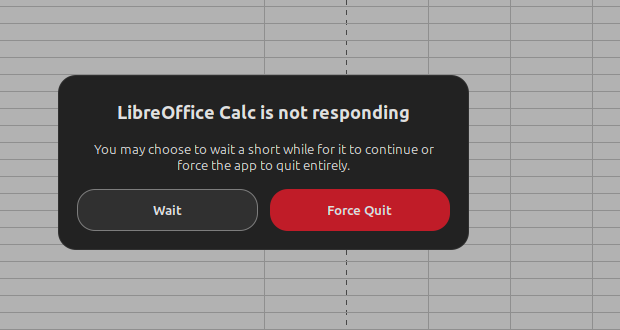
How do I do this? Note I’m completely new to Linux.
Thanks.
ahhh, I see you linked to it. I’ll give it a go.