
In my spreadsheet I am having issues to get the sort function to work on my data.
I have had issues where I put the sort on the sheet it works is some places and not others . It will sort part of the data but not all of it.
I don’t know how to troubleshoot why it don’t work sometimes.
Can anyone give me some ideas on what makes it work sometimes and not others?
I can give examples if needed.
Please, so we don’t need to guess.
.667	Buffalo Bills
.300	Miami Dolphins
.222	New York Jets
.700	 Los Angeles Chargers
.556	Kansas City Chiefs
.222	 Las Vegas Raiders
.444	Baltimore Ravens
.333	Cincinnati Bengals
.222	Cleveland Browns
.556	Jacksonville Jaguars
.444	Houston Texans
.111	Tennessee Titans
Can’t get this to sort in my sheet
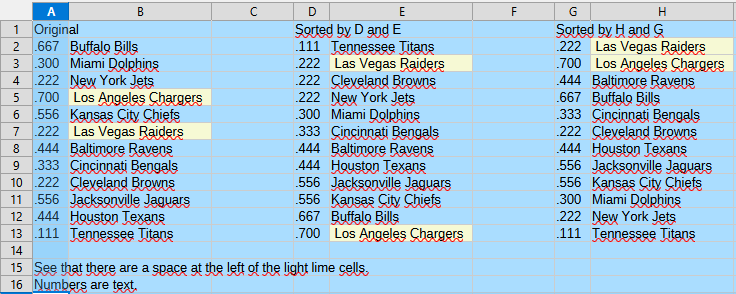
Sorting with the buttons work but that is the manual way to do it.
I am having issues with the sort function in the sort formua
So I broke out the sort to just one column at a time and the numbers column is working but the text column won’t sort. Now to figure out what the issue is.
The other thing is the all of the items the numbers and the text are cell links.
But the numbers seem to sort but the text isn’t
Forget about the sort function. It fails because of some idiosyncrasies of array formulas.
Here is how you get the same result from a careful setup:
- Select the source range
- Call Data>Define…
2.1, Give a name to the list.
2.2 Under “Options” specify if your list includes column labels or not.
2.3. Confirm the dialog - Select the top-left cell of the target where you want to have the sorted data and define this single cell as another database range.
- Click any cell in the source range, call Data>Sort… and specify your sort options with option “Copy output data” to the target cell.
Now you have a connection between the source range and the sorted target range. After you inserted new cells into the source range for new records, deleted records from the source range of edited the source range, simply call Data>Refresh from any selected cell in the source range in order to refresh the sorted target range.
That didn’t work either.
I got:
#REF!	#REF!
#REF!	#REF!
#REF!	#REF!
#REF!	#REF!
#REF!	#REF!
#REF!	#REF!
#REF!	#REF!
#REF!	#REF!
#REF!	#REF!
PCT	East
.800	New England Patriots
.000	0
That is because you have leading spaces, Spaces sort before letters so you need to remove them. You could use the TRIM() function in another column but it is easier to use Find & Replace with regular expressions.
- Select a text column with leading spaces
- Click Find and Replace
- In the dialogue that appears:
- In Find enter
^(that is, a hat then a space. With regular expressions, this finds the first space in alinecell) - Leave Replace blank
- Expand Other Options if you can’t see the following
- Tick Current selection only (if you have other columns that need leading spaces removed you can leave this unticked but make sure you there aren’t any vital leading spaces that you want to keep)
- Tick Regular expressions
- Click the Replace All button
- Click the Replace All button again if there could be more than one leading space. When the Find box goes red, there are no more leading spaces
- In Find enter
2 Likes
I got it figured out . At lest for this set of data.
In the 2 columns I am trying to sort I selected the data and Cleared the direct formatting.
Thanks everyone for their help.
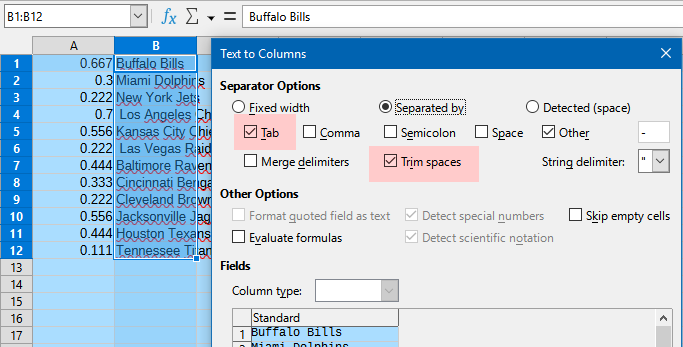
Text to Columns.
1 Like
That might be but I wanted to do it so I don’t have to interact with the data.
The data gets filled into the cells automatically and sorts without me having to manually sort when the data changes.
Does that make sense?
Yes. GIGO - Garbage In, Garbage Out - makes perfectly sense.
Seems you may have to improve this, if you expect your
to work. (And you have not told, how this magic sorting works, so I guess you are the one, to find the problem.)
.
The other point I don’t understand is how your formatting seem to be related to your sorting, as your solution to a problem with sort is
I am going to attach the spreadsheet since that is the only way I can show you what I am doing. After looking at it if you see a better way to do it let me know.
The Playoff tab is the one that is doing the sorting. Everything is driven from the Games tab by entering the scores of the games. The current week it is interacting with is Week 11.
Thanks
NFL Football 2025-2026.ods (80.6 KB)
for all the help.