
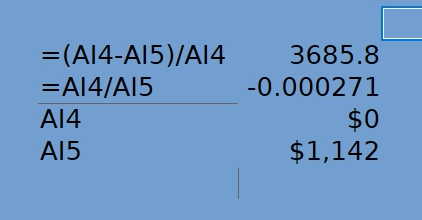
Explain what? Your AI4 is about 3685.8 times smaller in magnitude than your AI5; it is about -0.31. The cell is formatted to round to whole.
Why these answers aren’t what I was expecting.
I expect a divide by 0 to be an error.
The second one should be 0.
So save the cockiness.
And if you click on A14 and then press Ctrl+M to remove direct formatting, what do you see? Press Ctrl+Z to undo the change.
.
Formatting does not change the number, it just hides the detail.
There are a wide selection of rounding functions to make the zero actually 0, ROUND, is commonly used. You can choose where to round, normally at the end of all calculations because it reduces accuracy.
.
You could enclose the formula in A14 with ROUND function for example =ROUND(formula in A14;0). When you press Ctrl+M again you will see 0 and your other formula will show as you expect.
.
You could instead set Calc to use precision as displayed. I don’t use this but I suppose there are valid uses for it, see Help Using Rounded Off Numbers
Hi @CityguyUSA, in spreadsheets an image is too vague, post an example of this file with this information. You’ll get much more helpful assistance.
Your first line is = (X-Y)/X
X = -0.30948…
So the spreadsheet references another spreadsheet =$Gas.A60 which was a mis-targeted cell because I added 2026 which instead of increasing by 30 cells increased by one which was a yearly tax correction line which was -.31 but because I had used the “how many decimals” to display to zero I guess was acting as a rounding function? I’m new to LibreOffice this was all built under Excel. There are some quirks in Libre that I’m not used to. Is there a comparison document that explains these differences?
You could use the Calc Guide as a reference, download from English documentation | LibreOffice Documentation - LibreOffice User Guides
.
The spreadsheet should appear very similar to how Excel displays it, maybe the version of Excel had Use precision as displayed ticked in Excel Options > Advanced?