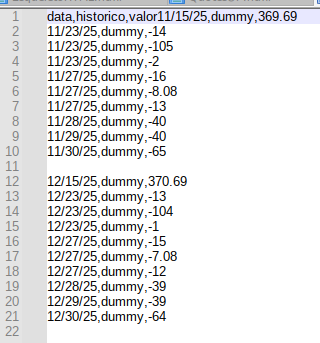
To insert .csvs into Calc

  1. Your existing data have been imported wrongly. The dates are text values, possibly due to wrong default value for “Detect special numbers”. Turn it on. The correction will be remembered.
  2. Tools>Options>Calc>General: “Expand references” is off by default. This is also wrong. Turn it on. This correction is sticky as well.
  3. After importing new data, I would copy the new data below the header row, select A12 (next empty cell below existing data) paste-special values with option “Insert rows”. This way all references from formulas, charts, pivot tables, names, database ranges, … will update to the new dimension of the data range. For instance, =SUM(C2:C11) automatically expands to SUM(C2:C23) after you imported 12 new rows.

One thing you should never do: Import each month onto a separate sheet. This is always a mistake.

My doubt is not about format. It’s how now I append “next month” to the sheet (?)

Of course I want to append.
Format can be Text. That’s not question here.
This is my question.

Calc can not insert new records into existing record sets like a database would do. You get close if you import correct data (with numeric dates, without header row), copy the data and paste-special with row insertion.

So no “native” – without writing scripts of course – way to append data?
This is my doubt :thinking:

Collecting database data on spreadsheets is pointless if your references do not update. You append 12 new rows of data to your list and all formulas, charts etc. still refer to A2:A11. This becomes a maintenance hell as you add more data, more evaluation and more charts.
The macro I suggested does the following:

  • Open a file in the specified directory.
  • Determine the row count on the specified sheet minus any specified header rows.
  • Turn on “Expand references…” if it was turned off.
  • Insert the necessary rows below the current region around a named cell “Target”.
  • Write data into the inserted range.
  • Open the next file, if any.
  • Turn off "Expand references… " if it was off when calling the macro.

You don’t need that macro for mass import if you follow the above simple steps, namely paste-special with option “insert rows” and global option “expand references…”

IMHO, Calc can not do that. Excel has a database tool named “Power Query”.

The user above simply used Sheet > External Links and browsed to the file. I tried it. It inserts the file where the cursor is located. If you want the new data at the top, click row 2, Sheet > External Links, and delete the extra titles (row 2).

That example works, because the new data is added to the csv outside Calc. Then the contents are refreshed. So the user has a automation in Calc, but still needs to do manual updates or scripts to do move his new “StaatementYearMonth.csv” into the linked csv. And here somebody needs to configure, how many rows to skip etc.

When I download banking activity, I usually download to a separate text/csv file in a dated file under a directory called Statements. I haven’t looked more closely at this time, but yes, the process to add the new data to the existing spreadsheet is manual. But it’s pretty easy. I’m not sure what you mean by “rows to skip”. LibreOffice Calc inserts the rows, expanding the table as needed, as long as I click on the row where I want the insertion to occur. Please see page 410 | Calc Guide 25.2 in the Calc Guide, Using the External Data dialog. Last, the link needs to be removed, by Edit > Links to External Files…. Two manual steps once a month.

Maybe a feature request to add an option to Remove the link right on the External Data dialog, or just some text saying To edit or remove any external link use the Edit menu.

  • If you add another csv to your sheet, you usually have to skip (or Interpret) the first row, containing the header.
  • Some csv-Files don’t have a header
  • Some have configuration lines at the start to tell about the used charset. SAP Help Portal | SAP Online Help
  • Some have lines to tell the parser the characters used for quoting and separator

So it is/may be easy, for your file and your case. But starting to create a solution for most/every csv is much more difficult. Can be done in an extension, but expect this to break sometimes because there is no enforced standard for csv.

No, and the “how to do it” is already described by others, so I try to show, where the problems are.
.
What we can do is linking to external data and refresh or defining a datasource, in this case a “virtual” database, where all csv-files in a folder are tables of the database and can be queried and refreshed. (You choose the folder as “database” for this.)
.
Above is a good solution, if you regularly get a full list of ISBN-codes or other stuff as csv. The problem arises when we have something like monthly increments to add:

We may have imported 2025-01.csv and Calc may even remember the settings, but now we have a new name 2025-02.csv, so Calc will ask every time for settings on import.
Also (while this example is obvious) we don’t know anything on the filenames (Jan25, Feb25, Mrz25 is also possible), so scripting or at least some config is necessary.
.
Next problem is: Can we avoid to import a file more than once, so a script should move a .csv to a subfolder “imported” after processing .
.
A solution or work-around would be to convert the monthly files in one file to import. But instead of solving all this in Calc I would suggest to do the scripting outside of Calc and combine the csv-files on command-line to a single source. On Linux and other OS with shell-scripts we can use tail, for Windows I’m used to Cygwin but other solutions are possible: https://stackoverflow.com/questions/53608556/remove-the-first-line-of-a-csv-file-under-windows-using-cmd-command
.
The combined file can then be used as datasource as already mentioned above. So my suggestion would be: Forget about the monthly import in Calc, but update an external .csv or directly import from csv to a database. I use sometimes the import from csv in sqlite.
.
To create a combined datasource there are also other tools available like for example csvstack
3. Power tools - csvkit 2.2.0 documentation

If one prefers a script inside LibreOffice I usually suggest to start here:
https://forum.openoffice.org/en/forum/viewtopic.php?f=21&t=77069

1 Like

Yes, this should be the practical solution within LO’s scope.
But (header = data,historico,valor pre inserted)

tail -n +2 Stmt*.csv | grep -v '^==>' >> Statements.csv

does this
AppendBug

tail(1) - Linux manual page :

  -q, --quiet, --silent
         never output headers giving file names

Header data,historico,valor is pre-inserted in Statements.csv
 
So insertion command must be

tail -n +2 -q  Stmt*.csv | grep -v '^==>' >> Statements.csv

:grey_question:

tail -n +2 -q  Stmt*.csv  >> Statements.csv

or probably too :

grep -v 'data,historico,valor'  Stmt*.csv  >> Statements.csv

@fpy
:+1:

tail -n +2 -q Stmt*.csv | grep -v '^==>' >> Statements.csv

does it!

But then in Base (a DB), not in Calc?
Because of course one can open the .csv in Calc, but after saving it is static, right?

The grep is no longer necessary ith tail working in quiet mode:
tail -n +2 -q Stmt*.csv >> Statements.csv

If the merged files are structured equally, you get a valid csv which can be used with any application able to process valid csv.

:+1:

Of course, but as question was about Calc…
No way to really link one “Statements.csv” montly appended to Calc, right?

Here is an approach that has already been proposed by colleagues.
You have an .ods file consisting of several sheets.
One sheet (let’s call it “Data”) contains bank statement data (from a Statements.csv file), while the other sheets are designed to display this data (for example, using formulas or pivot tables).
The most convenient way to fill the “Data” sheet in Calc (in my opinion) is to use Menu / Sheet / External Links… (see also messages above)
In the URL, specify the path to the file Statements.csv, Tables/Ranges: CSV_all.
You can choose periodic updates and update Data upon user request. In the latter case, use Menu / Edit / Edit Links… / Update.